

Satoshi Bro
233 Bài đăng

Satoshi Bro
Báo cáo
Chặn người dùng
Giao dịch mở
Trader thường xuyên
3.6 tháng
0 Đang theo dõi
19 Người theo dõi
8 Đã thích
Bài đăng
Danh mục đầu tư
Tất cả
Video
·
--
Xem bản dịch
🧭 Beginner tip: write your exit before your entry
Before you hit Buy, type three lines into your notes app:
1️⃣ Why am I buying this?
2️⃣ At what price am I wrong? (that's your stop)
3️⃣ Where do I take some profit?
Takes 30 seconds.
When the chart drops 10% at 3am, you're not deciding in a panic. You already decided while calm.
Bonus: after a month, those notes show you exactly which mistakes you keep repeating.
Do you plan your exits before buying, or figure it out on the way? 👇
#crypto #tradingtips #CryptoBeginners #Binance
🧭 Beginner tip: write your exit before your entry
Before you hit Buy, type three lines into your notes app:
1️⃣ Why am I buying this?
2️⃣ At what price am I wrong? (that's your stop)
3️⃣ Where do I take some profit?
Takes 30 seconds.
When the chart drops 10% at 3am, you're not deciding in a panic. You already decided while calm.
Bonus: after a month, those notes show you exactly which mistakes you keep repeating.
Do you plan your exits before buying, or figure it out on the way? 👇
#crypto #tradingtips #CryptoBeginners #Binance
Before you hit Buy, type three lines into your notes app:
1️⃣ Why am I buying this?
2️⃣ At what price am I wrong? (that's your stop)
3️⃣ Where do I take some profit?
Takes 30 seconds.
When the chart drops 10% at 3am, you're not deciding in a panic. You already decided while calm.
Bonus: after a month, those notes show you exactly which mistakes you keep repeating.
Do you plan your exits before buying, or figure it out on the way? 👇
#crypto #tradingtips #CryptoBeginners #Binance
1
·
--
Xem bản dịch
Hot take 🔥
Most people don't lose money on bad coins. They lose it on good coins bought at the wrong size.
Same coin, two traders:
👉 one puts 5% of the stack in and shrugs off a 15% dip
👉 the other goes 60% in, panics at -8% and sells the bottom
The coin didn't change. The position size did.
Before asking "what should I buy", ask "how much can I hold through a bad week without touching it?"
Agree or nah? 👇
#crypto #tradingtips #RiskManagement #Binance
Hot take 🔥
Most people don't lose money on bad coins. They lose it on good coins bought at the wrong size.
Same coin, two traders:
👉 one puts 5% of the stack in and shrugs off a 15% dip
👉 the other goes 60% in, panics at -8% and sells the bottom
The coin didn't change. The position size did.
Before asking "what should I buy", ask "how much can I hold through a bad week without touching it?"
Agree or nah? 👇
#crypto #tradingtips #RiskManagement #Binance
Most people don't lose money on bad coins. They lose it on good coins bought at the wrong size.
Same coin, two traders:
👉 one puts 5% of the stack in and shrugs off a 15% dip
👉 the other goes 60% in, panics at -8% and sells the bottom
The coin didn't change. The position size did.
Before asking "what should I buy", ask "how much can I hold through a bad week without touching it?"
Agree or nah? 👇
#crypto #tradingtips #RiskManagement #Binance
2
·
--
Mã thưởng đăng ký Binance để giảm phí giao dịch
Nhập mã khuyến mãi khi đăng ký để được giảm 20% phí giao dịch Spot.
1. Tạo tài khoản Binance mới
2. Nhập THEBESTCODE trước khi hoàn tất đăng ký
3. Kiểm tra xem tài khoản của bạn đã hiển thị mức giảm 20% phí giao dịch Spot chưa
Mã khuyến mãi THEBESTCODE
[Sign up with code THEBESTCODE](https://www.binance.com/join?ref=THEBESTCODE)
Thưởng chào mừng lên đến $19,800 dành cho người dùng đủ điều kiện
[Welcome bonus terms](https://www.binance.com/en/events/BESTBONUS)
Đây không phải lời khuyên tài chính. Phí và điều khoản thưởng có thể thay đổi.
#Binance #BinancePromoCode #crypto
Mã thưởng đăng ký Binance để giảm phí giao dịch
Nhập mã khuyến mãi khi đăng ký để được giảm 20% phí giao dịch Spot.
1. Tạo tài khoản Binance mới
2. Nhập THEBESTCODE trước khi hoàn tất đăng ký
3. Kiểm tra xem tài khoản của bạn đã hiển thị mức giảm 20% phí giao dịch Spot chưa
Mã khuyến mãi THEBESTCODE
Sign up with code THEBESTCODE
Thưởng chào mừng lên đến $19,800 dành cho người dùng đủ điều kiện
Welcome bonus terms
Đây không phải lời khuyên tài chính. Phí và điều khoản thưởng có thể thay đổi.
#Binance #BinancePromoCode #crypto
Nhập mã khuyến mãi khi đăng ký để được giảm 20% phí giao dịch Spot.
1. Tạo tài khoản Binance mới
2. Nhập THEBESTCODE trước khi hoàn tất đăng ký
3. Kiểm tra xem tài khoản của bạn đã hiển thị mức giảm 20% phí giao dịch Spot chưa
Mã khuyến mãi THEBESTCODE
Sign up with code THEBESTCODE
Thưởng chào mừng lên đến $19,800 dành cho người dùng đủ điều kiện
Welcome bonus terms
Đây không phải lời khuyên tài chính. Phí và điều khoản thưởng có thể thay đổi.
#Binance #BinancePromoCode #crypto
260
·
--
Bài viết
Hướng dẫn thiết lập Binance Recurring Buy cho Spot DCABinance có hai công cụ mua định kỳ khác nhau và cách tính phí của chúng cũng khác nhau. Phiên bản thanh toán bằng thẻ trong mục Buy Crypto sẽ trừ tiền từ thẻ Visa hoặc Mastercard theo lịch và tính thêm phí giao dịch thẻ cho mỗi lệnh. Convert Recurring sử dụng số dư bạn đang có trong tài khoản Spot, không có phí giao dịch riêng và có thể chạy thường xuyên đến mỗi giờ một lần. Chọn đúng công cụ trước khi tạo kế hoạch sẽ giúp bạn tránh phải tạo lại sau này.
👉 [Open a Binance account with code GETREWARD](https://www.binance.com/join?ref=GETREWARD)
Hướng dẫn này theo sát một kế hoạch từ lần nhấp đầu tiên đến lúc bạn tắt kế hoạch: tạo, chạy, tạm dừng, chỉnh sửa, hủy. Tiếp theo là các khoản phí cho kế hoạch 50 USD mỗi tuần và những lỗi âm thầm khiến kế hoạch không hoạt động.
Hướng dẫn thiết lập Binance Recurring Buy cho Spot DCA
Binance có hai công cụ mua định kỳ khác nhau và cách tính phí của chúng cũng khác nhau. Phiên bản thanh toán bằng thẻ trong mục Buy Crypto sẽ trừ tiền từ thẻ Visa hoặc Mastercard theo lịch và tính thêm phí giao dịch thẻ cho mỗi lệnh. Convert Recurring sử dụng số dư bạn đang có trong tài khoản Spot, không có phí giao dịch riêng và có thể chạy thường xuyên đến mỗi giờ một lần. Chọn đúng công cụ trước khi tạo kế hoạch sẽ giúp bạn tránh phải tạo lại sau này.
👉 Open a Binance account with code GETREWARD
Hướng dẫn này theo sát một kế hoạch từ lần nhấp đầu tiên đến lúc bạn tắt kế hoạch: tạo, chạy, tạm dừng, chỉnh sửa, hủy. Tiếp theo là các khoản phí cho kế hoạch 50 USD mỗi tuần và những lỗi âm thầm khiến kế hoạch không hoạt động.
👉 Open a Binance account with code GETREWARD
Hướng dẫn này theo sát một kế hoạch từ lần nhấp đầu tiên đến lúc bạn tắt kế hoạch: tạo, chạy, tạm dừng, chỉnh sửa, hủy. Tiếp theo là các khoản phí cho kế hoạch 50 USD mỗi tuần và những lỗi âm thầm khiến kế hoạch không hoạt động.
56
·
--
Xem bản dịch
📖 Glossary: MAKER vs TAKER
Every order you place falls into one of two roles.
🟢 Maker: you place a limit order that doesn't fill right away. It sits on the order book and adds liquidity until someone trades against it.
🔴 Taker: your order fills instantly against an order already on the book. Market orders are always taker. A limit order priced through the book fills as taker too.
Why it matters:
• Taker fees are usually higher than maker fees
• Over hundreds of trades that gap adds up
• Taker fills can also slip on a thin order book
If you hit "Market" on every trade, you pay the taker rate every single time.
Are you mostly a maker or a taker? 👇
#crypto #cryptoeducation #tradingtips #Binance
📖 Glossary: MAKER vs TAKER
Every order you place falls into one of two roles.
🟢 Maker: you place a limit order that doesn't fill right away. It sits on the order book and adds liquidity until someone trades against it.
🔴 Taker: your order fills instantly against an order already on the book. Market orders are always taker. A limit order priced through the book fills as taker too.
Why it matters:
• Taker fees are usually higher than maker fees
• Over hundreds of trades that gap adds up
• Taker fills can also slip on a thin order book
If you hit "Market" on every trade, you pay the taker rate every single time.
Are you mostly a maker or a taker? 👇
#crypto #cryptoeducation #tradingtips #Binance
Every order you place falls into one of two roles.
🟢 Maker: you place a limit order that doesn't fill right away. It sits on the order book and adds liquidity until someone trades against it.
🔴 Taker: your order fills instantly against an order already on the book. Market orders are always taker. A limit order priced through the book fills as taker too.
Why it matters:
• Taker fees are usually higher than maker fees
• Over hundreds of trades that gap adds up
• Taker fills can also slip on a thin order book
If you hit "Market" on every trade, you pay the taker rate every single time.
Are you mostly a maker or a taker? 👇
#crypto #cryptoeducation #tradingtips #Binance
49
·
--
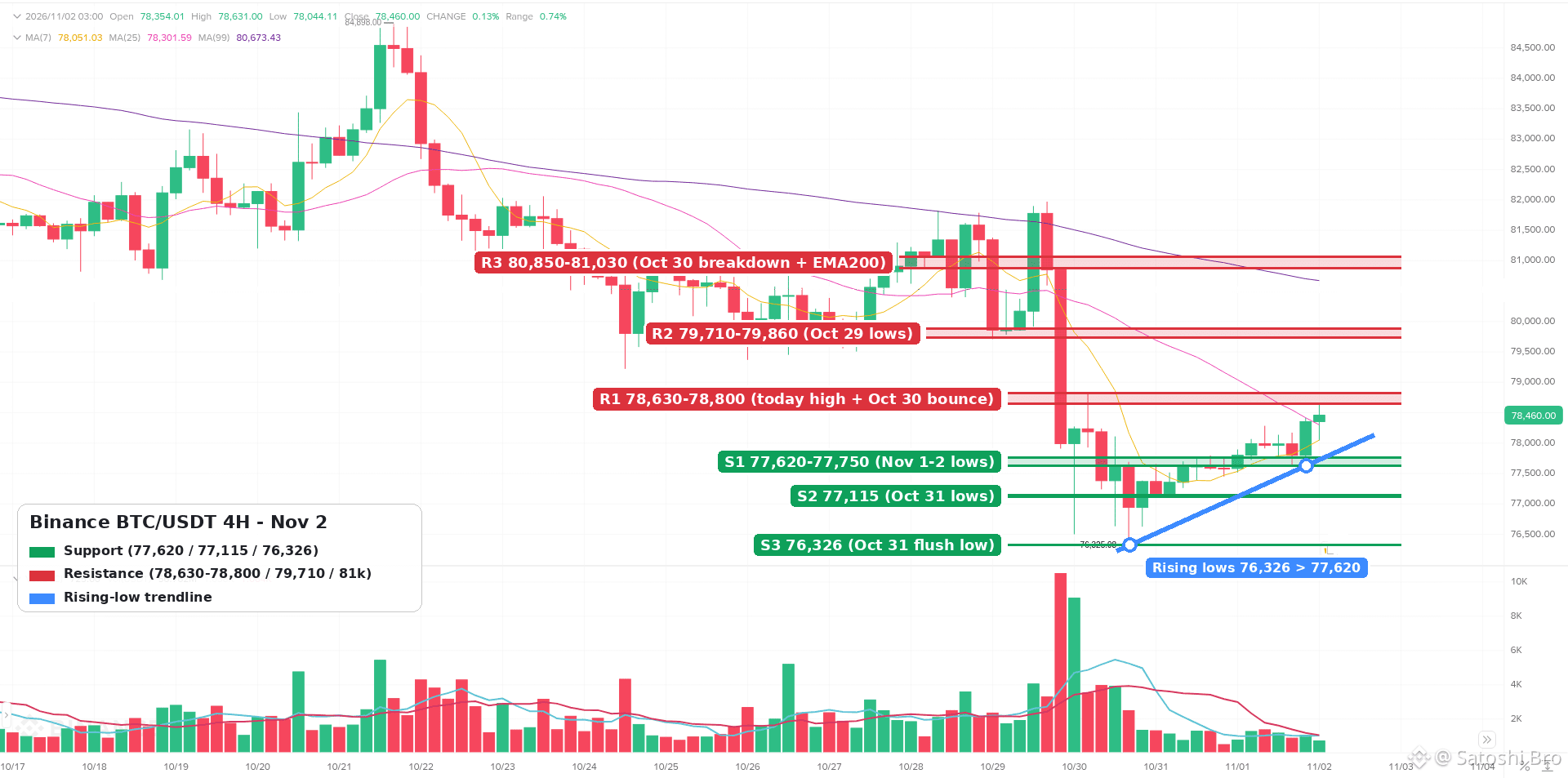
$BTC quay lại mức 78,490 sau cú bán tháo ngày 30/10. Đây là vùng tạo đáy hay chỉ là nhịp tạm nghỉ? Phân tích khung 4H 👇
• Xu hướng: vẫn nằm dưới EMA50 khung 4H (~79,240) và EMA200 (~81,030), nhưng các đáy liên tục cao dần từ 76,326 (31/10) lên 77,620 (sáng nay)
• Hỗ trợ: 77,620-77,750 trước tiên, tiếp đến 77,115, rồi đáy sau cú bán tháo tại 76,326
• Kháng cự: 78,630-78,800 hiện là vùng trần; phía trên là 79,710-79,860 (các đáy ngày 29/10) và 80,850-81,030
• RSI ~50, trung tính. Chưa quá nóng, cũng chưa có động lượng rõ rệt
• Kịch bản tăng: nến 4H đóng cửa trên 78,800 sẽ mở đường lên 79,240 và vùng 79,700
• Kịch bản giảm: thủng 77,600 và đường nối các đáy tăng dần sẽ khiến 77,100 và 76,300 trở lại vùng cần theo dõi
Kết luận: đáy cao dần nhưng đang ở dưới vùng kháng cự mạnh. Tôi muốn thấy giá đóng cửa trên 78,800 trước khi tin vào nhịp hồi này.
Đây không phải lời khuyên tài chính.
#BTC #bitcoin #TechnicalAnalysis #CryptoMarket #Binance
$BTC quay lại mức 78,490 sau cú bán tháo ngày 30/10. Đây là vùng tạo đáy hay chỉ là nhịp tạm nghỉ? Phân tích khung 4H 👇
• Xu hướng: vẫn nằm dưới EMA50 khung 4H (~79,240) và EMA200 (~81,030), nhưng các đáy liên tục cao dần từ 76,326 (31/10) lên 77,620 (sáng nay)
• Hỗ trợ: 77,620-77,750 trước tiên, tiếp đến 77,115, rồi đáy sau cú bán tháo tại 76,326
• Kháng cự: 78,630-78,800 hiện là vùng trần; phía trên là 79,710-79,860 (các đáy ngày 29/10) và 80,850-81,030
• RSI ~50, trung tính. Chưa quá nóng, cũng chưa có động lượng rõ rệt
• Kịch bản tăng: nến 4H đóng cửa trên 78,800 sẽ mở đường lên 79,240 và vùng 79,700
• Kịch bản giảm: thủng 77,600 và đường nối các đáy tăng dần sẽ khiến 77,100 và 76,300 trở lại vùng cần theo dõi
Kết luận: đáy cao dần nhưng đang ở dưới vùng kháng cự mạnh. Tôi muốn thấy giá đóng cửa trên 78,800 trước khi tin vào nhịp hồi này.
Đây không phải lời khuyên tài chính.
#BTC #bitcoin #TechnicalAnalysis #CryptoMarket #Binance
• Xu hướng: vẫn nằm dưới EMA50 khung 4H (~79,240) và EMA200 (~81,030), nhưng các đáy liên tục cao dần từ 76,326 (31/10) lên 77,620 (sáng nay)
• Hỗ trợ: 77,620-77,750 trước tiên, tiếp đến 77,115, rồi đáy sau cú bán tháo tại 76,326
• Kháng cự: 78,630-78,800 hiện là vùng trần; phía trên là 79,710-79,860 (các đáy ngày 29/10) và 80,850-81,030
• RSI ~50, trung tính. Chưa quá nóng, cũng chưa có động lượng rõ rệt
• Kịch bản tăng: nến 4H đóng cửa trên 78,800 sẽ mở đường lên 79,240 và vùng 79,700
• Kịch bản giảm: thủng 77,600 và đường nối các đáy tăng dần sẽ khiến 77,100 và 76,300 trở lại vùng cần theo dõi
Kết luận: đáy cao dần nhưng đang ở dưới vùng kháng cự mạnh. Tôi muốn thấy giá đóng cửa trên 78,800 trước khi tin vào nhịp hồi này.
Đây không phải lời khuyên tài chính.
#BTC #bitcoin #TechnicalAnalysis #CryptoMarket #Binance
1
166
·
--
Bài viết
Ưu và nhược điểm của tiền thưởng đăng ký Binance 2026 khi giảm 20% phíNhập 20LESSFEES vào ô mã khi mở tài khoản Binance, mọi giao dịch Spot và Futures trên tài khoản đó sẽ được giảm cố định 20% phí giao dịch. Tiền thưởng chào mừng lên đến $19,800 dành cho người dùng đủ điều kiện là chương trình nhiệm vụ riêng, được cộng thêm vào đó; bạn có thể bắt đầu bằng liên kết đăng ký bên dưới.
👉 [Sign up on Binance with 20LESSFEES](https://www.binance.com/join?ref=20LESSFEES)
Thưởng đăng ký nghe có vẻ như tiền miễn phí, và đó chính là lý do bạn nên xem xét một cách tỉnh táo. Dưới đây là những ưu điểm thực sự, nhược điểm thực sự và các con số đằng sau cả hai, để bạn có thể quyết định ưu đãi này đáng giá thế nào với cách giao dịch của mình.
Ưu và nhược điểm của tiền thưởng đăng ký Binance 2026 khi giảm 20% phí
Nhập 20LESSFEES vào ô mã khi mở tài khoản Binance, mọi giao dịch Spot và Futures trên tài khoản đó sẽ được giảm cố định 20% phí giao dịch. Tiền thưởng chào mừng lên đến $19,800 dành cho người dùng đủ điều kiện là chương trình nhiệm vụ riêng, được cộng thêm vào đó; bạn có thể bắt đầu bằng liên kết đăng ký bên dưới.
👉 Sign up on Binance with 20LESSFEES
Thưởng đăng ký nghe có vẻ như tiền miễn phí, và đó chính là lý do bạn nên xem xét một cách tỉnh táo. Dưới đây là những ưu điểm thực sự, nhược điểm thực sự và các con số đằng sau cả hai, để bạn có thể quyết định ưu đãi này đáng giá thế nào với cách giao dịch của mình.
👉 Sign up on Binance with 20LESSFEES
Thưởng đăng ký nghe có vẻ như tiền miễn phí, và đó chính là lý do bạn nên xem xét một cách tỉnh táo. Dưới đây là những ưu điểm thực sự, nhược điểm thực sự và các con số đằng sau cả hai, để bạn có thể quyết định ưu đãi này đáng giá thế nào với cách giao dịch của mình.
18
·
--
Xem bản dịch
Myth vs fact: "This coin is only $0.001, so it's cheap and has way more room to run than BTC" 🧐
❌ Myth: low price per coin = cheap coin.
✅ Fact: price per coin tells you nothing on its own. What matters is market cap = price x circulating supply.
A token at $0.001 with 500 trillion coins in circulation is already a $500 billion project. For it to 10x, $4.5 trillion of new value has to show up.
Before you call anything "cheap", check market cap, circulating supply and the unlock schedule. New supply hitting the market dilutes every holder.
Which "cheap coin" taught you this the hard way? 👇
#crypto #CryptoEducation #altcoins #Binance
Myth vs fact: "This coin is only $0.001, so it's cheap and has way more room to run than BTC" 🧐
❌ Myth: low price per coin = cheap coin.
✅ Fact: price per coin tells you nothing on its own. What matters is market cap = price x circulating supply.
A token at $0.001 with 500 trillion coins in circulation is already a $500 billion project. For it to 10x, $4.5 trillion of new value has to show up.
Before you call anything "cheap", check market cap, circulating supply and the unlock schedule. New supply hitting the market dilutes every holder.
Which "cheap coin" taught you this the hard way? 👇
#crypto #CryptoEducation #altcoins #Binance
❌ Myth: low price per coin = cheap coin.
✅ Fact: price per coin tells you nothing on its own. What matters is market cap = price x circulating supply.
A token at $0.001 with 500 trillion coins in circulation is already a $500 billion project. For it to 10x, $4.5 trillion of new value has to show up.
Before you call anything "cheap", check market cap, circulating supply and the unlock schedule. New supply hitting the market dilutes every holder.
Which "cheap coin" taught you this the hard way? 👇
#crypto #CryptoEducation #altcoins #Binance
22
·
--
Bài viết
Xem bản dịch
Binance Cross Margin vs Isolated Margin in Worked ExamplesTwo traders put $1,000 each into the same two margin trades, one coin halves, and they end the week in very different places, only because they picked different margin modes. Cross margin on Binance pools everything in your Cross Margin account as shared collateral for all your positions, with one margin level for the whole account. Isolated margin gives each trading pair its own small account with its own collateral and its own margin level, so a liquidation stays inside that pair.
👉 [Sign up on Binance with code 20LESSFEES for 20% lower Spot and Futures fees](https://www.binance.com/join?ref=20LESSFEES)
Neither mode is safer by default. Each one moves the danger to a different place, and the numbers below show where.
What does cross margin actually share?
You get exactly one Cross Margin account. Every coin you move into it backs every loan and every position in it, and you can trade all pairs offered on Binance Margin from that one account.
Binance tracks the health of the whole account with a single number, the margin level:
Formula: Margin level = total asset value in the account / (total borrowed + outstanding interest).Leverage setting: In Cross Margin Classic, leverage is set for the whole account at 3x or 5x. A higher-leverage Pro version of cross margin was phased out on 5 February 2026.Margin call zone: At 3x you get a margin call when the level sits between 1.1 and 1.3. At 5x that zone is between 1.1 and 1.16.Liquidation line: At a margin level of 1.1 or lower, in both 3x and 5x, the system starts selling collateral to repay the loans and interest.Transfers out: Moving coins out of the account is only possible while the margin level stays above 2.
The key word is total. A coin that is doing fine still counts as collateral for a coin that is collapsing, and in a liquidation both can be sold.
The ML reading next to the leverage button is that account-wide margin level. With no loans open it shows a very high number, and it starts to fall as soon as you borrow.
How is an isolated margin account different?
Isolated margin splits your margin trading into separate boxes, one per pair. A BTC/USDC isolated account can only hold, receive and borrow BTC and USDC, and nothing else.
Own collateral: Only the coins inside that pair's account back its loans. Your Cross Margin account and other isolated accounts are never pulled in automatically.Own margin level: Same formula as cross, but calculated per pair. A bad trade in one pair does not change the number in another.Leverage by pair: Eligible pairs go as high as 10x. Leverage is tiered, so the more you borrow in a pair, the lower the maximum leverage becomes, stepping down toward 5x on the largest tiers.Liquidation lines: They depend on the leverage class of the pair. Binance lists 1.05 for 10x pairs, 1.15 for 5x and 1.18 for 3x.Partial liquidation: When a pair hits its line, collateral is sold until the level climbs back to the margin call ratio in most cases. In extreme moves the whole position can be closed.
Adding margin to a struggling isolated position is a manual job. You transfer coins into that specific pair's account yourself.
How do the two modes line up point by point?
Cross margin, feature by feature:
Collateral: Everything in the one Cross Margin account.Accounts: One, covering all margin pairs.Leverage: 3x or 5x for the whole account (Classic).Liquidation: Margin level 1.1 or lower, checked across the whole account.Blast radius: A liquidation can sell any collateral in the account.
Isolated margin, the same features:
Collateral: Only the two coins of that pair.Accounts: As many as you open, one per pair.Leverage: Set per pair, tiered, as high as 10x on eligible pairs.Liquidation: Per pair, between 1.05 and 1.18 depending on the pair's leverage class.Blast radius: Limited to the coins in that one pair's account.
The Isolated tab asks you to transfer funds before a pair can be used, because each pair is its own account that starts empty.
What happens to $1,000 when one trade goes wrong?
Here is the scenario from the opening, worked out. All figures are illustrations that ignore interest, trading fees and slippage.
Cross trader: Moves 1,000 USDT into Cross Margin at 3x, borrows another 1,000 USDT and buys 1,000 USDT of coin A and 1,000 USDT of coin B.
Start: Assets 2,000, debt 1,000, margin level 2.0.Coin A falls 50%: Assets 500 + 1,000 = 1,500, margin level 1.5. No margin call, both positions still open, 500 USDT down on paper.Coin A falls 70%: Assets 1,300, margin level 1.3. The margin call arrives.Coin A falls 90%: Assets 1,100, margin level 1.1. Liquidation, and coin B is sold too, even though it never moved.
Isolated trader: Puts 500 USDT into an A/USDT isolated account and 500 USDT into a B/USDT one, borrows 500 USDT in each and buys 1,000 USDT of each coin. Assume both are 10x pairs with a 1.05 liquidation line.
Start: Each account has assets 1,000, debt 500, margin level 2.0.Coin A falls 47.5%: The A account holds 525 against 500 of debt, margin level 1.05. Liquidation starts and only about 25 USDT of equity is left there, before the 2% liquidation fee on the debt repaid.Coin B account: Still at 2.0. Untouched.
So after the same 50% drop, both traders are roughly 500 USDT down. The difference is what comes next. If coin A bounces, the cross trader still holds it and recovers part of the loss, while the isolated trader was closed near the low. If coin A keeps sliding toward zero, the cross trader can lose the whole 1,000, while the isolated trader's loss stops at the 500 in that pair.
What if the whole market drops at once?
Here is a surprise for many people. When both coins fall by the same percentage, the margin level math comes out the same in both modes.
Both down 30%: Cross has 1,400 of assets against 1,000 of debt, margin level 1.4. Each isolated account has 700 against 500, also 1.4.Both down 45%: Cross sits at 1.1 and is liquidated. Each isolated account sits at 1.1 too, just above its 1.05 line in this example.
In a broad selloff, isolation buys you almost nothing. The real gap between the two modes shows up when your positions move in different directions or by very different amounts.
How much does borrowing interest move the margin level?
Margin loans accrue interest every hour, and that interest is added to the bottom of the margin level formula. Rates are variable and shown in the Borrow window.
As an illustration, an hourly rate of 0.0005% on 1,000 USDT adds about 0.005 USDT per hour, roughly 0.12 USDT a day. That is tiny for a two-day trade and noticeable on a loan left open for months while the price drifts against you.
Closing a trade does not automatically clear the loan either. Unless you use the Repay trading method or the automatic repay option, the debt stays open and keeps accruing.
Does Futures use the same cross and isolated idea?
Yes, with its own rules. On the Futures order panel the first button reads Cross by default, next to the leverage button that may show something like 20x.
Default mode: All contracts start in Cross. You click Cross to switch a contract to Isolated, and the change applies only to that contract.Timing: You cannot change the margin mode while you have open orders or positions on that contract. Pick the mode first.What cross shares: Margin is shared among positions that use the same margin asset, for example all USDT-margined contracts draw on the USDT in your USDⓈ-M Futures wallet.Liquidation with profits: Cross liquidation is triggered when the shared margin balance falls below the maintenance margin. A big loser can take down the account even while another position shows a profit.Isolated leverage: On an open isolated position you can raise the leverage but not lower it.Multi-Assets Mode: It only supports Cross, so isolated positions must be switched before you turn it on.
A rough illustration: with 1,000 USDT in the Futures wallet you open a 2,000 USDT long at 20x, which needs about 100 USDT of initial margin. In Isolated, only that 100 is on the line, and a move of a little under 5% against you is enough to liquidate it. In Cross, the whole 1,000 backs the position, so it survives a much bigger move, but if the move comes you can lose far more than 100. The maintenance margin, fees and funding shift these figures, and this guide to [mark price and funding on perpetual futures](https://www.binance.com/en/square/post/381971268831170) covers how liquidation prices are worked out.
Which mode should a beginner pick first?
Isolated, in most cases. It turns the question "how much can I lose?" into a number you choose before the trade.
Start isolated, one pair: Put in only the amount you are ready to lose on that idea and nothing else.Use low leverage: The fact that a pair allows 10x does not mean you should borrow that much. At 2x the liquidation line is much further away than at 8x.Move to cross later: Cross makes sense once you run several positions that offset each other, such as a long in one coin and a short in a related one, and you want one buffer instead of topping up each pair by hand.Futures follows the same logic: Switch the contract to Isolated before your first order, size the margin you are willing to lose, then pick the leverage.
Which mistakes wipe out margin accounts?
Using Cross Margin as storage: Coins you meant to hold long term become collateral the moment they sit in the Cross Margin account.Thinking isolated means safe: A 10x isolated position can be liquidated on a small move. Isolation limits how far the damage spreads, not how fast it arrives.Feeding a losing pair: Topping up an isolated account again and again turns a capped loss into an open-ended one.Doubling the same bet: Holding ETH as collateral in cross and also opening a leveraged ETH long means one price drop hits both sides of the margin level formula.Forgetting the loan: Selling the coin with the Normal method leaves the debt open and interest keeps adding up.Clicking order first, mode second: In Futures the mode cannot be changed once an order or position is open on that contract.
Which edge cases catch experienced traders?
Gaps past the margin call: In a fast market the margin level can drop from the margin call zone straight to liquidation, before any top-up lands.Locked transfers: In cross, profits cannot be moved out while the margin level is 2 or lower, even if you want to use them elsewhere.Haircuts on collateral: In Cross Margin Classic, collateral haircuts reduce how much you can borrow and transfer out, though they are not part of the margin level itself.Frozen during liquidation: While a liquidation runs you cannot change the margin positions involved.Tier changes as you borrow: Borrowing more in an isolated pair can push it into a lower leverage tier with a higher initial risk ratio.
How do you keep the margin level healthy?
Watch the ML number: It sits on the order panel. Decide in advance what level makes you reduce the position, for example 1.5 in cross.Use exit orders: The margin order panel offers Limit, Market, OCO and Stop-limit. Our walkthrough on [setting a Binance stop loss with stop-limit, OCO and trailing stops](https://www.binance.com/en/square/post/381732956220471) shows each one.Keep spare funds outside: A stablecoin reserve in your Spot wallet can be moved in on purpose, rather than sitting in cross where it is exposed.Repay as you close: Pick the Repay method or the automatic repay option when you exit so interest stops.Run the Calculator: The panel has a Calculator link. Check the liquidation price before you open, not after.
What are the risks either way?
Leverage cuts both ways: Borrowing magnifies losses exactly as much as gains, and a liquidation can remove most of the collateral involved.Fees on top: Binance charges a 2% liquidation fee on the debt repaid, plus hourly interest and trading fees.Market speed: Prices can move faster than any alert or manual top-up.Rule changes: Leverage limits, tiers and thresholds can change. Check the current values on Binance before you trade.
This article is for education only and is not financial advice. Margin and futures trading with leverage can lead to liquidation and the loss of your full collateral.
If you are setting up a new account for this, code 20LESSFEES takes a flat 20% off your Spot and Futures trading fees, and the [Binance welcome bonus page for new users](https://www.binance.com/en/events/BESTBONUS) lists the current tasks and terms.
Cross or isolated, quick questions
Can I hold cross and isolated positions at the same time?
Yes. You have one Cross Margin account and can open separate isolated accounts for different pairs alongside it. Each keeps its own margin level.
Does isolated margin cap my loss at what I put into the pair?
Your other accounts are not pulled in, so the damage stays inside that pair. Treat the whole amount in the pair as at risk, because fast moves can close it at worse prices than you expected.
Is the margin level the same thing as leverage?
No. Leverage is the maximum you are allowed to borrow, while the margin level shows how far your current assets cover your current debt and interest.
Why does the Isolated tab ask me to transfer first?
Every pair is a separate account that starts empty. Until you move collateral into it, there is nothing to borrow against.
Why can I not move coins out of Cross Margin?
Transfers out are blocked while the account's margin level is 2 or lower. Repay part of the loan or add collateral to lift it above 2.
Disclosure: this article includes a Binance sign-up link with the code 20LESSFEES. Leveraged trading can lead to liquidation. This is not financial advice.
Binance Cross Margin vs Isolated Margin in Worked Examples
Two traders put $1,000 each into the same two margin trades, one coin halves, and they end the week in very different places, only because they picked different margin modes. Cross margin on Binance pools everything in your Cross Margin account as shared collateral for all your positions, with one margin level for the whole account. Isolated margin gives each trading pair its own small account with its own collateral and its own margin level, so a liquidation stays inside that pair.
👉 Sign up on Binance with code 20LESSFEES for 20% lower Spot and Futures fees
Neither mode is safer by default. Each one moves the danger to a different place, and the numbers below show where.
What does cross margin actually share?
You get exactly one Cross Margin account. Every coin you move into it backs every loan and every position in it, and you can trade all pairs offered on Binance Margin from that one account.
Binance tracks the health of the whole account with a single number, the margin level:
Formula: Margin level = total asset value in the account / (total borrowed + outstanding interest).Leverage setting: In Cross Margin Classic, leverage is set for the whole account at 3x or 5x. A higher-leverage Pro version of cross margin was phased out on 5 February 2026.Margin call zone: At 3x you get a margin call when the level sits between 1.1 and 1.3. At 5x that zone is between 1.1 and 1.16.Liquidation line: At a margin level of 1.1 or lower, in both 3x and 5x, the system starts selling collateral to repay the loans and interest.Transfers out: Moving coins out of the account is only possible while the margin level stays above 2.
The key word is total. A coin that is doing fine still counts as collateral for a coin that is collapsing, and in a liquidation both can be sold.
The ML reading next to the leverage button is that account-wide margin level. With no loans open it shows a very high number, and it starts to fall as soon as you borrow.
How is an isolated margin account different?
Isolated margin splits your margin trading into separate boxes, one per pair. A BTC/USDC isolated account can only hold, receive and borrow BTC and USDC, and nothing else.
Own collateral: Only the coins inside that pair's account back its loans. Your Cross Margin account and other isolated accounts are never pulled in automatically.Own margin level: Same formula as cross, but calculated per pair. A bad trade in one pair does not change the number in another.Leverage by pair: Eligible pairs go as high as 10x. Leverage is tiered, so the more you borrow in a pair, the lower the maximum leverage becomes, stepping down toward 5x on the largest tiers.Liquidation lines: They depend on the leverage class of the pair. Binance lists 1.05 for 10x pairs, 1.15 for 5x and 1.18 for 3x.Partial liquidation: When a pair hits its line, collateral is sold until the level climbs back to the margin call ratio in most cases. In extreme moves the whole position can be closed.
Adding margin to a struggling isolated position is a manual job. You transfer coins into that specific pair's account yourself.
How do the two modes line up point by point?
Cross margin, feature by feature:
Collateral: Everything in the one Cross Margin account.Accounts: One, covering all margin pairs.Leverage: 3x or 5x for the whole account (Classic).Liquidation: Margin level 1.1 or lower, checked across the whole account.Blast radius: A liquidation can sell any collateral in the account.
Isolated margin, the same features:
Collateral: Only the two coins of that pair.Accounts: As many as you open, one per pair.Leverage: Set per pair, tiered, as high as 10x on eligible pairs.Liquidation: Per pair, between 1.05 and 1.18 depending on the pair's leverage class.Blast radius: Limited to the coins in that one pair's account.
The Isolated tab asks you to transfer funds before a pair can be used, because each pair is its own account that starts empty.
What happens to $1,000 when one trade goes wrong?
Here is the scenario from the opening, worked out. All figures are illustrations that ignore interest, trading fees and slippage.
Cross trader: Moves 1,000 USDT into Cross Margin at 3x, borrows another 1,000 USDT and buys 1,000 USDT of coin A and 1,000 USDT of coin B.
Start: Assets 2,000, debt 1,000, margin level 2.0.Coin A falls 50%: Assets 500 + 1,000 = 1,500, margin level 1.5. No margin call, both positions still open, 500 USDT down on paper.Coin A falls 70%: Assets 1,300, margin level 1.3. The margin call arrives.Coin A falls 90%: Assets 1,100, margin level 1.1. Liquidation, and coin B is sold too, even though it never moved.
Isolated trader: Puts 500 USDT into an A/USDT isolated account and 500 USDT into a B/USDT one, borrows 500 USDT in each and buys 1,000 USDT of each coin. Assume both are 10x pairs with a 1.05 liquidation line.
Start: Each account has assets 1,000, debt 500, margin level 2.0.Coin A falls 47.5%: The A account holds 525 against 500 of debt, margin level 1.05. Liquidation starts and only about 25 USDT of equity is left there, before the 2% liquidation fee on the debt repaid.Coin B account: Still at 2.0. Untouched.
So after the same 50% drop, both traders are roughly 500 USDT down. The difference is what comes next. If coin A bounces, the cross trader still holds it and recovers part of the loss, while the isolated trader was closed near the low. If coin A keeps sliding toward zero, the cross trader can lose the whole 1,000, while the isolated trader's loss stops at the 500 in that pair.
What if the whole market drops at once?
Here is a surprise for many people. When both coins fall by the same percentage, the margin level math comes out the same in both modes.
Both down 30%: Cross has 1,400 of assets against 1,000 of debt, margin level 1.4. Each isolated account has 700 against 500, also 1.4.Both down 45%: Cross sits at 1.1 and is liquidated. Each isolated account sits at 1.1 too, just above its 1.05 line in this example.
In a broad selloff, isolation buys you almost nothing. The real gap between the two modes shows up when your positions move in different directions or by very different amounts.
How much does borrowing interest move the margin level?
Margin loans accrue interest every hour, and that interest is added to the bottom of the margin level formula. Rates are variable and shown in the Borrow window.
As an illustration, an hourly rate of 0.0005% on 1,000 USDT adds about 0.005 USDT per hour, roughly 0.12 USDT a day. That is tiny for a two-day trade and noticeable on a loan left open for months while the price drifts against you.
Closing a trade does not automatically clear the loan either. Unless you use the Repay trading method or the automatic repay option, the debt stays open and keeps accruing.
Does Futures use the same cross and isolated idea?
Yes, with its own rules. On the Futures order panel the first button reads Cross by default, next to the leverage button that may show something like 20x.
Default mode: All contracts start in Cross. You click Cross to switch a contract to Isolated, and the change applies only to that contract.Timing: You cannot change the margin mode while you have open orders or positions on that contract. Pick the mode first.What cross shares: Margin is shared among positions that use the same margin asset, for example all USDT-margined contracts draw on the USDT in your USDⓈ-M Futures wallet.Liquidation with profits: Cross liquidation is triggered when the shared margin balance falls below the maintenance margin. A big loser can take down the account even while another position shows a profit.Isolated leverage: On an open isolated position you can raise the leverage but not lower it.Multi-Assets Mode: It only supports Cross, so isolated positions must be switched before you turn it on.
A rough illustration: with 1,000 USDT in the Futures wallet you open a 2,000 USDT long at 20x, which needs about 100 USDT of initial margin. In Isolated, only that 100 is on the line, and a move of a little under 5% against you is enough to liquidate it. In Cross, the whole 1,000 backs the position, so it survives a much bigger move, but if the move comes you can lose far more than 100. The maintenance margin, fees and funding shift these figures, and this guide to mark price and funding on perpetual futures covers how liquidation prices are worked out.
Which mode should a beginner pick first?
Isolated, in most cases. It turns the question "how much can I lose?" into a number you choose before the trade.
Start isolated, one pair: Put in only the amount you are ready to lose on that idea and nothing else.Use low leverage: The fact that a pair allows 10x does not mean you should borrow that much. At 2x the liquidation line is much further away than at 8x.Move to cross later: Cross makes sense once you run several positions that offset each other, such as a long in one coin and a short in a related one, and you want one buffer instead of topping up each pair by hand.Futures follows the same logic: Switch the contract to Isolated before your first order, size the margin you are willing to lose, then pick the leverage.
Which mistakes wipe out margin accounts?
Using Cross Margin as storage: Coins you meant to hold long term become collateral the moment they sit in the Cross Margin account.Thinking isolated means safe: A 10x isolated position can be liquidated on a small move. Isolation limits how far the damage spreads, not how fast it arrives.Feeding a losing pair: Topping up an isolated account again and again turns a capped loss into an open-ended one.Doubling the same bet: Holding ETH as collateral in cross and also opening a leveraged ETH long means one price drop hits both sides of the margin level formula.Forgetting the loan: Selling the coin with the Normal method leaves the debt open and interest keeps adding up.Clicking order first, mode second: In Futures the mode cannot be changed once an order or position is open on that contract.
Which edge cases catch experienced traders?
Gaps past the margin call: In a fast market the margin level can drop from the margin call zone straight to liquidation, before any top-up lands.Locked transfers: In cross, profits cannot be moved out while the margin level is 2 or lower, even if you want to use them elsewhere.Haircuts on collateral: In Cross Margin Classic, collateral haircuts reduce how much you can borrow and transfer out, though they are not part of the margin level itself.Frozen during liquidation: While a liquidation runs you cannot change the margin positions involved.Tier changes as you borrow: Borrowing more in an isolated pair can push it into a lower leverage tier with a higher initial risk ratio.
How do you keep the margin level healthy?
Watch the ML number: It sits on the order panel. Decide in advance what level makes you reduce the position, for example 1.5 in cross.Use exit orders: The margin order panel offers Limit, Market, OCO and Stop-limit. Our walkthrough on setting a Binance stop loss with stop-limit, OCO and trailing stops shows each one.Keep spare funds outside: A stablecoin reserve in your Spot wallet can be moved in on purpose, rather than sitting in cross where it is exposed.Repay as you close: Pick the Repay method or the automatic repay option when you exit so interest stops.Run the Calculator: The panel has a Calculator link. Check the liquidation price before you open, not after.
What are the risks either way?
Leverage cuts both ways: Borrowing magnifies losses exactly as much as gains, and a liquidation can remove most of the collateral involved.Fees on top: Binance charges a 2% liquidation fee on the debt repaid, plus hourly interest and trading fees.Market speed: Prices can move faster than any alert or manual top-up.Rule changes: Leverage limits, tiers and thresholds can change. Check the current values on Binance before you trade.
This article is for education only and is not financial advice. Margin and futures trading with leverage can lead to liquidation and the loss of your full collateral.
If you are setting up a new account for this, code 20LESSFEES takes a flat 20% off your Spot and Futures trading fees, and the Binance welcome bonus page for new users lists the current tasks and terms.
Cross or isolated, quick questions
Can I hold cross and isolated positions at the same time?
Yes. You have one Cross Margin account and can open separate isolated accounts for different pairs alongside it. Each keeps its own margin level.
Does isolated margin cap my loss at what I put into the pair?
Your other accounts are not pulled in, so the damage stays inside that pair. Treat the whole amount in the pair as at risk, because fast moves can close it at worse prices than you expected.
Is the margin level the same thing as leverage?
No. Leverage is the maximum you are allowed to borrow, while the margin level shows how far your current assets cover your current debt and interest.
Why does the Isolated tab ask me to transfer first?
Every pair is a separate account that starts empty. Until you move collateral into it, there is nothing to borrow against.
Why can I not move coins out of Cross Margin?
Transfers out are blocked while the account's margin level is 2 or lower. Repay part of the loan or add collateral to lift it above 2.
Disclosure: this article includes a Binance sign-up link with the code 20LESSFEES. Leveraged trading can lead to liquidation. This is not financial advice.
👉 Sign up on Binance with code 20LESSFEES for 20% lower Spot and Futures fees
Neither mode is safer by default. Each one moves the danger to a different place, and the numbers below show where.
What does cross margin actually share?
You get exactly one Cross Margin account. Every coin you move into it backs every loan and every position in it, and you can trade all pairs offered on Binance Margin from that one account.
Binance tracks the health of the whole account with a single number, the margin level:
Formula: Margin level = total asset value in the account / (total borrowed + outstanding interest).Leverage setting: In Cross Margin Classic, leverage is set for the whole account at 3x or 5x. A higher-leverage Pro version of cross margin was phased out on 5 February 2026.Margin call zone: At 3x you get a margin call when the level sits between 1.1 and 1.3. At 5x that zone is between 1.1 and 1.16.Liquidation line: At a margin level of 1.1 or lower, in both 3x and 5x, the system starts selling collateral to repay the loans and interest.Transfers out: Moving coins out of the account is only possible while the margin level stays above 2.
The key word is total. A coin that is doing fine still counts as collateral for a coin that is collapsing, and in a liquidation both can be sold.
The ML reading next to the leverage button is that account-wide margin level. With no loans open it shows a very high number, and it starts to fall as soon as you borrow.
How is an isolated margin account different?
Isolated margin splits your margin trading into separate boxes, one per pair. A BTC/USDC isolated account can only hold, receive and borrow BTC and USDC, and nothing else.
Own collateral: Only the coins inside that pair's account back its loans. Your Cross Margin account and other isolated accounts are never pulled in automatically.Own margin level: Same formula as cross, but calculated per pair. A bad trade in one pair does not change the number in another.Leverage by pair: Eligible pairs go as high as 10x. Leverage is tiered, so the more you borrow in a pair, the lower the maximum leverage becomes, stepping down toward 5x on the largest tiers.Liquidation lines: They depend on the leverage class of the pair. Binance lists 1.05 for 10x pairs, 1.15 for 5x and 1.18 for 3x.Partial liquidation: When a pair hits its line, collateral is sold until the level climbs back to the margin call ratio in most cases. In extreme moves the whole position can be closed.
Adding margin to a struggling isolated position is a manual job. You transfer coins into that specific pair's account yourself.
How do the two modes line up point by point?
Cross margin, feature by feature:
Collateral: Everything in the one Cross Margin account.Accounts: One, covering all margin pairs.Leverage: 3x or 5x for the whole account (Classic).Liquidation: Margin level 1.1 or lower, checked across the whole account.Blast radius: A liquidation can sell any collateral in the account.
Isolated margin, the same features:
Collateral: Only the two coins of that pair.Accounts: As many as you open, one per pair.Leverage: Set per pair, tiered, as high as 10x on eligible pairs.Liquidation: Per pair, between 1.05 and 1.18 depending on the pair's leverage class.Blast radius: Limited to the coins in that one pair's account.
The Isolated tab asks you to transfer funds before a pair can be used, because each pair is its own account that starts empty.
What happens to $1,000 when one trade goes wrong?
Here is the scenario from the opening, worked out. All figures are illustrations that ignore interest, trading fees and slippage.
Cross trader: Moves 1,000 USDT into Cross Margin at 3x, borrows another 1,000 USDT and buys 1,000 USDT of coin A and 1,000 USDT of coin B.
Start: Assets 2,000, debt 1,000, margin level 2.0.Coin A falls 50%: Assets 500 + 1,000 = 1,500, margin level 1.5. No margin call, both positions still open, 500 USDT down on paper.Coin A falls 70%: Assets 1,300, margin level 1.3. The margin call arrives.Coin A falls 90%: Assets 1,100, margin level 1.1. Liquidation, and coin B is sold too, even though it never moved.
Isolated trader: Puts 500 USDT into an A/USDT isolated account and 500 USDT into a B/USDT one, borrows 500 USDT in each and buys 1,000 USDT of each coin. Assume both are 10x pairs with a 1.05 liquidation line.
Start: Each account has assets 1,000, debt 500, margin level 2.0.Coin A falls 47.5%: The A account holds 525 against 500 of debt, margin level 1.05. Liquidation starts and only about 25 USDT of equity is left there, before the 2% liquidation fee on the debt repaid.Coin B account: Still at 2.0. Untouched.
So after the same 50% drop, both traders are roughly 500 USDT down. The difference is what comes next. If coin A bounces, the cross trader still holds it and recovers part of the loss, while the isolated trader was closed near the low. If coin A keeps sliding toward zero, the cross trader can lose the whole 1,000, while the isolated trader's loss stops at the 500 in that pair.
What if the whole market drops at once?
Here is a surprise for many people. When both coins fall by the same percentage, the margin level math comes out the same in both modes.
Both down 30%: Cross has 1,400 of assets against 1,000 of debt, margin level 1.4. Each isolated account has 700 against 500, also 1.4.Both down 45%: Cross sits at 1.1 and is liquidated. Each isolated account sits at 1.1 too, just above its 1.05 line in this example.
In a broad selloff, isolation buys you almost nothing. The real gap between the two modes shows up when your positions move in different directions or by very different amounts.
How much does borrowing interest move the margin level?
Margin loans accrue interest every hour, and that interest is added to the bottom of the margin level formula. Rates are variable and shown in the Borrow window.
As an illustration, an hourly rate of 0.0005% on 1,000 USDT adds about 0.005 USDT per hour, roughly 0.12 USDT a day. That is tiny for a two-day trade and noticeable on a loan left open for months while the price drifts against you.
Closing a trade does not automatically clear the loan either. Unless you use the Repay trading method or the automatic repay option, the debt stays open and keeps accruing.
Does Futures use the same cross and isolated idea?
Yes, with its own rules. On the Futures order panel the first button reads Cross by default, next to the leverage button that may show something like 20x.
Default mode: All contracts start in Cross. You click Cross to switch a contract to Isolated, and the change applies only to that contract.Timing: You cannot change the margin mode while you have open orders or positions on that contract. Pick the mode first.What cross shares: Margin is shared among positions that use the same margin asset, for example all USDT-margined contracts draw on the USDT in your USDⓈ-M Futures wallet.Liquidation with profits: Cross liquidation is triggered when the shared margin balance falls below the maintenance margin. A big loser can take down the account even while another position shows a profit.Isolated leverage: On an open isolated position you can raise the leverage but not lower it.Multi-Assets Mode: It only supports Cross, so isolated positions must be switched before you turn it on.
A rough illustration: with 1,000 USDT in the Futures wallet you open a 2,000 USDT long at 20x, which needs about 100 USDT of initial margin. In Isolated, only that 100 is on the line, and a move of a little under 5% against you is enough to liquidate it. In Cross, the whole 1,000 backs the position, so it survives a much bigger move, but if the move comes you can lose far more than 100. The maintenance margin, fees and funding shift these figures, and this guide to mark price and funding on perpetual futures covers how liquidation prices are worked out.
Which mode should a beginner pick first?
Isolated, in most cases. It turns the question "how much can I lose?" into a number you choose before the trade.
Start isolated, one pair: Put in only the amount you are ready to lose on that idea and nothing else.Use low leverage: The fact that a pair allows 10x does not mean you should borrow that much. At 2x the liquidation line is much further away than at 8x.Move to cross later: Cross makes sense once you run several positions that offset each other, such as a long in one coin and a short in a related one, and you want one buffer instead of topping up each pair by hand.Futures follows the same logic: Switch the contract to Isolated before your first order, size the margin you are willing to lose, then pick the leverage.
Which mistakes wipe out margin accounts?
Using Cross Margin as storage: Coins you meant to hold long term become collateral the moment they sit in the Cross Margin account.Thinking isolated means safe: A 10x isolated position can be liquidated on a small move. Isolation limits how far the damage spreads, not how fast it arrives.Feeding a losing pair: Topping up an isolated account again and again turns a capped loss into an open-ended one.Doubling the same bet: Holding ETH as collateral in cross and also opening a leveraged ETH long means one price drop hits both sides of the margin level formula.Forgetting the loan: Selling the coin with the Normal method leaves the debt open and interest keeps adding up.Clicking order first, mode second: In Futures the mode cannot be changed once an order or position is open on that contract.
Which edge cases catch experienced traders?
Gaps past the margin call: In a fast market the margin level can drop from the margin call zone straight to liquidation, before any top-up lands.Locked transfers: In cross, profits cannot be moved out while the margin level is 2 or lower, even if you want to use them elsewhere.Haircuts on collateral: In Cross Margin Classic, collateral haircuts reduce how much you can borrow and transfer out, though they are not part of the margin level itself.Frozen during liquidation: While a liquidation runs you cannot change the margin positions involved.Tier changes as you borrow: Borrowing more in an isolated pair can push it into a lower leverage tier with a higher initial risk ratio.
How do you keep the margin level healthy?
Watch the ML number: It sits on the order panel. Decide in advance what level makes you reduce the position, for example 1.5 in cross.Use exit orders: The margin order panel offers Limit, Market, OCO and Stop-limit. Our walkthrough on setting a Binance stop loss with stop-limit, OCO and trailing stops shows each one.Keep spare funds outside: A stablecoin reserve in your Spot wallet can be moved in on purpose, rather than sitting in cross where it is exposed.Repay as you close: Pick the Repay method or the automatic repay option when you exit so interest stops.Run the Calculator: The panel has a Calculator link. Check the liquidation price before you open, not after.
What are the risks either way?
Leverage cuts both ways: Borrowing magnifies losses exactly as much as gains, and a liquidation can remove most of the collateral involved.Fees on top: Binance charges a 2% liquidation fee on the debt repaid, plus hourly interest and trading fees.Market speed: Prices can move faster than any alert or manual top-up.Rule changes: Leverage limits, tiers and thresholds can change. Check the current values on Binance before you trade.
This article is for education only and is not financial advice. Margin and futures trading with leverage can lead to liquidation and the loss of your full collateral.
If you are setting up a new account for this, code 20LESSFEES takes a flat 20% off your Spot and Futures trading fees, and the Binance welcome bonus page for new users lists the current tasks and terms.
Cross or isolated, quick questions
Can I hold cross and isolated positions at the same time?
Yes. You have one Cross Margin account and can open separate isolated accounts for different pairs alongside it. Each keeps its own margin level.
Does isolated margin cap my loss at what I put into the pair?
Your other accounts are not pulled in, so the damage stays inside that pair. Treat the whole amount in the pair as at risk, because fast moves can close it at worse prices than you expected.
Is the margin level the same thing as leverage?
No. Leverage is the maximum you are allowed to borrow, while the margin level shows how far your current assets cover your current debt and interest.
Why does the Isolated tab ask me to transfer first?
Every pair is a separate account that starts empty. Until you move collateral into it, there is nothing to borrow against.
Why can I not move coins out of Cross Margin?
Transfers out are blocked while the account's margin level is 2 or lower. Repay part of the loan or add collateral to lift it above 2.
Disclosure: this article includes a Binance sign-up link with the code 20LESSFEES. Leveraged trading can lead to liquidation. This is not financial advice.
25
·
--
Xem bản dịch
🚨 Security tip: real Binance support will never DM you first.
The scam usually goes like this:
👉 You post about a stuck withdrawal
👉 Minutes later a "support agent" messages you on Telegram or X
👉 They ask for your 2FA code, a screen share, or to "verify" your wallet on a link
Real support doesn't open DMs and never asks for codes or seed phrases.
What to do instead:
✅ Use the in-app Chat support only
✅ Check any contact with Binance Verify
✅ Never type a 2FA code or seed phrase for anyone
Has a fake agent ever slid into your DMs? 👇
#ScamAlert #CryptoSecurity #crypto #Binance
🚨 Security tip: real Binance support will never DM you first.
The scam usually goes like this:
👉 You post about a stuck withdrawal
👉 Minutes later a "support agent" messages you on Telegram or X
👉 They ask for your 2FA code, a screen share, or to "verify" your wallet on a link
Real support doesn't open DMs and never asks for codes or seed phrases.
What to do instead:
✅ Use the in-app Chat support only
✅ Check any contact with Binance Verify
✅ Never type a 2FA code or seed phrase for anyone
Has a fake agent ever slid into your DMs? 👇
#ScamAlert #CryptoSecurity #crypto #Binance
The scam usually goes like this:
👉 You post about a stuck withdrawal
👉 Minutes later a "support agent" messages you on Telegram or X
👉 They ask for your 2FA code, a screen share, or to "verify" your wallet on a link
Real support doesn't open DMs and never asks for codes or seed phrases.
What to do instead:
✅ Use the in-app Chat support only
✅ Check any contact with Binance Verify
✅ Never type a 2FA code or seed phrase for anyone
Has a fake agent ever slid into your DMs? 👇
#ScamAlert #CryptoSecurity #crypto #Binance
1
·
--
Bài viết
Xem bản dịch
Binance Invitation Code 2026 for 20% Lower Spot FeesWhat does a code typed into one small box at sign-up actually change? On Binance, quite a lot. Enter THEBESTCODE while you create your account and every Spot trade you make on it is charged a flat 20% less in trading fees. The welcome bonus of up to $19,800 for eligible users comes on top as a separate, task-based extra.
👉 [Create your Binance account with THEBESTCODE](https://www.binance.com/join?ref=THEBESTCODE)
Most guides stop at "enter the code and you're done". That covers the first ten minutes and skips everything after it. This one follows a new account from the sign-up screen through the first trades, the welcome tasks and the habits that decide how much the 20% is really worth over a year. Read it in order, or jump to the level you've already reached.
Why put a code on the account at all?
Lower fees on every Spot trade: The standard Spot rate for a regular user is 0.100% per side. With THEBESTCODE it drops by a flat 20%, to the equivalent of 0.080%. That isn't a ceiling or a teaser rate; it applies to the account's Spot trades.Nothing to lose: The code costs nothing, adds no subscription and doesn't change the prices you see in the order book.The welcome bonus is still there: Eligible users get the same new-user task program whichever code they use, with rewards up to $19,800. The code doesn't shrink it or replace it.It only works at the start: The code attaches to the account while it is being created. Skip it and there's no settings page where you can add it later.
That last point is the reason this whole guide starts at the sign-up screen and not at your first trade.
Level one is the first ten minutes
This part takes less time than making a coffee, and it is the only part you can't redo.
Open the sign-up page: Use the link above, or open the Binance app and pick Sign Up. The link fills in the code for you.Enter your email or phone number: Use an address you check often, because the verification code arrives there within a minute or two.Check the code line before anything else: On the web form it sits under the email field and may be folded away behind a small arrow. It should read THEBESTCODE. If it's empty, type it in by hand, letter by letter, in capitals.Tap Register and confirm: Enter the verification code, set a strong password and finish.
Step three is where people lose the 20%. Autofill in some browsers clears the field, and a few people paste the code with a stray space. Ten seconds of checking saves you from contacting support about something support usually can't change.
One more habit from level one: write down the date you registered. The welcome tasks run on a clock that starts around then, and you'll want to know how many days you have left without guessing.
Level two is your first week of trades
Before any trading, Binance asks you to verify your identity. Have a government ID and a few minutes of good light for the selfie step. Verification often clears within the hour, though busy periods can stretch it to a day or longer.
Once you're verified, fund the account. Common routes are a card purchase, a bank deposit where your country supports one, or a crypto transfer from another wallet. Each route has its own costs, so compare them before moving a large amount.
Now the first trade, and the first chance to see the code at work. Take a $1,000 market buy of BTC on the Spot market:
Standard regular-user fee: $1,000 × 0.100% = $1.00With the code: $1,000 × 0.080% = $0.80Difference on this one order: $0.20
Twenty cents looks like nothing, and on a single order it is nothing. Every position you open, you'll also close, though, so the real unit is the round trip: $2.00 in fees at the standard rate against $1.60 with the code. The gap grows from there, which is what level four is about.
A tip most beginners miss: after your first trade, open your trade history and look at the fee column. You want to see what was charged with your own eyes rather than trust any article, this one included.
THEBESTCODE covers Spot trading. If you also plan to trade Futures, check that part of the fee table separately, because the 20% on this code is a Spot benefit.
Level three is working through the welcome tasks
The welcome program is a list of tasks with rewards attached, not a lump sum that lands on day one. Each tier usually asks for some mix of a net deposit, a trading volume target and a deadline counted in days. Finish the tier inside the window and the listed reward is credited, usually as a voucher or token reward rather than spendable cash.
Three details trip people up:
Net deposit means net: If you deposit $500 and withdraw $200 a week later, the program may count $300. Plan withdrawals around the task window if you're chasing a tier.Volume targets can push you to overtrade: Trading more than you planned only to hit a number can cost more in spreads and bad entries than the reward is worth. Pick the tier that fits the trading you were going to do anyway.Eligibility varies: Rewards are for eligible users, and your country, verification status and account history all play a part. The task page on your own account is the final word.
If you're unsure whether the bonus or the lower fee matters more for your style, our comparison of the [Binance welcome bonus against a 20% Spot fee cut](https://www.binance.com/en/square/post/382587824863014) walks through both from the point of view of a small and a larger account.
The bonus and the code are separate things. The bonus ends when the task window closes. The 20% on Spot fees stays with the account. Only one of them depends on what you type at sign-up.
Level four is the habits that make the 20% grow
Once the welcome window has closed, the fee cut is the part of the deal that keeps working. Here is what it adds up to at a few monthly Spot volumes, using the regular-user rate:
$5,000 a month: $5.00 in fees at the standard rate, $4.00 with the code, $1 kept each month and $12 over a year.$20,000 a month: $20 against $16, so $4 a month and $48 a year.$100,000 a month: $100 against $80, so $20 a month and $240 a year.
These figures are fees only, with no prediction about trading results. Prices can fall and trades can lose money whatever the fee rate. For a longer order-by-order version of this math, see our breakdown of [Binance fee savings worked out trade by trade](https://www.binance.com/en/square/post/382706745306481).
A few habits squeeze more out of the same rate:
Fewer, larger orders: Ten $100 orders and one $1,000 order cost the same in percentage fees, but the larger order gets one fill and less slippage on thin pairs.Know maker from taker: A limit order that rests on the book is a maker order, and a market order is a taker order. At the regular tier the Spot rate is the same for both, but the gap opens at higher tiers, so the habit is worth building early.The BNB fee setting is a separate switch: Binance lets you settle fees in BNB at a lower listed rate, 0.075% in the regular row of the fee table. That option belongs to Binance's own fee schedule and isn't part of the code. Check your trade history after switching it on to see what you're actually charged.Look at the fee column once a month: It takes a minute and confirms the rate on your account is what you expect.
Mistakes that cost new users the 20%
Signing up in a hurry on mobile: The app's sign-up flow puts the code line in a small field that's easy to scroll past. Slow down on that one screen.Opening a second account to add a code: Binance allows one account per verified person. A duplicate account can be restricted, and the code won't move to your old one.Trusting a code from a random chat: Some posts dress up a stranger's code as a special deal. If the page you land on asks for anything beyond the normal sign-up details, close it.Mixing up the bonus and the fee cut: The bonus is temporary and task-based. The 20% stays. People who only chase the bonus often forget why the code was there in the first place.Skipping the fee check: If something went wrong at sign-up, the first trade history entry is where you'll spot it. Better to know in week one than in month six.
Questions people ask before signing up
I already have an account: The code can't be added to an existing account, and a second account for yourself isn't allowed. If someone in your household is opening their own account, they can enter the code on theirs.
Is it safe to use a code at all: The code is a standard field on Binance's own sign-up form. It gives nobody access to your account, funds or personal data. Use the official site or app, and never share your password or 2FA codes with anyone.
Can I add it after I register: No. That's why level one matters so much. Check the field before you tap Register.
Does the code change the price I buy at: No. Prices come from the order book and are the same for everyone. Only the trading fee on your Spot orders changes.
Which level are you at today?
If you haven't registered yet, you're at level one, and that's the only level with a deadline that can't be undone. Open the sign-up page, make sure THEBESTCODE is in the code line and finish the form. The rest of this guide will still be here for the first trade, the welcome tasks and the monthly check.
👉 Sign up on Binance with THEBESTCODE for 20% lower Spot fees.
Tasks, tiers and rewards change from time to time, so before planning around them, [check the current Binance welcome bonus campaign](https://www.binance.com/en/events/BESTBONUS) and read the rules shown for your account.
FAQ
Does the code expire?
The 20% applies to the account's Spot trading fees once the code is attached at sign-up. Binance can change its programs, so check your fee records from time to time.
Does the code work in the Binance app as well as the website?
Yes. Both sign-up flows have a code field. In the app it can sit lower on the screen, so scroll before tapping the final button.
What if the code field is greyed out or missing?
Close the page and open the sign-up link again in a fresh browser tab, or update the app. If the field still won't take the code, don't finish registering until it does, since it can't be added afterwards.
Do I have to finish the welcome tasks to keep the lower fee?
No. The fee cut and the welcome tasks are independent. You can ignore the tasks completely and still trade Spot at 20% less.
Does a lower fee mean I'll make money trading?
No. A lower fee only reduces costs. Crypto prices can fall, and any trade can lose money.
Disclosure: this article includes a Binance sign-up link with the code THEBESTCODE. Crypto prices can fall. This is not financial advice.
Binance Invitation Code 2026 for 20% Lower Spot Fees
What does a code typed into one small box at sign-up actually change? On Binance, quite a lot. Enter THEBESTCODE while you create your account and every Spot trade you make on it is charged a flat 20% less in trading fees. The welcome bonus of up to $19,800 for eligible users comes on top as a separate, task-based extra.
👉 Create your Binance account with THEBESTCODE
Most guides stop at "enter the code and you're done". That covers the first ten minutes and skips everything after it. This one follows a new account from the sign-up screen through the first trades, the welcome tasks and the habits that decide how much the 20% is really worth over a year. Read it in order, or jump to the level you've already reached.
Why put a code on the account at all?
Lower fees on every Spot trade: The standard Spot rate for a regular user is 0.100% per side. With THEBESTCODE it drops by a flat 20%, to the equivalent of 0.080%. That isn't a ceiling or a teaser rate; it applies to the account's Spot trades.Nothing to lose: The code costs nothing, adds no subscription and doesn't change the prices you see in the order book.The welcome bonus is still there: Eligible users get the same new-user task program whichever code they use, with rewards up to $19,800. The code doesn't shrink it or replace it.It only works at the start: The code attaches to the account while it is being created. Skip it and there's no settings page where you can add it later.
That last point is the reason this whole guide starts at the sign-up screen and not at your first trade.
Level one is the first ten minutes
This part takes less time than making a coffee, and it is the only part you can't redo.
Open the sign-up page: Use the link above, or open the Binance app and pick Sign Up. The link fills in the code for you.Enter your email or phone number: Use an address you check often, because the verification code arrives there within a minute or two.Check the code line before anything else: On the web form it sits under the email field and may be folded away behind a small arrow. It should read THEBESTCODE. If it's empty, type it in by hand, letter by letter, in capitals.Tap Register and confirm: Enter the verification code, set a strong password and finish.
Step three is where people lose the 20%. Autofill in some browsers clears the field, and a few people paste the code with a stray space. Ten seconds of checking saves you from contacting support about something support usually can't change.
One more habit from level one: write down the date you registered. The welcome tasks run on a clock that starts around then, and you'll want to know how many days you have left without guessing.
Level two is your first week of trades
Before any trading, Binance asks you to verify your identity. Have a government ID and a few minutes of good light for the selfie step. Verification often clears within the hour, though busy periods can stretch it to a day or longer.
Once you're verified, fund the account. Common routes are a card purchase, a bank deposit where your country supports one, or a crypto transfer from another wallet. Each route has its own costs, so compare them before moving a large amount.
Now the first trade, and the first chance to see the code at work. Take a $1,000 market buy of BTC on the Spot market:
Standard regular-user fee: $1,000 × 0.100% = $1.00With the code: $1,000 × 0.080% = $0.80Difference on this one order: $0.20
Twenty cents looks like nothing, and on a single order it is nothing. Every position you open, you'll also close, though, so the real unit is the round trip: $2.00 in fees at the standard rate against $1.60 with the code. The gap grows from there, which is what level four is about.
A tip most beginners miss: after your first trade, open your trade history and look at the fee column. You want to see what was charged with your own eyes rather than trust any article, this one included.
THEBESTCODE covers Spot trading. If you also plan to trade Futures, check that part of the fee table separately, because the 20% on this code is a Spot benefit.
Level three is working through the welcome tasks
The welcome program is a list of tasks with rewards attached, not a lump sum that lands on day one. Each tier usually asks for some mix of a net deposit, a trading volume target and a deadline counted in days. Finish the tier inside the window and the listed reward is credited, usually as a voucher or token reward rather than spendable cash.
Three details trip people up:
Net deposit means net: If you deposit $500 and withdraw $200 a week later, the program may count $300. Plan withdrawals around the task window if you're chasing a tier.Volume targets can push you to overtrade: Trading more than you planned only to hit a number can cost more in spreads and bad entries than the reward is worth. Pick the tier that fits the trading you were going to do anyway.Eligibility varies: Rewards are for eligible users, and your country, verification status and account history all play a part. The task page on your own account is the final word.
If you're unsure whether the bonus or the lower fee matters more for your style, our comparison of the Binance welcome bonus against a 20% Spot fee cut walks through both from the point of view of a small and a larger account.
The bonus and the code are separate things. The bonus ends when the task window closes. The 20% on Spot fees stays with the account. Only one of them depends on what you type at sign-up.
Level four is the habits that make the 20% grow
Once the welcome window has closed, the fee cut is the part of the deal that keeps working. Here is what it adds up to at a few monthly Spot volumes, using the regular-user rate:
$5,000 a month: $5.00 in fees at the standard rate, $4.00 with the code, $1 kept each month and $12 over a year.$20,000 a month: $20 against $16, so $4 a month and $48 a year.$100,000 a month: $100 against $80, so $20 a month and $240 a year.
These figures are fees only, with no prediction about trading results. Prices can fall and trades can lose money whatever the fee rate. For a longer order-by-order version of this math, see our breakdown of Binance fee savings worked out trade by trade.
A few habits squeeze more out of the same rate:
Fewer, larger orders: Ten $100 orders and one $1,000 order cost the same in percentage fees, but the larger order gets one fill and less slippage on thin pairs.Know maker from taker: A limit order that rests on the book is a maker order, and a market order is a taker order. At the regular tier the Spot rate is the same for both, but the gap opens at higher tiers, so the habit is worth building early.The BNB fee setting is a separate switch: Binance lets you settle fees in BNB at a lower listed rate, 0.075% in the regular row of the fee table. That option belongs to Binance's own fee schedule and isn't part of the code. Check your trade history after switching it on to see what you're actually charged.Look at the fee column once a month: It takes a minute and confirms the rate on your account is what you expect.
Mistakes that cost new users the 20%
Signing up in a hurry on mobile: The app's sign-up flow puts the code line in a small field that's easy to scroll past. Slow down on that one screen.Opening a second account to add a code: Binance allows one account per verified person. A duplicate account can be restricted, and the code won't move to your old one.Trusting a code from a random chat: Some posts dress up a stranger's code as a special deal. If the page you land on asks for anything beyond the normal sign-up details, close it.Mixing up the bonus and the fee cut: The bonus is temporary and task-based. The 20% stays. People who only chase the bonus often forget why the code was there in the first place.Skipping the fee check: If something went wrong at sign-up, the first trade history entry is where you'll spot it. Better to know in week one than in month six.
Questions people ask before signing up
I already have an account: The code can't be added to an existing account, and a second account for yourself isn't allowed. If someone in your household is opening their own account, they can enter the code on theirs.
Is it safe to use a code at all: The code is a standard field on Binance's own sign-up form. It gives nobody access to your account, funds or personal data. Use the official site or app, and never share your password or 2FA codes with anyone.
Can I add it after I register: No. That's why level one matters so much. Check the field before you tap Register.
Does the code change the price I buy at: No. Prices come from the order book and are the same for everyone. Only the trading fee on your Spot orders changes.
Which level are you at today?
If you haven't registered yet, you're at level one, and that's the only level with a deadline that can't be undone. Open the sign-up page, make sure THEBESTCODE is in the code line and finish the form. The rest of this guide will still be here for the first trade, the welcome tasks and the monthly check.
👉 Sign up on Binance with THEBESTCODE for 20% lower Spot fees.
Tasks, tiers and rewards change from time to time, so before planning around them, check the current Binance welcome bonus campaign and read the rules shown for your account.
FAQ
Does the code expire?
The 20% applies to the account's Spot trading fees once the code is attached at sign-up. Binance can change its programs, so check your fee records from time to time.
Does the code work in the Binance app as well as the website?
Yes. Both sign-up flows have a code field. In the app it can sit lower on the screen, so scroll before tapping the final button.
What if the code field is greyed out or missing?
Close the page and open the sign-up link again in a fresh browser tab, or update the app. If the field still won't take the code, don't finish registering until it does, since it can't be added afterwards.
Do I have to finish the welcome tasks to keep the lower fee?
No. The fee cut and the welcome tasks are independent. You can ignore the tasks completely and still trade Spot at 20% less.
Does a lower fee mean I'll make money trading?
No. A lower fee only reduces costs. Crypto prices can fall, and any trade can lose money.
Disclosure: this article includes a Binance sign-up link with the code THEBESTCODE. Crypto prices can fall. This is not financial advice.
👉 Create your Binance account with THEBESTCODE
Most guides stop at "enter the code and you're done". That covers the first ten minutes and skips everything after it. This one follows a new account from the sign-up screen through the first trades, the welcome tasks and the habits that decide how much the 20% is really worth over a year. Read it in order, or jump to the level you've already reached.
Why put a code on the account at all?
Lower fees on every Spot trade: The standard Spot rate for a regular user is 0.100% per side. With THEBESTCODE it drops by a flat 20%, to the equivalent of 0.080%. That isn't a ceiling or a teaser rate; it applies to the account's Spot trades.Nothing to lose: The code costs nothing, adds no subscription and doesn't change the prices you see in the order book.The welcome bonus is still there: Eligible users get the same new-user task program whichever code they use, with rewards up to $19,800. The code doesn't shrink it or replace it.It only works at the start: The code attaches to the account while it is being created. Skip it and there's no settings page where you can add it later.
That last point is the reason this whole guide starts at the sign-up screen and not at your first trade.
Level one is the first ten minutes
This part takes less time than making a coffee, and it is the only part you can't redo.
Open the sign-up page: Use the link above, or open the Binance app and pick Sign Up. The link fills in the code for you.Enter your email or phone number: Use an address you check often, because the verification code arrives there within a minute or two.Check the code line before anything else: On the web form it sits under the email field and may be folded away behind a small arrow. It should read THEBESTCODE. If it's empty, type it in by hand, letter by letter, in capitals.Tap Register and confirm: Enter the verification code, set a strong password and finish.
Step three is where people lose the 20%. Autofill in some browsers clears the field, and a few people paste the code with a stray space. Ten seconds of checking saves you from contacting support about something support usually can't change.
One more habit from level one: write down the date you registered. The welcome tasks run on a clock that starts around then, and you'll want to know how many days you have left without guessing.
Level two is your first week of trades
Before any trading, Binance asks you to verify your identity. Have a government ID and a few minutes of good light for the selfie step. Verification often clears within the hour, though busy periods can stretch it to a day or longer.
Once you're verified, fund the account. Common routes are a card purchase, a bank deposit where your country supports one, or a crypto transfer from another wallet. Each route has its own costs, so compare them before moving a large amount.
Now the first trade, and the first chance to see the code at work. Take a $1,000 market buy of BTC on the Spot market:
Standard regular-user fee: $1,000 × 0.100% = $1.00With the code: $1,000 × 0.080% = $0.80Difference on this one order: $0.20
Twenty cents looks like nothing, and on a single order it is nothing. Every position you open, you'll also close, though, so the real unit is the round trip: $2.00 in fees at the standard rate against $1.60 with the code. The gap grows from there, which is what level four is about.
A tip most beginners miss: after your first trade, open your trade history and look at the fee column. You want to see what was charged with your own eyes rather than trust any article, this one included.
THEBESTCODE covers Spot trading. If you also plan to trade Futures, check that part of the fee table separately, because the 20% on this code is a Spot benefit.
Level three is working through the welcome tasks
The welcome program is a list of tasks with rewards attached, not a lump sum that lands on day one. Each tier usually asks for some mix of a net deposit, a trading volume target and a deadline counted in days. Finish the tier inside the window and the listed reward is credited, usually as a voucher or token reward rather than spendable cash.
Three details trip people up:
Net deposit means net: If you deposit $500 and withdraw $200 a week later, the program may count $300. Plan withdrawals around the task window if you're chasing a tier.Volume targets can push you to overtrade: Trading more than you planned only to hit a number can cost more in spreads and bad entries than the reward is worth. Pick the tier that fits the trading you were going to do anyway.Eligibility varies: Rewards are for eligible users, and your country, verification status and account history all play a part. The task page on your own account is the final word.
If you're unsure whether the bonus or the lower fee matters more for your style, our comparison of the Binance welcome bonus against a 20% Spot fee cut walks through both from the point of view of a small and a larger account.
The bonus and the code are separate things. The bonus ends when the task window closes. The 20% on Spot fees stays with the account. Only one of them depends on what you type at sign-up.
Level four is the habits that make the 20% grow
Once the welcome window has closed, the fee cut is the part of the deal that keeps working. Here is what it adds up to at a few monthly Spot volumes, using the regular-user rate:
$5,000 a month: $5.00 in fees at the standard rate, $4.00 with the code, $1 kept each month and $12 over a year.$20,000 a month: $20 against $16, so $4 a month and $48 a year.$100,000 a month: $100 against $80, so $20 a month and $240 a year.
These figures are fees only, with no prediction about trading results. Prices can fall and trades can lose money whatever the fee rate. For a longer order-by-order version of this math, see our breakdown of Binance fee savings worked out trade by trade.
A few habits squeeze more out of the same rate:
Fewer, larger orders: Ten $100 orders and one $1,000 order cost the same in percentage fees, but the larger order gets one fill and less slippage on thin pairs.Know maker from taker: A limit order that rests on the book is a maker order, and a market order is a taker order. At the regular tier the Spot rate is the same for both, but the gap opens at higher tiers, so the habit is worth building early.The BNB fee setting is a separate switch: Binance lets you settle fees in BNB at a lower listed rate, 0.075% in the regular row of the fee table. That option belongs to Binance's own fee schedule and isn't part of the code. Check your trade history after switching it on to see what you're actually charged.Look at the fee column once a month: It takes a minute and confirms the rate on your account is what you expect.
Mistakes that cost new users the 20%
Signing up in a hurry on mobile: The app's sign-up flow puts the code line in a small field that's easy to scroll past. Slow down on that one screen.Opening a second account to add a code: Binance allows one account per verified person. A duplicate account can be restricted, and the code won't move to your old one.Trusting a code from a random chat: Some posts dress up a stranger's code as a special deal. If the page you land on asks for anything beyond the normal sign-up details, close it.Mixing up the bonus and the fee cut: The bonus is temporary and task-based. The 20% stays. People who only chase the bonus often forget why the code was there in the first place.Skipping the fee check: If something went wrong at sign-up, the first trade history entry is where you'll spot it. Better to know in week one than in month six.
Questions people ask before signing up
I already have an account: The code can't be added to an existing account, and a second account for yourself isn't allowed. If someone in your household is opening their own account, they can enter the code on theirs.
Is it safe to use a code at all: The code is a standard field on Binance's own sign-up form. It gives nobody access to your account, funds or personal data. Use the official site or app, and never share your password or 2FA codes with anyone.
Can I add it after I register: No. That's why level one matters so much. Check the field before you tap Register.
Does the code change the price I buy at: No. Prices come from the order book and are the same for everyone. Only the trading fee on your Spot orders changes.
Which level are you at today?
If you haven't registered yet, you're at level one, and that's the only level with a deadline that can't be undone. Open the sign-up page, make sure THEBESTCODE is in the code line and finish the form. The rest of this guide will still be here for the first trade, the welcome tasks and the monthly check.
👉 Sign up on Binance with THEBESTCODE for 20% lower Spot fees.
Tasks, tiers and rewards change from time to time, so before planning around them, check the current Binance welcome bonus campaign and read the rules shown for your account.
FAQ
Does the code expire?
The 20% applies to the account's Spot trading fees once the code is attached at sign-up. Binance can change its programs, so check your fee records from time to time.
Does the code work in the Binance app as well as the website?
Yes. Both sign-up flows have a code field. In the app it can sit lower on the screen, so scroll before tapping the final button.
What if the code field is greyed out or missing?
Close the page and open the sign-up link again in a fresh browser tab, or update the app. If the field still won't take the code, don't finish registering until it does, since it can't be added afterwards.
Do I have to finish the welcome tasks to keep the lower fee?
No. The fee cut and the welcome tasks are independent. You can ignore the tasks completely and still trade Spot at 20% less.
Does a lower fee mean I'll make money trading?
No. A lower fee only reduces costs. Crypto prices can fall, and any trade can lose money.
Disclosure: this article includes a Binance sign-up link with the code THEBESTCODE. Crypto prices can fall. This is not financial advice.
30
·
--
Xem bản dịch
3 quick rules for a quiet Monday open 🧵
1️⃣ Weekend ranges fool people. Volume is thin on Saturday and Sunday, so breakouts are easy to fake. Give it a few hours of real volume before you trust the move.
2️⃣ Set alerts, not screen time. Mark your levels, set price alerts, close the app. Staring at 1-minute candles leads to trades you never planned.
3️⃣ Check the week's calendar. Big macro data or a large token release coming? Know the dates before you size up.
Which one do you break most often? 👇
#crypto #tradingtips #CryptoEducation #Binance
3 quick rules for a quiet Monday open 🧵
1️⃣ Weekend ranges fool people. Volume is thin on Saturday and Sunday, so breakouts are easy to fake. Give it a few hours of real volume before you trust the move.
2️⃣ Set alerts, not screen time. Mark your levels, set price alerts, close the app. Staring at 1-minute candles leads to trades you never planned.
3️⃣ Check the week's calendar. Big macro data or a large token release coming? Know the dates before you size up.
Which one do you break most often? 👇
#crypto #tradingtips #CryptoEducation #Binance
1️⃣ Weekend ranges fool people. Volume is thin on Saturday and Sunday, so breakouts are easy to fake. Give it a few hours of real volume before you trust the move.
2️⃣ Set alerts, not screen time. Mark your levels, set price alerts, close the app. Staring at 1-minute candles leads to trades you never planned.
3️⃣ Check the week's calendar. Big macro data or a large token release coming? Know the dates before you size up.
Which one do you break most often? 👇
#crypto #tradingtips #CryptoEducation #Binance
2
·
--
Bài viết
Xem bản dịch
Binance Withdrawal Whitelist Setup ChecklistThe Binance withdrawal whitelist is a setting that lets your account send crypto only to addresses you approved in advance. You switch it on under Settings, then Withdrawal, add your own wallet addresses in Address Management, and confirm each step with a passkey or 2FA.
👉 [Open a Binance account with code GETREWARD](https://www.binance.com/join?ref=GETREWARD)
If someone gets into your account, the whitelist means they cannot just paste their own address and drain it. They would first have to add a new address, and with the withdrawal limit switched on, that address stays blocked for 24, 48 or 72 hours. That window is your chance to notice and lock things down.
This guide is a checklist in three parts: what to prepare before you touch the setting, how to set it up, and what to check afterwards. Tick the items off in order and the whole job takes about 20 minutes, plus the waiting time you choose.
What does the whitelist actually block?
With the whitelist off, any address typed into the withdrawal form is accepted once you pass verification. With it on, the form only lets you send to saved addresses that carry the whitelist mark.
It does not stop someone from logging in, placing trades or changing other settings. It narrows one door, the one where crypto leaves the account. That is why it works as a layer on top of 2FA, not as a replacement for it.
Before you start, what should be ready?
Go through these items first. Each one saves you a failed attempt or a locked withdrawal later.
2FA or a passkey is active: Every whitelist action asks for verification, so an authenticator app or passkey has to be set up on the account.Your own receiving addresses: Copy them from your hardware wallet, mobile wallet or other exchange account, straight from that app, not from an old chat or email.The network for each address: Note whether the address is for BNB Smart Chain, Ethereum, Tron, Bitcoin or another network. The same coin on the wrong network can be lost.Memo or tag details: Some exchanges need a memo or tag along with the address. Write it down next to the address if the receiving platform shows one.A quiet moment: Do not set this up the day you need to move funds. Changes to the whitelist can pause withdrawals for a while.
The security settings page is where the 2FA methods live. Check that at least one strong method shows as active before you go further.
How do you switch the whitelist on?
On the website, hover over the profile icon and open Settings. Scroll to the Withdrawal section and click Enable next to Withdrawal Whitelist.
A notice explains that once it is on, you can only withdraw to addresses on your whitelist. Confirm, then verify with your passkey or 2FA. The setting is now active.
In the mobile app, the same controls sit on the Withdrawal Address page. The Whitelist tab there lets you turn the whitelist and one-step withdrawal on or off, and the All tab lists every saved address.
How do you add an address the right way?
Under Settings, then Withdrawal, open Address Management. Hover over Add and choose Add address, or Add Multiple Addresses if you have several.
Label: Give it a name you will recognise at a glance, such as "Ledger BTC" or "Trust Wallet BNB". Vague labels like "wallet 2" cause mistakes months later.Coin and network: Pick a specific coin and its network, or tick the option for a universal address, which works for every coin on that network.Address origin: This optional field asks whether the address belongs to an exchange, a personal wallet or something else. Pick the honest answer.Memo: Fill it in when the receiving exchange requires one. Leave it empty for a personal wallet that does not use memos.Whitelist box: Tick Add Address to Whitelist before you click Save. Without that tick, the address is saved but still cannot receive withdrawals while the whitelist is on.
Complete 2FA once more and the address appears with its whitelist mark. Binance accepts a maximum of 200 whitelisted addresses, which is far more than most people need.
Inside the withdrawal form, the small address book icon in the address field opens this same list, so you pick a saved address instead of pasting one.
Should you turn on the whitelist withdrawal limit?
Yes, for most people. This separate switch blocks withdrawals to any newly added whitelist address for a period you choose: 24, 48 or 72 hours.
Turn it on under Settings, then Withdrawal, then Whitelist Withdrawal Limit. Pick the period and confirm. To change the period later, use Manage.
Here is an illustrative timeline with a 48-hour limit. You add a new hardware wallet address on Monday at 09:00. Withdrawals to that address open on Wednesday at 09:00. Withdrawals to addresses you whitelisted before Monday keep working as normal.
Now the same timeline from an attacker's side. Someone logs in on Monday night and adds their own address. They still cannot send anything there until Wednesday night, and in that gap you get the email and app alerts for the new address.
The trade-off is speed. If you switch the limit off, every whitelisted address works at once, including ones added a minute ago, which removes the delay that protects you.
Which mistakes cause most whitelist trouble?
Whitelisting an address from a message: Scammers send "support" chats with an address to add. Any address that did not come from your own wallet app should never go on the list.Wrong network: An Ethereum address saved under BNB Smart Chain may look identical, yet the funds go somewhere you did not plan. Match the network to what the receiving wallet shows.Missing memo: Sending to another exchange without its memo can leave funds stuck until that exchange's support finds them, if it can.Setting it up right before a transfer: Adding an address with a 72-hour limit on the day of a big move means waiting three days.Turning it off to save time: Disabling the whitelist while the limit is on suspends withdrawals for the chosen period anyway, so it rarely saves time.
How do you test the setup safely?
Run one small withdrawal before trusting the setup with a larger amount. The illustrative example below uses round numbers so the logic is easy to follow.
Test amount: Send 20 USDT to your new whitelisted wallet once its waiting period has passed. Check the network fee shown on the form before you confirm.Confirm arrival: Look for the transaction in the receiving wallet and compare the TxID with the one in your Binance withdrawal history.Then the main amount: If the 20 USDT arrived correctly, the address, network and memo are right, and the next transfer can be larger.
Also try to withdraw to an address that is not on your list. The form should refuse it. If it does not, the whitelist is not switched on.
Before any transfer, check the network status on the withdrawal screen. Binance can pause withdrawals on a single network, or across the platform, during maintenance or a security review.
What should you check after setup?
Once a month, or after any change to your wallets, run through this short review.
Remove old addresses: A wallet you no longer use is still a valid exit. Open the menu next to it in Address Management and choose Remove from Whitelist.Read every alert: An email or app notice about a new whitelist address that you did not add means you should change your password and 2FA and contact support from inside the app.Turn on the anti-phishing code: It adds a personal word to genuine Binance emails, so a fake "address added" email without your word stands out.Check devices: The Devices and Activities section lists logged-in devices. Remove any you do not recognise.
Our guide to [withdrawing crypto from Binance step by step](https://www.binance.com/en/square/post/380702654824231) covers networks and the withdrawal form in more detail.
Should you allow small withdrawals without 2FA?
One-step withdrawal lets you send a small amount to a whitelisted address without completing 2FA each time. You set the quota yourself under Settings, then Withdrawal, and Binance notes that 2FA may still be requested in some cases.
It is convenient for regular small transfers to your own wallet. Keep the quota low, though, because it is the amount someone with access to your logged-in session could move with fewer checks.
Which helps more, the whitelist or the phishing code?
They guard different things. The anti-phishing code helps you spot fake emails before you click a bad link and hand over your login. The whitelist limits the damage if your login is taken anyway.
Use both. Most account takeovers start with a phishing page, so it also helps to read our breakdown of [how common Binance scams work](https://www.binance.com/en/square/post/380764242914857) and what they look like.
Your complete checklist in one place
Before: 2FA or passkey active, addresses copied from your own wallets, network and memo written down, no transfer planned for the next few days.Setup: Withdrawal Whitelist enabled, addresses added with clear labels and the whitelist box ticked, Whitelist Withdrawal Limit set to 24, 48 or 72 hours.Test: One small withdrawal after the waiting period, arrival confirmed, a non-listed address refused.After: Old addresses removed, anti-phishing code on, devices reviewed, alerts read.
Opening a new account? You can [see the current Binance welcome bonus campaign](https://www.binance.com/en/events/BESTBONUS) to check which tasks and reward limits apply to eligible new users.
Sign-up code: GETREWARD
FAQ
Does the whitelist apply to transfers to another Binance user?
The whitelist covers on-chain withdrawals to saved addresses. Check the Withdraw screen for how internal transfers behave on your account before relying on it for those.
Can I add an address while the whitelist is on?
Yes. New addresses can be added at any time, but with the withdrawal limit enabled they stay blocked for the period you chose.
Can support lift the waiting period early?
Do not count on it. Plan whitelist changes a few days before you need to move funds.
What happens if I disable the whitelist?
You can withdraw to any address again, but if the withdrawal limit was on, withdrawals are suspended for 24, 48 or 72 hours first.
Does the whitelist work in the mobile app?
Yes. The Withdrawal Address page in the app has a Whitelist tab where you can turn it on and manage saved addresses.
Disclosure: this article includes a Binance sign-up link with the code GETREWARD. Crypto prices can fall. This is not financial advice.
Binance Withdrawal Whitelist Setup Checklist
The Binance withdrawal whitelist is a setting that lets your account send crypto only to addresses you approved in advance. You switch it on under Settings, then Withdrawal, add your own wallet addresses in Address Management, and confirm each step with a passkey or 2FA.
👉 Open a Binance account with code GETREWARD
If someone gets into your account, the whitelist means they cannot just paste their own address and drain it. They would first have to add a new address, and with the withdrawal limit switched on, that address stays blocked for 24, 48 or 72 hours. That window is your chance to notice and lock things down.
This guide is a checklist in three parts: what to prepare before you touch the setting, how to set it up, and what to check afterwards. Tick the items off in order and the whole job takes about 20 minutes, plus the waiting time you choose.
What does the whitelist actually block?
With the whitelist off, any address typed into the withdrawal form is accepted once you pass verification. With it on, the form only lets you send to saved addresses that carry the whitelist mark.
It does not stop someone from logging in, placing trades or changing other settings. It narrows one door, the one where crypto leaves the account. That is why it works as a layer on top of 2FA, not as a replacement for it.
Before you start, what should be ready?
Go through these items first. Each one saves you a failed attempt or a locked withdrawal later.
2FA or a passkey is active: Every whitelist action asks for verification, so an authenticator app or passkey has to be set up on the account.Your own receiving addresses: Copy them from your hardware wallet, mobile wallet or other exchange account, straight from that app, not from an old chat or email.The network for each address: Note whether the address is for BNB Smart Chain, Ethereum, Tron, Bitcoin or another network. The same coin on the wrong network can be lost.Memo or tag details: Some exchanges need a memo or tag along with the address. Write it down next to the address if the receiving platform shows one.A quiet moment: Do not set this up the day you need to move funds. Changes to the whitelist can pause withdrawals for a while.
The security settings page is where the 2FA methods live. Check that at least one strong method shows as active before you go further.
How do you switch the whitelist on?
On the website, hover over the profile icon and open Settings. Scroll to the Withdrawal section and click Enable next to Withdrawal Whitelist.
A notice explains that once it is on, you can only withdraw to addresses on your whitelist. Confirm, then verify with your passkey or 2FA. The setting is now active.
In the mobile app, the same controls sit on the Withdrawal Address page. The Whitelist tab there lets you turn the whitelist and one-step withdrawal on or off, and the All tab lists every saved address.
How do you add an address the right way?
Under Settings, then Withdrawal, open Address Management. Hover over Add and choose Add address, or Add Multiple Addresses if you have several.
Label: Give it a name you will recognise at a glance, such as "Ledger BTC" or "Trust Wallet BNB". Vague labels like "wallet 2" cause mistakes months later.Coin and network: Pick a specific coin and its network, or tick the option for a universal address, which works for every coin on that network.Address origin: This optional field asks whether the address belongs to an exchange, a personal wallet or something else. Pick the honest answer.Memo: Fill it in when the receiving exchange requires one. Leave it empty for a personal wallet that does not use memos.Whitelist box: Tick Add Address to Whitelist before you click Save. Without that tick, the address is saved but still cannot receive withdrawals while the whitelist is on.
Complete 2FA once more and the address appears with its whitelist mark. Binance accepts a maximum of 200 whitelisted addresses, which is far more than most people need.
Inside the withdrawal form, the small address book icon in the address field opens this same list, so you pick a saved address instead of pasting one.
Should you turn on the whitelist withdrawal limit?
Yes, for most people. This separate switch blocks withdrawals to any newly added whitelist address for a period you choose: 24, 48 or 72 hours.
Turn it on under Settings, then Withdrawal, then Whitelist Withdrawal Limit. Pick the period and confirm. To change the period later, use Manage.
Here is an illustrative timeline with a 48-hour limit. You add a new hardware wallet address on Monday at 09:00. Withdrawals to that address open on Wednesday at 09:00. Withdrawals to addresses you whitelisted before Monday keep working as normal.
Now the same timeline from an attacker's side. Someone logs in on Monday night and adds their own address. They still cannot send anything there until Wednesday night, and in that gap you get the email and app alerts for the new address.
The trade-off is speed. If you switch the limit off, every whitelisted address works at once, including ones added a minute ago, which removes the delay that protects you.
Which mistakes cause most whitelist trouble?
Whitelisting an address from a message: Scammers send "support" chats with an address to add. Any address that did not come from your own wallet app should never go on the list.Wrong network: An Ethereum address saved under BNB Smart Chain may look identical, yet the funds go somewhere you did not plan. Match the network to what the receiving wallet shows.Missing memo: Sending to another exchange without its memo can leave funds stuck until that exchange's support finds them, if it can.Setting it up right before a transfer: Adding an address with a 72-hour limit on the day of a big move means waiting three days.Turning it off to save time: Disabling the whitelist while the limit is on suspends withdrawals for the chosen period anyway, so it rarely saves time.
How do you test the setup safely?
Run one small withdrawal before trusting the setup with a larger amount. The illustrative example below uses round numbers so the logic is easy to follow.
Test amount: Send 20 USDT to your new whitelisted wallet once its waiting period has passed. Check the network fee shown on the form before you confirm.Confirm arrival: Look for the transaction in the receiving wallet and compare the TxID with the one in your Binance withdrawal history.Then the main amount: If the 20 USDT arrived correctly, the address, network and memo are right, and the next transfer can be larger.
Also try to withdraw to an address that is not on your list. The form should refuse it. If it does not, the whitelist is not switched on.
Before any transfer, check the network status on the withdrawal screen. Binance can pause withdrawals on a single network, or across the platform, during maintenance or a security review.
What should you check after setup?
Once a month, or after any change to your wallets, run through this short review.
Remove old addresses: A wallet you no longer use is still a valid exit. Open the menu next to it in Address Management and choose Remove from Whitelist.Read every alert: An email or app notice about a new whitelist address that you did not add means you should change your password and 2FA and contact support from inside the app.Turn on the anti-phishing code: It adds a personal word to genuine Binance emails, so a fake "address added" email without your word stands out.Check devices: The Devices and Activities section lists logged-in devices. Remove any you do not recognise.
Our guide to withdrawing crypto from Binance step by step covers networks and the withdrawal form in more detail.
Should you allow small withdrawals without 2FA?
One-step withdrawal lets you send a small amount to a whitelisted address without completing 2FA each time. You set the quota yourself under Settings, then Withdrawal, and Binance notes that 2FA may still be requested in some cases.
It is convenient for regular small transfers to your own wallet. Keep the quota low, though, because it is the amount someone with access to your logged-in session could move with fewer checks.
Which helps more, the whitelist or the phishing code?
They guard different things. The anti-phishing code helps you spot fake emails before you click a bad link and hand over your login. The whitelist limits the damage if your login is taken anyway.
Use both. Most account takeovers start with a phishing page, so it also helps to read our breakdown of how common Binance scams work and what they look like.
Your complete checklist in one place
Before: 2FA or passkey active, addresses copied from your own wallets, network and memo written down, no transfer planned for the next few days.Setup: Withdrawal Whitelist enabled, addresses added with clear labels and the whitelist box ticked, Whitelist Withdrawal Limit set to 24, 48 or 72 hours.Test: One small withdrawal after the waiting period, arrival confirmed, a non-listed address refused.After: Old addresses removed, anti-phishing code on, devices reviewed, alerts read.
Opening a new account? You can see the current Binance welcome bonus campaign to check which tasks and reward limits apply to eligible new users.
Sign-up code: GETREWARD
FAQ
Does the whitelist apply to transfers to another Binance user?
The whitelist covers on-chain withdrawals to saved addresses. Check the Withdraw screen for how internal transfers behave on your account before relying on it for those.
Can I add an address while the whitelist is on?
Yes. New addresses can be added at any time, but with the withdrawal limit enabled they stay blocked for the period you chose.
Can support lift the waiting period early?
Do not count on it. Plan whitelist changes a few days before you need to move funds.
What happens if I disable the whitelist?
You can withdraw to any address again, but if the withdrawal limit was on, withdrawals are suspended for 24, 48 or 72 hours first.
Does the whitelist work in the mobile app?
Yes. The Withdrawal Address page in the app has a Whitelist tab where you can turn it on and manage saved addresses.
Disclosure: this article includes a Binance sign-up link with the code GETREWARD. Crypto prices can fall. This is not financial advice.
👉 Open a Binance account with code GETREWARD
If someone gets into your account, the whitelist means they cannot just paste their own address and drain it. They would first have to add a new address, and with the withdrawal limit switched on, that address stays blocked for 24, 48 or 72 hours. That window is your chance to notice and lock things down.
This guide is a checklist in three parts: what to prepare before you touch the setting, how to set it up, and what to check afterwards. Tick the items off in order and the whole job takes about 20 minutes, plus the waiting time you choose.
What does the whitelist actually block?
With the whitelist off, any address typed into the withdrawal form is accepted once you pass verification. With it on, the form only lets you send to saved addresses that carry the whitelist mark.
It does not stop someone from logging in, placing trades or changing other settings. It narrows one door, the one where crypto leaves the account. That is why it works as a layer on top of 2FA, not as a replacement for it.
Before you start, what should be ready?
Go through these items first. Each one saves you a failed attempt or a locked withdrawal later.
2FA or a passkey is active: Every whitelist action asks for verification, so an authenticator app or passkey has to be set up on the account.Your own receiving addresses: Copy them from your hardware wallet, mobile wallet or other exchange account, straight from that app, not from an old chat or email.The network for each address: Note whether the address is for BNB Smart Chain, Ethereum, Tron, Bitcoin or another network. The same coin on the wrong network can be lost.Memo or tag details: Some exchanges need a memo or tag along with the address. Write it down next to the address if the receiving platform shows one.A quiet moment: Do not set this up the day you need to move funds. Changes to the whitelist can pause withdrawals for a while.
The security settings page is where the 2FA methods live. Check that at least one strong method shows as active before you go further.
How do you switch the whitelist on?
On the website, hover over the profile icon and open Settings. Scroll to the Withdrawal section and click Enable next to Withdrawal Whitelist.
A notice explains that once it is on, you can only withdraw to addresses on your whitelist. Confirm, then verify with your passkey or 2FA. The setting is now active.
In the mobile app, the same controls sit on the Withdrawal Address page. The Whitelist tab there lets you turn the whitelist and one-step withdrawal on or off, and the All tab lists every saved address.
How do you add an address the right way?
Under Settings, then Withdrawal, open Address Management. Hover over Add and choose Add address, or Add Multiple Addresses if you have several.
Label: Give it a name you will recognise at a glance, such as "Ledger BTC" or "Trust Wallet BNB". Vague labels like "wallet 2" cause mistakes months later.Coin and network: Pick a specific coin and its network, or tick the option for a universal address, which works for every coin on that network.Address origin: This optional field asks whether the address belongs to an exchange, a personal wallet or something else. Pick the honest answer.Memo: Fill it in when the receiving exchange requires one. Leave it empty for a personal wallet that does not use memos.Whitelist box: Tick Add Address to Whitelist before you click Save. Without that tick, the address is saved but still cannot receive withdrawals while the whitelist is on.
Complete 2FA once more and the address appears with its whitelist mark. Binance accepts a maximum of 200 whitelisted addresses, which is far more than most people need.
Inside the withdrawal form, the small address book icon in the address field opens this same list, so you pick a saved address instead of pasting one.
Should you turn on the whitelist withdrawal limit?
Yes, for most people. This separate switch blocks withdrawals to any newly added whitelist address for a period you choose: 24, 48 or 72 hours.
Turn it on under Settings, then Withdrawal, then Whitelist Withdrawal Limit. Pick the period and confirm. To change the period later, use Manage.
Here is an illustrative timeline with a 48-hour limit. You add a new hardware wallet address on Monday at 09:00. Withdrawals to that address open on Wednesday at 09:00. Withdrawals to addresses you whitelisted before Monday keep working as normal.
Now the same timeline from an attacker's side. Someone logs in on Monday night and adds their own address. They still cannot send anything there until Wednesday night, and in that gap you get the email and app alerts for the new address.
The trade-off is speed. If you switch the limit off, every whitelisted address works at once, including ones added a minute ago, which removes the delay that protects you.
Which mistakes cause most whitelist trouble?
Whitelisting an address from a message: Scammers send "support" chats with an address to add. Any address that did not come from your own wallet app should never go on the list.Wrong network: An Ethereum address saved under BNB Smart Chain may look identical, yet the funds go somewhere you did not plan. Match the network to what the receiving wallet shows.Missing memo: Sending to another exchange without its memo can leave funds stuck until that exchange's support finds them, if it can.Setting it up right before a transfer: Adding an address with a 72-hour limit on the day of a big move means waiting three days.Turning it off to save time: Disabling the whitelist while the limit is on suspends withdrawals for the chosen period anyway, so it rarely saves time.
How do you test the setup safely?
Run one small withdrawal before trusting the setup with a larger amount. The illustrative example below uses round numbers so the logic is easy to follow.
Test amount: Send 20 USDT to your new whitelisted wallet once its waiting period has passed. Check the network fee shown on the form before you confirm.Confirm arrival: Look for the transaction in the receiving wallet and compare the TxID with the one in your Binance withdrawal history.Then the main amount: If the 20 USDT arrived correctly, the address, network and memo are right, and the next transfer can be larger.
Also try to withdraw to an address that is not on your list. The form should refuse it. If it does not, the whitelist is not switched on.
Before any transfer, check the network status on the withdrawal screen. Binance can pause withdrawals on a single network, or across the platform, during maintenance or a security review.
What should you check after setup?
Once a month, or after any change to your wallets, run through this short review.
Remove old addresses: A wallet you no longer use is still a valid exit. Open the menu next to it in Address Management and choose Remove from Whitelist.Read every alert: An email or app notice about a new whitelist address that you did not add means you should change your password and 2FA and contact support from inside the app.Turn on the anti-phishing code: It adds a personal word to genuine Binance emails, so a fake "address added" email without your word stands out.Check devices: The Devices and Activities section lists logged-in devices. Remove any you do not recognise.
Our guide to withdrawing crypto from Binance step by step covers networks and the withdrawal form in more detail.
Should you allow small withdrawals without 2FA?
One-step withdrawal lets you send a small amount to a whitelisted address without completing 2FA each time. You set the quota yourself under Settings, then Withdrawal, and Binance notes that 2FA may still be requested in some cases.
It is convenient for regular small transfers to your own wallet. Keep the quota low, though, because it is the amount someone with access to your logged-in session could move with fewer checks.
Which helps more, the whitelist or the phishing code?
They guard different things. The anti-phishing code helps you spot fake emails before you click a bad link and hand over your login. The whitelist limits the damage if your login is taken anyway.
Use both. Most account takeovers start with a phishing page, so it also helps to read our breakdown of how common Binance scams work and what they look like.
Your complete checklist in one place
Before: 2FA or passkey active, addresses copied from your own wallets, network and memo written down, no transfer planned for the next few days.Setup: Withdrawal Whitelist enabled, addresses added with clear labels and the whitelist box ticked, Whitelist Withdrawal Limit set to 24, 48 or 72 hours.Test: One small withdrawal after the waiting period, arrival confirmed, a non-listed address refused.After: Old addresses removed, anti-phishing code on, devices reviewed, alerts read.
Opening a new account? You can see the current Binance welcome bonus campaign to check which tasks and reward limits apply to eligible new users.
Sign-up code: GETREWARD
FAQ
Does the whitelist apply to transfers to another Binance user?
The whitelist covers on-chain withdrawals to saved addresses. Check the Withdraw screen for how internal transfers behave on your account before relying on it for those.
Can I add an address while the whitelist is on?
Yes. New addresses can be added at any time, but with the withdrawal limit enabled they stay blocked for the period you chose.
Can support lift the waiting period early?
Do not count on it. Plan whitelist changes a few days before you need to move funds.
What happens if I disable the whitelist?
You can withdraw to any address again, but if the withdrawal limit was on, withdrawals are suspended for 24, 48 or 72 hours first.
Does the whitelist work in the mobile app?
Yes. The Withdrawal Address page in the app has a Whitelist tab where you can turn it on and manage saved addresses.
Disclosure: this article includes a Binance sign-up link with the code GETREWARD. Crypto prices can fall. This is not financial advice.
4
·
--
Xem bản dịch
Binance Referral Code for Indonesia
Trading from Indonesia? Apply a promo code at sign-up for a flat 20% off Spot and Futures fees.
1. Open Binance sign-up
2. Enter the code 20LESSFEES
3. Finish registration and check your fee rate
Code: 20LESSFEES
Sign up: [Sign up with code 20LESSFEES](https://www.binance.com/join?ref=20LESSFEES)
Welcome bonus up to $19,800 for eligible users: [Welcome bonus terms](https://www.binance.com/en/events/BESTBONUS)
Not financial advice.
#Binance #BinanceIndonesia #BinancePromoCode #crypto
Binance Referral Code for Indonesia
Trading from Indonesia? Apply a promo code at sign-up for a flat 20% off Spot and Futures fees.
1. Open Binance sign-up
2. Enter the code 20LESSFEES
3. Finish registration and check your fee rate
Code: 20LESSFEES
Sign up: Sign up with code 20LESSFEES
Welcome bonus up to $19,800 for eligible users: Welcome bonus terms
Not financial advice.
#Binance #BinanceIndonesia #BinancePromoCode #crypto
Trading from Indonesia? Apply a promo code at sign-up for a flat 20% off Spot and Futures fees.
1. Open Binance sign-up
2. Enter the code 20LESSFEES
3. Finish registration and check your fee rate
Code: 20LESSFEES
Sign up: Sign up with code 20LESSFEES
Welcome bonus up to $19,800 for eligible users: Welcome bonus terms
Not financial advice.
#Binance #BinanceIndonesia #BinancePromoCode #crypto
112
·
--
Bài viết
Xem bản dịch
Binance Azerbaijan m10 AZN Deposit and Withdrawal GuideSay you have 1,700 manat sitting in m10 and want USDT on Binance by tonight. Since the m10 integration went live, you do not need a stranger on P2P for that. You send the manat from the m10 app straight into an AZN balance on Binance, buy crypto against it, and later send manat back the same way.
👉 [Create your Binance account with code GETREWARD](https://www.binance.com/join?ref=GETREWARD)
Below are three real-life scenarios with the numbers worked out: a first deposit, a conversion to USDT and a cash-out, followed by the monthly cap, a cost comparison with P2P, the legal position and fixes for the usual problems. Fees and limits quoted here are the terms m10 and Binance announced in October 2025. Check the confirmation screen in both apps before every transfer, because the figure shown there is the one that applies.
Who can use the m10 route?
The service is built for Azerbaijani citizens, and both sides of it need a verified identity. Before the first transfer, make sure every item below is ready:
A verified Binance account: Identity verification must be complete, or the AZN option will not appear under Deposit.A verified m10 account: Binance's own help page says to create the m10 account and finish its ID check first.Both apps on one phone: When you start a deposit in the Binance app, it hands you over to the m10 app to confirm. If m10 is missing, you are sent to the app store instead.Two-factor authentication on Binance: Withdrawals ask for it, and it protects the account if your phone number is ever hijacked.The same name everywhere: The m10 account and the Binance account should belong to the same person. A mismatch is the fastest way to a stuck or returned transfer.
The flow is close to a bank-transfer deposit in other currencies. If you want to compare, our [step-by-step AED bank transfer guide](https://www.binance.com/en/square/post/383357785856469) shows how the same Deposit screen works for dirhams.
Scenario one, moving 1,700 manat into Binance
On the app the deposit takes about a minute once both accounts are verified.
Open Binance and go to Wallets, then Deposit.Choose AZN as the currency and m10 as the method, then tap Continue.Type the amount, here 1,700, and tap Continue again.The m10 app opens. Read the amount and the fee line, then confirm inside m10.Go back to Binance. The manat should show as an AZN balance in your wallet.
On the website the path is Deposit, then Bank Deposit in the side panel. The site cannot open m10 for you, so it shows a code to scan with your phone and the rest happens in the m10 app.
Now the cost. The announced deposit fee is 1%. On 1,700 manat that is 17 manat. If the fee comes off the amount you send, 1,683 manat land on Binance; if m10 adds it on top, 1,717 leave your m10 balance and the full 1,700 arrive. The confirmation screen in m10 tells you which of the two applies to your transfer, so read it before you tap confirm.
The Deposit and Withdraw buttons both sit on the wallet overview:
Scenario two, turning the manat into USDT
An AZN balance on its own does nothing. You need to swap it into a coin before you can trade Spot, send crypto out or use any other product.
Buy crypto with AZN: In the app, tap Add Funds, choose Buy crypto with AZN, enter the manat amount and the coin, and pick your AZN wallet as the funding source. Confirm before the quote timer runs out, or tap Refresh for a new price.Convert: The Convert screen does the same job with a From box and a To box. Put AZN in From, USDT in To, and the amount you will receive appears before you confirm.
The manat has been held close to 1.70 per US dollar by the Central Bank for years, so it is easy to sanity-check a quote. With 1,683 manat, the reference figure is 1,683 ÷ 1.70 = 990 USDT. A quote of 984 USDT means about 0.6% of spread is built into the price. A quote of 960 means about 3%, and you should wait or try a smaller amount.
The coins land in your Spot wallet, so you can place an order straight away. The Convert screen looks like this:
Scenario three, cashing out 500 USDT back to m10
Going the other way is two moves: sell the coin for manat, then withdraw the manat.
Convert or sell 500 USDT to AZN. At the 1.70 reference that is about 850 manat, less whatever spread the quote carries.Open Withdraw, choose AZN and m10, and enter your m10 account details.Enter the amount, confirm with your two-factor code and wait for the manat to reach m10.
The announced withdrawal fee is 1.5%. On 850 manat that is 12.75 manat, which leaves about 837.25.
Put the three scenarios together and you can see the real cost of a full round trip. Leaving aside spread, 1,700 manat in becomes 1,683, and if you converted all of it to USDT and straight back, the 1.5% exit would leave roughly 1,657.75 manat. That is about 2.5% gone to fees before any price move. The route makes sense for money you plan to keep in crypto for a while, not for quick in-and-out moves.
How does the monthly deposit cap work in practice?
During the sandbox phase the deposit limit was set at the equivalent of 20,000 US dollars per month, resetting on the first day of each month. At about 1.70 that is roughly 34,000 manat. Withdrawals were announced without a monthly limit.
A quick example. You deposit 20,000 manat on 10 March and another 10,000 on 20 March. About 4,000 manat of room is left until 1 April. A transfer of 6,000 on 28 March would be refused or cut, so either split it across the month boundary or move the rest through P2P.
The cap counts what you deposit, not what you hold. Converting manat to USDT does not give you room back.
When is P2P the cheaper choice?
P2P is the fallback when the cap is used up or the m10 route is down. Many Azerbaijani advertisers accept m10 and Kapital Bank transfers. Independent testing published in 2026 put USDT/AZN prices on Binance P2P typically 1 to 2% above the official 1.70 rate.
Compare the two for a 1,000 manat purchase, with figures used only to show the method:
m10 deposit plus Convert: 1% fee leaves 990 manat; at a 0.5% spread you get about 579 USDT.P2P at 1.5% above 1.70: The ad price is about 1.7255, so 1,000 manat buys about 579.5 USDT, with no Binance fee on the buyer side.
Close to a tie. The difference comes from other things: the m10 route has no counterparty and no escrow timer, while P2P has no monthly cap and can be cheaper on a quiet day. For larger amounts, run the numbers with that day's prices rather than trusting a rule of thumb. Before your first P2P order, read our guide to [trading on P2P safely with local bank methods](https://www.binance.com/en/square/post/381644669847043). The P2P market lists each ad with its price, limits and accepted methods:
Is this route official in Azerbaijan?
The m10 integration was tested inside the Central Bank of Azerbaijan's regulatory sandbox. The sandbox registry lists the testing period as 15 November 2024 to 3 April 2026, and the Central Bank said in August 2025 that the first phase was successful and extended it for six more months. m10 itself is a licensed Azerbaijani financial institution.
That is not the same as a crypto licence for the exchange. Azerbaijan has no licensing regime for crypto platforms yet. The virtual asset rules the Central Bank signed in 2023 only take effect once a law on service providers is adopted, and that law is still being drafted.
Three practical points follow:
Crypto is not money in Azerbaijan: The manat is the only legal tender, so you cannot use crypto to settle purchases inside the country.Taxes are your job: The Tax Code has listed virtual assets as intangible assets since February 2025, which brings gains into the tax system. How that applies to your own trades is a question for a local tax adviser. This is not tax or financial advice.Terms can change: A sandbox product can be extended, reshaped or closed. Before a large transfer, check that AZN and m10 still show under Deposit and that the fee line matches what you expect.
What to do if a transfer goes wrong
AZN is missing under Deposit: Finish identity verification on Binance and check that your account is registered as Azerbaijani. Update the app; the option can be absent from old versions.Binance does not open m10: Install m10 on the same phone and log in there first, then start the deposit again from Binance.The deposit left m10 but is not on Binance: Wait a few minutes and check the deposit history in Binance. If it is still missing, contact Binance support from inside the app with the time and amount, and keep the m10 receipt.The transfer was refused: The usual reasons are the monthly cap, an unverified m10 account or a name mismatch. Check them in that order.The withdrawal is pending: Confirm that the m10 account details you typed belong to you and that your two-factor step went through.Someone offers to help on Telegram: Ignore it. Real support never asks for your password, codes or a transfer to a third account.
For every transfer, save the m10 receipt and the Binance history entry together. When the tax question comes, those two records show what you sent, what arrived and the rate you converted at.
A short plan for your first week
Day one, verify both accounts and turn on two-factor. Day two, send a small test deposit of 50 manat and convert it to see the real spread. After that, move the main amount, keep an eye on the monthly cap, and withdraw a small amount once so you know the exit works before you need it.
New to Binance? You can [check the current Binance bonus campaign](https://www.binance.com/en/events/BESTBONUS) to see which welcome tasks apply to eligible new users right now.
Sign-up code: GETREWARD
FAQ
Can foreigners living in Baku use the m10 route?
The service was announced for Azerbaijani citizens. Residents with another nationality should expect to use P2P instead.
Does the AZN balance count toward the monthly cap when I convert it?
No. The cap applies to deposits from m10. Converting or holding manat on Binance does not use it up.
Can I deposit from a bank card instead of m10?
Card options depend on your account and region and can carry their own fees. Check the Deposit screen for what is offered to you.
Is there a minimum deposit?
The announcements did not name one. The m10 confirmation screen shows any minimum before you send.
Disclosure: this article includes a Binance sign-up link with the code GETREWARD. Crypto prices can fall. This is not financial or tax advice.
Binance Azerbaijan m10 AZN Deposit and Withdrawal Guide
Say you have 1,700 manat sitting in m10 and want USDT on Binance by tonight. Since the m10 integration went live, you do not need a stranger on P2P for that. You send the manat from the m10 app straight into an AZN balance on Binance, buy crypto against it, and later send manat back the same way.
👉 Create your Binance account with code GETREWARD
Below are three real-life scenarios with the numbers worked out: a first deposit, a conversion to USDT and a cash-out, followed by the monthly cap, a cost comparison with P2P, the legal position and fixes for the usual problems. Fees and limits quoted here are the terms m10 and Binance announced in October 2025. Check the confirmation screen in both apps before every transfer, because the figure shown there is the one that applies.
Who can use the m10 route?
The service is built for Azerbaijani citizens, and both sides of it need a verified identity. Before the first transfer, make sure every item below is ready:
A verified Binance account: Identity verification must be complete, or the AZN option will not appear under Deposit.A verified m10 account: Binance's own help page says to create the m10 account and finish its ID check first.Both apps on one phone: When you start a deposit in the Binance app, it hands you over to the m10 app to confirm. If m10 is missing, you are sent to the app store instead.Two-factor authentication on Binance: Withdrawals ask for it, and it protects the account if your phone number is ever hijacked.The same name everywhere: The m10 account and the Binance account should belong to the same person. A mismatch is the fastest way to a stuck or returned transfer.
The flow is close to a bank-transfer deposit in other currencies. If you want to compare, our step-by-step AED bank transfer guide shows how the same Deposit screen works for dirhams.
Scenario one, moving 1,700 manat into Binance
On the app the deposit takes about a minute once both accounts are verified.
Open Binance and go to Wallets, then Deposit.Choose AZN as the currency and m10 as the method, then tap Continue.Type the amount, here 1,700, and tap Continue again.The m10 app opens. Read the amount and the fee line, then confirm inside m10.Go back to Binance. The manat should show as an AZN balance in your wallet.
On the website the path is Deposit, then Bank Deposit in the side panel. The site cannot open m10 for you, so it shows a code to scan with your phone and the rest happens in the m10 app.
Now the cost. The announced deposit fee is 1%. On 1,700 manat that is 17 manat. If the fee comes off the amount you send, 1,683 manat land on Binance; if m10 adds it on top, 1,717 leave your m10 balance and the full 1,700 arrive. The confirmation screen in m10 tells you which of the two applies to your transfer, so read it before you tap confirm.
The Deposit and Withdraw buttons both sit on the wallet overview:
Scenario two, turning the manat into USDT
An AZN balance on its own does nothing. You need to swap it into a coin before you can trade Spot, send crypto out or use any other product.
Buy crypto with AZN: In the app, tap Add Funds, choose Buy crypto with AZN, enter the manat amount and the coin, and pick your AZN wallet as the funding source. Confirm before the quote timer runs out, or tap Refresh for a new price.Convert: The Convert screen does the same job with a From box and a To box. Put AZN in From, USDT in To, and the amount you will receive appears before you confirm.
The manat has been held close to 1.70 per US dollar by the Central Bank for years, so it is easy to sanity-check a quote. With 1,683 manat, the reference figure is 1,683 ÷ 1.70 = 990 USDT. A quote of 984 USDT means about 0.6% of spread is built into the price. A quote of 960 means about 3%, and you should wait or try a smaller amount.
The coins land in your Spot wallet, so you can place an order straight away. The Convert screen looks like this:
Scenario three, cashing out 500 USDT back to m10
Going the other way is two moves: sell the coin for manat, then withdraw the manat.
Convert or sell 500 USDT to AZN. At the 1.70 reference that is about 850 manat, less whatever spread the quote carries.Open Withdraw, choose AZN and m10, and enter your m10 account details.Enter the amount, confirm with your two-factor code and wait for the manat to reach m10.
The announced withdrawal fee is 1.5%. On 850 manat that is 12.75 manat, which leaves about 837.25.
Put the three scenarios together and you can see the real cost of a full round trip. Leaving aside spread, 1,700 manat in becomes 1,683, and if you converted all of it to USDT and straight back, the 1.5% exit would leave roughly 1,657.75 manat. That is about 2.5% gone to fees before any price move. The route makes sense for money you plan to keep in crypto for a while, not for quick in-and-out moves.
How does the monthly deposit cap work in practice?
During the sandbox phase the deposit limit was set at the equivalent of 20,000 US dollars per month, resetting on the first day of each month. At about 1.70 that is roughly 34,000 manat. Withdrawals were announced without a monthly limit.
A quick example. You deposit 20,000 manat on 10 March and another 10,000 on 20 March. About 4,000 manat of room is left until 1 April. A transfer of 6,000 on 28 March would be refused or cut, so either split it across the month boundary or move the rest through P2P.
The cap counts what you deposit, not what you hold. Converting manat to USDT does not give you room back.
When is P2P the cheaper choice?
P2P is the fallback when the cap is used up or the m10 route is down. Many Azerbaijani advertisers accept m10 and Kapital Bank transfers. Independent testing published in 2026 put USDT/AZN prices on Binance P2P typically 1 to 2% above the official 1.70 rate.
Compare the two for a 1,000 manat purchase, with figures used only to show the method:
m10 deposit plus Convert: 1% fee leaves 990 manat; at a 0.5% spread you get about 579 USDT.P2P at 1.5% above 1.70: The ad price is about 1.7255, so 1,000 manat buys about 579.5 USDT, with no Binance fee on the buyer side.
Close to a tie. The difference comes from other things: the m10 route has no counterparty and no escrow timer, while P2P has no monthly cap and can be cheaper on a quiet day. For larger amounts, run the numbers with that day's prices rather than trusting a rule of thumb. Before your first P2P order, read our guide to trading on P2P safely with local bank methods. The P2P market lists each ad with its price, limits and accepted methods:
Is this route official in Azerbaijan?
The m10 integration was tested inside the Central Bank of Azerbaijan's regulatory sandbox. The sandbox registry lists the testing period as 15 November 2024 to 3 April 2026, and the Central Bank said in August 2025 that the first phase was successful and extended it for six more months. m10 itself is a licensed Azerbaijani financial institution.
That is not the same as a crypto licence for the exchange. Azerbaijan has no licensing regime for crypto platforms yet. The virtual asset rules the Central Bank signed in 2023 only take effect once a law on service providers is adopted, and that law is still being drafted.
Three practical points follow:
Crypto is not money in Azerbaijan: The manat is the only legal tender, so you cannot use crypto to settle purchases inside the country.Taxes are your job: The Tax Code has listed virtual assets as intangible assets since February 2025, which brings gains into the tax system. How that applies to your own trades is a question for a local tax adviser. This is not tax or financial advice.Terms can change: A sandbox product can be extended, reshaped or closed. Before a large transfer, check that AZN and m10 still show under Deposit and that the fee line matches what you expect.
What to do if a transfer goes wrong
AZN is missing under Deposit: Finish identity verification on Binance and check that your account is registered as Azerbaijani. Update the app; the option can be absent from old versions.Binance does not open m10: Install m10 on the same phone and log in there first, then start the deposit again from Binance.The deposit left m10 but is not on Binance: Wait a few minutes and check the deposit history in Binance. If it is still missing, contact Binance support from inside the app with the time and amount, and keep the m10 receipt.The transfer was refused: The usual reasons are the monthly cap, an unverified m10 account or a name mismatch. Check them in that order.The withdrawal is pending: Confirm that the m10 account details you typed belong to you and that your two-factor step went through.Someone offers to help on Telegram: Ignore it. Real support never asks for your password, codes or a transfer to a third account.
For every transfer, save the m10 receipt and the Binance history entry together. When the tax question comes, those two records show what you sent, what arrived and the rate you converted at.
A short plan for your first week
Day one, verify both accounts and turn on two-factor. Day two, send a small test deposit of 50 manat and convert it to see the real spread. After that, move the main amount, keep an eye on the monthly cap, and withdraw a small amount once so you know the exit works before you need it.
New to Binance? You can check the current Binance bonus campaign to see which welcome tasks apply to eligible new users right now.
Sign-up code: GETREWARD
FAQ
Can foreigners living in Baku use the m10 route?
The service was announced for Azerbaijani citizens. Residents with another nationality should expect to use P2P instead.
Does the AZN balance count toward the monthly cap when I convert it?
No. The cap applies to deposits from m10. Converting or holding manat on Binance does not use it up.
Can I deposit from a bank card instead of m10?
Card options depend on your account and region and can carry their own fees. Check the Deposit screen for what is offered to you.
Is there a minimum deposit?
The announcements did not name one. The m10 confirmation screen shows any minimum before you send.
Disclosure: this article includes a Binance sign-up link with the code GETREWARD. Crypto prices can fall. This is not financial or tax advice.
👉 Create your Binance account with code GETREWARD
Below are three real-life scenarios with the numbers worked out: a first deposit, a conversion to USDT and a cash-out, followed by the monthly cap, a cost comparison with P2P, the legal position and fixes for the usual problems. Fees and limits quoted here are the terms m10 and Binance announced in October 2025. Check the confirmation screen in both apps before every transfer, because the figure shown there is the one that applies.
Who can use the m10 route?
The service is built for Azerbaijani citizens, and both sides of it need a verified identity. Before the first transfer, make sure every item below is ready:
A verified Binance account: Identity verification must be complete, or the AZN option will not appear under Deposit.A verified m10 account: Binance's own help page says to create the m10 account and finish its ID check first.Both apps on one phone: When you start a deposit in the Binance app, it hands you over to the m10 app to confirm. If m10 is missing, you are sent to the app store instead.Two-factor authentication on Binance: Withdrawals ask for it, and it protects the account if your phone number is ever hijacked.The same name everywhere: The m10 account and the Binance account should belong to the same person. A mismatch is the fastest way to a stuck or returned transfer.
The flow is close to a bank-transfer deposit in other currencies. If you want to compare, our step-by-step AED bank transfer guide shows how the same Deposit screen works for dirhams.
Scenario one, moving 1,700 manat into Binance
On the app the deposit takes about a minute once both accounts are verified.
Open Binance and go to Wallets, then Deposit.Choose AZN as the currency and m10 as the method, then tap Continue.Type the amount, here 1,700, and tap Continue again.The m10 app opens. Read the amount and the fee line, then confirm inside m10.Go back to Binance. The manat should show as an AZN balance in your wallet.
On the website the path is Deposit, then Bank Deposit in the side panel. The site cannot open m10 for you, so it shows a code to scan with your phone and the rest happens in the m10 app.
Now the cost. The announced deposit fee is 1%. On 1,700 manat that is 17 manat. If the fee comes off the amount you send, 1,683 manat land on Binance; if m10 adds it on top, 1,717 leave your m10 balance and the full 1,700 arrive. The confirmation screen in m10 tells you which of the two applies to your transfer, so read it before you tap confirm.
The Deposit and Withdraw buttons both sit on the wallet overview:
Scenario two, turning the manat into USDT
An AZN balance on its own does nothing. You need to swap it into a coin before you can trade Spot, send crypto out or use any other product.
Buy crypto with AZN: In the app, tap Add Funds, choose Buy crypto with AZN, enter the manat amount and the coin, and pick your AZN wallet as the funding source. Confirm before the quote timer runs out, or tap Refresh for a new price.Convert: The Convert screen does the same job with a From box and a To box. Put AZN in From, USDT in To, and the amount you will receive appears before you confirm.
The manat has been held close to 1.70 per US dollar by the Central Bank for years, so it is easy to sanity-check a quote. With 1,683 manat, the reference figure is 1,683 ÷ 1.70 = 990 USDT. A quote of 984 USDT means about 0.6% of spread is built into the price. A quote of 960 means about 3%, and you should wait or try a smaller amount.
The coins land in your Spot wallet, so you can place an order straight away. The Convert screen looks like this:
Scenario three, cashing out 500 USDT back to m10
Going the other way is two moves: sell the coin for manat, then withdraw the manat.
Convert or sell 500 USDT to AZN. At the 1.70 reference that is about 850 manat, less whatever spread the quote carries.Open Withdraw, choose AZN and m10, and enter your m10 account details.Enter the amount, confirm with your two-factor code and wait for the manat to reach m10.
The announced withdrawal fee is 1.5%. On 850 manat that is 12.75 manat, which leaves about 837.25.
Put the three scenarios together and you can see the real cost of a full round trip. Leaving aside spread, 1,700 manat in becomes 1,683, and if you converted all of it to USDT and straight back, the 1.5% exit would leave roughly 1,657.75 manat. That is about 2.5% gone to fees before any price move. The route makes sense for money you plan to keep in crypto for a while, not for quick in-and-out moves.
How does the monthly deposit cap work in practice?
During the sandbox phase the deposit limit was set at the equivalent of 20,000 US dollars per month, resetting on the first day of each month. At about 1.70 that is roughly 34,000 manat. Withdrawals were announced without a monthly limit.
A quick example. You deposit 20,000 manat on 10 March and another 10,000 on 20 March. About 4,000 manat of room is left until 1 April. A transfer of 6,000 on 28 March would be refused or cut, so either split it across the month boundary or move the rest through P2P.
The cap counts what you deposit, not what you hold. Converting manat to USDT does not give you room back.
When is P2P the cheaper choice?
P2P is the fallback when the cap is used up or the m10 route is down. Many Azerbaijani advertisers accept m10 and Kapital Bank transfers. Independent testing published in 2026 put USDT/AZN prices on Binance P2P typically 1 to 2% above the official 1.70 rate.
Compare the two for a 1,000 manat purchase, with figures used only to show the method:
m10 deposit plus Convert: 1% fee leaves 990 manat; at a 0.5% spread you get about 579 USDT.P2P at 1.5% above 1.70: The ad price is about 1.7255, so 1,000 manat buys about 579.5 USDT, with no Binance fee on the buyer side.
Close to a tie. The difference comes from other things: the m10 route has no counterparty and no escrow timer, while P2P has no monthly cap and can be cheaper on a quiet day. For larger amounts, run the numbers with that day's prices rather than trusting a rule of thumb. Before your first P2P order, read our guide to trading on P2P safely with local bank methods. The P2P market lists each ad with its price, limits and accepted methods:
Is this route official in Azerbaijan?
The m10 integration was tested inside the Central Bank of Azerbaijan's regulatory sandbox. The sandbox registry lists the testing period as 15 November 2024 to 3 April 2026, and the Central Bank said in August 2025 that the first phase was successful and extended it for six more months. m10 itself is a licensed Azerbaijani financial institution.
That is not the same as a crypto licence for the exchange. Azerbaijan has no licensing regime for crypto platforms yet. The virtual asset rules the Central Bank signed in 2023 only take effect once a law on service providers is adopted, and that law is still being drafted.
Three practical points follow:
Crypto is not money in Azerbaijan: The manat is the only legal tender, so you cannot use crypto to settle purchases inside the country.Taxes are your job: The Tax Code has listed virtual assets as intangible assets since February 2025, which brings gains into the tax system. How that applies to your own trades is a question for a local tax adviser. This is not tax or financial advice.Terms can change: A sandbox product can be extended, reshaped or closed. Before a large transfer, check that AZN and m10 still show under Deposit and that the fee line matches what you expect.
What to do if a transfer goes wrong
AZN is missing under Deposit: Finish identity verification on Binance and check that your account is registered as Azerbaijani. Update the app; the option can be absent from old versions.Binance does not open m10: Install m10 on the same phone and log in there first, then start the deposit again from Binance.The deposit left m10 but is not on Binance: Wait a few minutes and check the deposit history in Binance. If it is still missing, contact Binance support from inside the app with the time and amount, and keep the m10 receipt.The transfer was refused: The usual reasons are the monthly cap, an unverified m10 account or a name mismatch. Check them in that order.The withdrawal is pending: Confirm that the m10 account details you typed belong to you and that your two-factor step went through.Someone offers to help on Telegram: Ignore it. Real support never asks for your password, codes or a transfer to a third account.
For every transfer, save the m10 receipt and the Binance history entry together. When the tax question comes, those two records show what you sent, what arrived and the rate you converted at.
A short plan for your first week
Day one, verify both accounts and turn on two-factor. Day two, send a small test deposit of 50 manat and convert it to see the real spread. After that, move the main amount, keep an eye on the monthly cap, and withdraw a small amount once so you know the exit works before you need it.
New to Binance? You can check the current Binance bonus campaign to see which welcome tasks apply to eligible new users right now.
Sign-up code: GETREWARD
FAQ
Can foreigners living in Baku use the m10 route?
The service was announced for Azerbaijani citizens. Residents with another nationality should expect to use P2P instead.
Does the AZN balance count toward the monthly cap when I convert it?
No. The cap applies to deposits from m10. Converting or holding manat on Binance does not use it up.
Can I deposit from a bank card instead of m10?
Card options depend on your account and region and can carry their own fees. Check the Deposit screen for what is offered to you.
Is there a minimum deposit?
The announcements did not name one. The m10 confirmation screen shows any minimum before you send.
Disclosure: this article includes a Binance sign-up link with the code GETREWARD. Crypto prices can fall. This is not financial or tax advice.
12
·
--
$BNB đang giao dịch quanh mức 714 USDT sau hai ngày mắc kẹt trong vùng 694-711 dưới áp lực bán tháo ngày 30 tháng 10. Các nến 4H chiều nay cuối cùng đã vượt qua mức cao nhất ngày 31 tháng 10 (710.83) và chạm 716.
• Xu hướng: cú giảm ngày 30 tháng 10 từ 745 xuống mức rút chân 680 đã phá vỡ đáy của vùng giá từ ngày 18 đến 29 tháng 10. Kể từ đó, các đáy liên tục cao dần (694 > 698.8 > 702) dọc theo đường xu hướng ngắn hạn hiện ở gần 706
• Hỗ trợ chính: 703-706 (đáy vùng giá + đường xu hướng), tiếp đến 694-696 (các đáy ngày 30-31 tháng 10), rồi 680 (mức rút chân trong đợt bán tháo)
• Kháng cự chính: 720-722 (các đỉnh bật tăng ngày 30 tháng 10), 724.8 (EMA50 trên khung 4H), rồi 731-737, nơi các đáy ngày 24-27 tháng 10 và EMA200 (~736.8) hội tụ
• RSI(14) khoảng 47, tăng từ vùng giữa 30 vào ngày 30 tháng 10 nhưng vẫn chưa vượt 50
• Tăng giá: nến 4H đóng cửa trên 722 và EMA50 sẽ mở đường lên 731-737. Giảm giá: nếu mất 703 và đường xu hướng, giá sẽ quay lại 694; nếu thủng mức đó, 680 là mốc đáng kể tiếp theo
Tôi xem đây là một nỗ lực bứt phá, nhưng giá vẫn cần vượt qua 722 thì tín hiệu mới thực sự có ý nghĩa.
Đây không phải lời khuyên tài chính.
#BNB #BNBChain #TechnicalAnalysis #CryptoMarket #Binance
$BNB đang giao dịch quanh mức 714 USDT sau hai ngày mắc kẹt trong vùng 694-711 dưới áp lực bán tháo ngày 30 tháng 10. Các nến 4H chiều nay cuối cùng đã vượt qua mức cao nhất ngày 31 tháng 10 (710.83) và chạm 716.
• Xu hướng: cú giảm ngày 30 tháng 10 từ 745 xuống mức rút chân 680 đã phá vỡ đáy của vùng giá từ ngày 18 đến 29 tháng 10. Kể từ đó, các đáy liên tục cao dần (694 > 698.8 > 702) dọc theo đường xu hướng ngắn hạn hiện ở gần 706
• Hỗ trợ chính: 703-706 (đáy vùng giá + đường xu hướng), tiếp đến 694-696 (các đáy ngày 30-31 tháng 10), rồi 680 (mức rút chân trong đợt bán tháo)
• Kháng cự chính: 720-722 (các đỉnh bật tăng ngày 30 tháng 10), 724.8 (EMA50 trên khung 4H), rồi 731-737, nơi các đáy ngày 24-27 tháng 10 và EMA200 (~736.8) hội tụ
• RSI(14) khoảng 47, tăng từ vùng giữa 30 vào ngày 30 tháng 10 nhưng vẫn chưa vượt 50
• Tăng giá: nến 4H đóng cửa trên 722 và EMA50 sẽ mở đường lên 731-737. Giảm giá: nếu mất 703 và đường xu hướng, giá sẽ quay lại 694; nếu thủng mức đó, 680 là mốc đáng kể tiếp theo
Tôi xem đây là một nỗ lực bứt phá, nhưng giá vẫn cần vượt qua 722 thì tín hiệu mới thực sự có ý nghĩa.
Đây không phải lời khuyên tài chính.
#BNB #BNBChain #TechnicalAnalysis #CryptoMarket #Binance
• Xu hướng: cú giảm ngày 30 tháng 10 từ 745 xuống mức rút chân 680 đã phá vỡ đáy của vùng giá từ ngày 18 đến 29 tháng 10. Kể từ đó, các đáy liên tục cao dần (694 > 698.8 > 702) dọc theo đường xu hướng ngắn hạn hiện ở gần 706
• Hỗ trợ chính: 703-706 (đáy vùng giá + đường xu hướng), tiếp đến 694-696 (các đáy ngày 30-31 tháng 10), rồi 680 (mức rút chân trong đợt bán tháo)
• Kháng cự chính: 720-722 (các đỉnh bật tăng ngày 30 tháng 10), 724.8 (EMA50 trên khung 4H), rồi 731-737, nơi các đáy ngày 24-27 tháng 10 và EMA200 (~736.8) hội tụ
• RSI(14) khoảng 47, tăng từ vùng giữa 30 vào ngày 30 tháng 10 nhưng vẫn chưa vượt 50
• Tăng giá: nến 4H đóng cửa trên 722 và EMA50 sẽ mở đường lên 731-737. Giảm giá: nếu mất 703 và đường xu hướng, giá sẽ quay lại 694; nếu thủng mức đó, 680 là mốc đáng kể tiếp theo
Tôi xem đây là một nỗ lực bứt phá, nhưng giá vẫn cần vượt qua 722 thì tín hiệu mới thực sự có ý nghĩa.
Đây không phải lời khuyên tài chính.
#BNB #BNBChain #TechnicalAnalysis #CryptoMarket #Binance
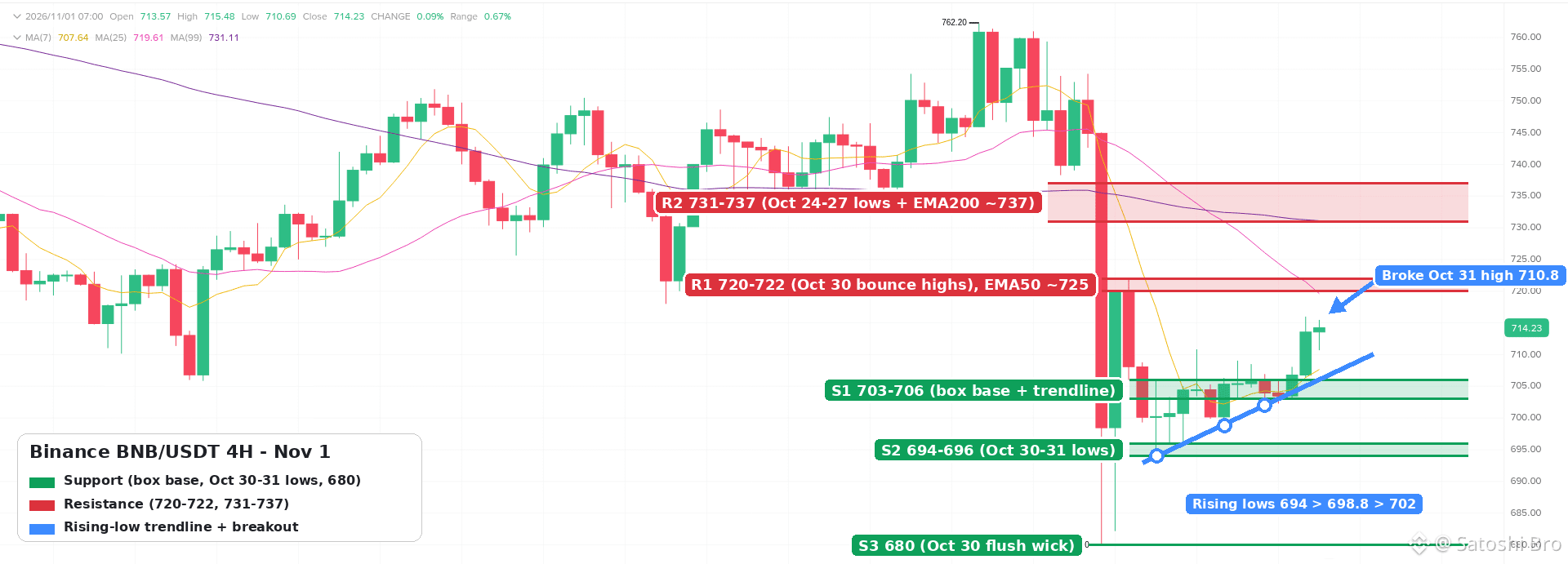
36
·
--
Bài viết
Câu hỏi thường gặp về P2P bằng UAH tại Binance Ukraine sau khi Fiat Trade đóng cửaKể từ ngày 28 tháng 9 năm 2026, Binance không còn số dư hryvnia, sổ lệnh USDT/UAH hay chức năng nạp và rút UAH trực tiếp thông qua Fiat Trade UAH. Giao dịch P2P bằng hryvnia không nằm trong thông báo đó và vẫn diễn ra hằng ngày, vì vậy hiện nay, với hầu hết mọi người ở Ukraine, đây là cách chính để chuyển đổi giữa UAH và tiền mã hóa trên Binance.
👉 [Open a Binance account with code GETREWARD](https://www.binance.com/join?ref=GETREWARD)
Dưới đây là những câu hỏi được mọi người đặt ra nhiều nhất trong những tuần sau khi thay đổi: chính xác thì những gì đã ngừng hoạt động, số hryvnia còn lại được chuyển đi đâu, giao dịch P2P hoạt động thế nào khi không còn cổng giao dịch cũ, các hạn mức ngân hàng Ukraine được áp dụng ra sao và tình trạng pháp lý hiện nay thế nào. Các mục menu và hạn mức khác nhau tùy tài khoản và có thể thay đổi theo thời gian, vì vậy hãy kiểm tra ứng dụng của bạn trước khi thực hiện bất kỳ điều gì dựa trên thông tin ở đây.
Câu hỏi thường gặp về P2P bằng UAH tại Binance Ukraine sau khi Fiat Trade đóng cửa
Kể từ ngày 28 tháng 9 năm 2026, Binance không còn số dư hryvnia, sổ lệnh USDT/UAH hay chức năng nạp và rút UAH trực tiếp thông qua Fiat Trade UAH. Giao dịch P2P bằng hryvnia không nằm trong thông báo đó và vẫn diễn ra hằng ngày, vì vậy hiện nay, với hầu hết mọi người ở Ukraine, đây là cách chính để chuyển đổi giữa UAH và tiền mã hóa trên Binance.
👉 Open a Binance account with code GETREWARD
Dưới đây là những câu hỏi được mọi người đặt ra nhiều nhất trong những tuần sau khi thay đổi: chính xác thì những gì đã ngừng hoạt động, số hryvnia còn lại được chuyển đi đâu, giao dịch P2P hoạt động thế nào khi không còn cổng giao dịch cũ, các hạn mức ngân hàng Ukraine được áp dụng ra sao và tình trạng pháp lý hiện nay thế nào. Các mục menu và hạn mức khác nhau tùy tài khoản và có thể thay đổi theo thời gian, vì vậy hãy kiểm tra ứng dụng của bạn trước khi thực hiện bất kỳ điều gì dựa trên thông tin ở đây.
👉 Open a Binance account with code GETREWARD
Dưới đây là những câu hỏi được mọi người đặt ra nhiều nhất trong những tuần sau khi thay đổi: chính xác thì những gì đã ngừng hoạt động, số hryvnia còn lại được chuyển đi đâu, giao dịch P2P hoạt động thế nào khi không còn cổng giao dịch cũ, các hạn mức ngân hàng Ukraine được áp dụng ra sao và tình trạng pháp lý hiện nay thế nào. Các mục menu và hạn mức khác nhau tùy tài khoản và có thể thay đổi theo thời gian, vì vậy hãy kiểm tra ứng dụng của bạn trước khi thực hiện bất kỳ điều gì dựa trên thông tin ở đây.
14
·
--
Thăm dò nhanh dành cho mọi người tối Chủ nhật 🗳️
Biểu đồ đang yên ắng. Kế hoạch của bạn cho tuần tới là gì?
1️⃣ DCA và không nhìn biểu đồ
2️⃣ Chờ phá vỡ rõ ràng rồi mới hành động
3️⃣ Đã vào vị thế, giờ chỉ quản lý mức cắt lỗ
4️⃣ Tạm giữ stablecoin cho đến khi biến động quay trở lại
Chọn số bên dưới và cho biết lý do nhé 👇
#poll #crypto #Binance #CryptoCommunity
Thăm dò nhanh dành cho mọi người tối Chủ nhật 🗳️
Biểu đồ đang yên ắng. Kế hoạch của bạn cho tuần tới là gì?
1️⃣ DCA và không nhìn biểu đồ
2️⃣ Chờ phá vỡ rõ ràng rồi mới hành động
3️⃣ Đã vào vị thế, giờ chỉ quản lý mức cắt lỗ
4️⃣ Tạm giữ stablecoin cho đến khi biến động quay trở lại
Chọn số bên dưới và cho biết lý do nhé 👇
#poll #crypto #Binance #CryptoCommunity
Biểu đồ đang yên ắng. Kế hoạch của bạn cho tuần tới là gì?
1️⃣ DCA và không nhìn biểu đồ
2️⃣ Chờ phá vỡ rõ ràng rồi mới hành động
3️⃣ Đã vào vị thế, giờ chỉ quản lý mức cắt lỗ
4️⃣ Tạm giữ stablecoin cho đến khi biến động quay trở lại
Chọn số bên dưới và cho biết lý do nhé 👇
#poll #crypto #Binance #CryptoCommunity
1
·
--
Bài viết
Xem bản dịch
Binance Kazakhstan KZT P2P Guide Under AIFC RulesCan you swap tenge for USDT person to person in Kazakhstan and stay inside the rules? Yes. Since July 2026 Binance Kazakhstan runs its own P2P service for KZT, where ads come only from approved professional partners, every buyer and seller has passed identity checks, and the tenge side moves by bank transfer to an IBAN.
👉 [Open a Binance account with code GETREWARD](https://www.binance.com/join?ref=GETREWARD)
This guide explains what makes that setup different from the open P2P many people in Almaty and Astana used for years, what to prepare before your first order, how a buy and a sale actually run, and which warning signs should make you cancel. Screens and limits vary by account and change often, so your own app has the final word.
What changed for tenge P2P in 2026
Four things happened in a short space of time, and together they explain why the KZT market looks the way it does now.
The law got enforced: Article 11(5) of the Law on Digital Assets bans organising the circulation of digital assets in Kazakhstan without a licence or authorisation under AIFC law or national law. The Astana Financial Services Authority (AFSA) repeated this in an April 2026 public warning that named P2P services on unlicensed platforms among the risks.AFSA set a P2P model: Its published rules allow P2P only on digital asset trading facilities licensed in the Astana International Financial Centre. The facility must hold custody permissions, lock the seller's coins until the deal settles, run KYC and anti-money-laundering checks, and move fiat only through banks AFSA has approved.Binance Kazakhstan launched under that model: The local platform is operated by BN KZ Technologies Limited, listed in the AFSA public register with licence number AFSA-A-LA-2024-0028. Its P2P service went live in mid-July 2026 with ads from licensed partners only and IBAN transfers for tenge at the first stage.Courts and app stores followed: In September 2026 the AIFC Court granted AFSA injunctions against several unlicensed crypto platforms, and the order was sent to Google and Apple so their apps can be geo-restricted in Kazakhstan.
For you as a user, the practical point is this. If a deal goes wrong on a platform without a local licence, there is no Kazakh authority that can step in. AFSA says as much in its warning: people dealing with unlicensed firms get none of the protections that apply to supervised ones.
Regulated P2P compared with the open model you may remember
The buttons look familiar, but several things behind them work differently.
Who posts the ads: On an open P2P market almost any verified user can become an advertiser. On Binance Kazakhstan only professional partners approved by the platform, called P2Pro or Makers, can post ads. You are always the taker.How tenge moves: Open markets list whatever the advertiser accepts, including card-to-card transfers and e-wallets. The regulated service settles by IBAN transfer through official bank channels.Escrow: Both models lock the seller's coins once an order opens. Under the AFSA rules this lock is a licence condition, not just a product feature.Identity: Both require verification. On the Kazakh side, tenge methods tie your account to your IIN, the 12-digit individual identification number, so the name and IIN on the bank account have to match the verified profile.Where you complain: A licensed operator answers to AFSA and has a formal complaints process. With an unlicensed platform you are left with its own support desk and nothing behind it.Choice and price: Fewer advertisers means fewer ads to pick from, especially in the first months. The gap between buy and sell prices can be wider than on a crowded open market, so compare before you commit.
Three things to set up before your first order
An identity check that includes your IIN: Binance's help page for tenge deposits through Freedom Bank says that if the document you verified with does not show your IIN, you have to reset verification and redo it with one that does. Doing this before you need tenge saves a wait of a day or more in the middle of a trade. If a check gets rejected, these notes on [fixing a rejected Binance KYC check](https://www.binance.com/en/square/post/381616035393917) cover the usual causes, from glare on the photo to a name mismatch.
An authenticator app: P2P means coins and money moving between strangers, and a hijacked account is the fastest way to lose both. Turn on the authenticator in Security before you trade, so a leaked password alone is not enough to open orders or release coins.
A tenge bank account in your own name: A Kazakh IBAN has 20 characters and starts with KZ. Keep it handy in your banking app, and make sure the account holder name matches your Binance profile letter for letter. Transfers from a spouse's or a friend's account are the classic reason an order ends up in appeal.
How a first tenge buy runs, step by step
Open P2P, choose Buy, pick USDT and set the currency to KZT.Read each ad before the price. Look at the order count, the completion rate, the time limit and the minimum and maximum order size.Type the amount in tenge. The order screen shows how much USDT you get at that ad's price, which is the number that matters.Open the order. The partner's USDT is now locked by the platform and the timer starts.Send the exact tenge amount by IBAN from your own account to the details shown inside the order. Add a reference only if the order asks for one.Tap the button that marks the transfer as done only after your bank shows it as sent.Wait for the partner to confirm receipt. The USDT then appears in your Funding wallet.
Two habits make this smoother. Do the first order small, well under any limit you plan to use later, so a slow bank or a typo costs you nothing but time. And keep the order ID with the bank receipt, because any appeal starts with those two items.
The market page looks like the capture below. It was taken on the global site with USD selected, but the tenge page lists the same details for every ad.
Selling USDT for tenge without surprises
A sale is the same flow in reverse, and the one step that matters most is the last one.
Move the coins first: P2P sells from the Funding wallet. If your USDT sits in Spot, transfer it across before opening the order, otherwise the amount field stays empty.Open the order: Your USDT is locked as soon as you do. It is not gone, it is held until you release it or the order is cancelled.Check your own bank app: Wait until the full tenge amount is credited, from an account in the partner's verified name. A screenshot or a forwarded SMS is not proof of anything.Release: Only then tap Release and confirm with your authenticator code. After release the platform cannot pull the coins back for you.
Coins you buy on P2P land in the Funding wallet, and coins you sell leave from there. The screen below shows where to find it and the Transfer button that moves USDT to Spot when you want to trade.
Illustrative tenge math before you tap Buy
The numbers here are made up to show the method. They are not a quote and not what you will see on any given day.
Say you want to put 100,000 KZT into USDT. Ad A shows 500 tenge per USDT and ad B shows 505.
Ad A: 100,000 ÷ 500 = 200 USDT.Ad B: 100,000 ÷ 505 = 198.02 USDT.The gap: About 1.98 USDT, close to 1,000 tenge, for picking the higher price. On a 1,000,000 KZT order the same gap is nearly 10,000 tenge.
Now look at the round trip. If the buy ads sit around 505 and the sell ads around 495, buying and selling straight back would cost about 10 tenge on every USDT, roughly 2%. That spread is the real cost of P2P for most takers, so check both sides of the market before treating P2P as a cheap in-and-out.
Two more lines belong in the sum. Your bank may charge for an interbank IBAN transfer, and that fee depends on your bank and plan, not on Binance. And check whether the order screen shows a separate fee line; on many P2P markets the taker's cost is built into the price rather than charged on top.
Warning signs that should stop the order
Most P2P losses follow a short list of patterns. Cancel, or refuse to release, if you see any of these.
A move off the platform: The other side wants to continue on Telegram or WhatsApp, or offers a better price if you deal outside the order.Changed bank details: You are asked to send tenge to a card number or a different IBAN from the one shown inside the order.A name that does not match: Money arrives from a third party rather than the partner's verified account.Pressure: Messages telling you to release quickly before the money shows, or threats of an appeal if you wait.Fake helpers: Someone claiming to be support or an AFSA officer who can unfreeze your order for a fee. Real support works inside the app.A platform you cannot find in the register: AFSA keeps a public list of licensed firms. A well-known name, a slick app or heavy advertising does not mean a platform is licensed.
For the everyday habits behind these rules, from reading advertiser stats to keeping records, see this guide to [buying and selling crypto safely on P2P](https://www.binance.com/en/square/post/381644669847043).
What to do if a tenge order stalls
You sent tenge but the timer is running out: Mark the transfer as done if you really sent it, then write in the order chat with the time of the transfer. If the partner does not respond, use the appeal button once it becomes active and upload the bank receipt.The bank holds the transfer: Banks sometimes ask about the purpose of a transfer to a crypto-related account. Answer truthfully and keep the order ID ready. Cancelling and resending to a different account only makes the trail harder to follow.The order was cancelled after you sent money: Do not send again. Open an appeal or contact support from the order page with the receipt, and wait for the partner's refund through the platform.The tenge method is greyed out: This usually means verification is missing the IIN or still under review. Check the verification page before contacting anyone.Coins did not show up: Look in the Funding wallet, not Spot. P2P purchases always arrive there first.
Records worth keeping
Save the order ID, the date, the amount in tenge and USDT, and the bank statement line for every P2P trade. It takes a minute per order and answers almost any question a bank or a tax adviser can ask later. Tax treatment of crypto in Kazakhstan has its own rules, so talk to a local adviser about your situation; nothing here is tax or financial advice.
A short routine for every tenge trade
Verified profile with your IIN, authenticator on, bank account in your own name. Small first order. Read the ad, then the price. Transfer only to the details inside the order. Release only when your bank app shows the money. Keep the order ID with the receipt.
New to Binance? You can [check the active Binance bonus event](https://www.binance.com/en/events/BESTBONUS) to see which welcome tasks currently apply to eligible new users.
Sign-up code: GETREWARD
FAQ
Is P2P on Binance Kazakhstan the same as P2P on the global site?
The buy and sell flow looks alike, but on the local platform ads come only from approved professional partners and tenge moves by IBAN through official bank channels.
Do I need an IIN to trade tenge?
For tenge methods, yes in practice. If your verified document does not show your IIN, Binance asks you to reset verification with one that does.
Can I use a card transfer instead of an IBAN?
At launch the service settled tenge by IBAN only. Other methods may be added later, so check the options shown inside the ad.
What if the partner never confirms my transfer?
Open an appeal from the order once the button is active and attach your bank receipt. The partner's USDT stays locked while the case is reviewed.
Are P2P prices fixed?
No. Each partner sets its own price and limits, and they move with the market through the day.
Disclosure: this article includes a Binance sign-up link with the code GETREWARD. Crypto prices can fall. This is not financial or tax advice.
Binance Kazakhstan KZT P2P Guide Under AIFC Rules
Can you swap tenge for USDT person to person in Kazakhstan and stay inside the rules? Yes. Since July 2026 Binance Kazakhstan runs its own P2P service for KZT, where ads come only from approved professional partners, every buyer and seller has passed identity checks, and the tenge side moves by bank transfer to an IBAN.
👉 Open a Binance account with code GETREWARD
This guide explains what makes that setup different from the open P2P many people in Almaty and Astana used for years, what to prepare before your first order, how a buy and a sale actually run, and which warning signs should make you cancel. Screens and limits vary by account and change often, so your own app has the final word.
What changed for tenge P2P in 2026
Four things happened in a short space of time, and together they explain why the KZT market looks the way it does now.
The law got enforced: Article 11(5) of the Law on Digital Assets bans organising the circulation of digital assets in Kazakhstan without a licence or authorisation under AIFC law or national law. The Astana Financial Services Authority (AFSA) repeated this in an April 2026 public warning that named P2P services on unlicensed platforms among the risks.AFSA set a P2P model: Its published rules allow P2P only on digital asset trading facilities licensed in the Astana International Financial Centre. The facility must hold custody permissions, lock the seller's coins until the deal settles, run KYC and anti-money-laundering checks, and move fiat only through banks AFSA has approved.Binance Kazakhstan launched under that model: The local platform is operated by BN KZ Technologies Limited, listed in the AFSA public register with licence number AFSA-A-LA-2024-0028. Its P2P service went live in mid-July 2026 with ads from licensed partners only and IBAN transfers for tenge at the first stage.Courts and app stores followed: In September 2026 the AIFC Court granted AFSA injunctions against several unlicensed crypto platforms, and the order was sent to Google and Apple so their apps can be geo-restricted in Kazakhstan.
For you as a user, the practical point is this. If a deal goes wrong on a platform without a local licence, there is no Kazakh authority that can step in. AFSA says as much in its warning: people dealing with unlicensed firms get none of the protections that apply to supervised ones.
Regulated P2P compared with the open model you may remember
The buttons look familiar, but several things behind them work differently.
Who posts the ads: On an open P2P market almost any verified user can become an advertiser. On Binance Kazakhstan only professional partners approved by the platform, called P2Pro or Makers, can post ads. You are always the taker.How tenge moves: Open markets list whatever the advertiser accepts, including card-to-card transfers and e-wallets. The regulated service settles by IBAN transfer through official bank channels.Escrow: Both models lock the seller's coins once an order opens. Under the AFSA rules this lock is a licence condition, not just a product feature.Identity: Both require verification. On the Kazakh side, tenge methods tie your account to your IIN, the 12-digit individual identification number, so the name and IIN on the bank account have to match the verified profile.Where you complain: A licensed operator answers to AFSA and has a formal complaints process. With an unlicensed platform you are left with its own support desk and nothing behind it.Choice and price: Fewer advertisers means fewer ads to pick from, especially in the first months. The gap between buy and sell prices can be wider than on a crowded open market, so compare before you commit.
Three things to set up before your first order
An identity check that includes your IIN: Binance's help page for tenge deposits through Freedom Bank says that if the document you verified with does not show your IIN, you have to reset verification and redo it with one that does. Doing this before you need tenge saves a wait of a day or more in the middle of a trade. If a check gets rejected, these notes on fixing a rejected Binance KYC check cover the usual causes, from glare on the photo to a name mismatch.
An authenticator app: P2P means coins and money moving between strangers, and a hijacked account is the fastest way to lose both. Turn on the authenticator in Security before you trade, so a leaked password alone is not enough to open orders or release coins.
A tenge bank account in your own name: A Kazakh IBAN has 20 characters and starts with KZ. Keep it handy in your banking app, and make sure the account holder name matches your Binance profile letter for letter. Transfers from a spouse's or a friend's account are the classic reason an order ends up in appeal.
How a first tenge buy runs, step by step
Open P2P, choose Buy, pick USDT and set the currency to KZT.Read each ad before the price. Look at the order count, the completion rate, the time limit and the minimum and maximum order size.Type the amount in tenge. The order screen shows how much USDT you get at that ad's price, which is the number that matters.Open the order. The partner's USDT is now locked by the platform and the timer starts.Send the exact tenge amount by IBAN from your own account to the details shown inside the order. Add a reference only if the order asks for one.Tap the button that marks the transfer as done only after your bank shows it as sent.Wait for the partner to confirm receipt. The USDT then appears in your Funding wallet.
Two habits make this smoother. Do the first order small, well under any limit you plan to use later, so a slow bank or a typo costs you nothing but time. And keep the order ID with the bank receipt, because any appeal starts with those two items.
The market page looks like the capture below. It was taken on the global site with USD selected, but the tenge page lists the same details for every ad.
Selling USDT for tenge without surprises
A sale is the same flow in reverse, and the one step that matters most is the last one.
Move the coins first: P2P sells from the Funding wallet. If your USDT sits in Spot, transfer it across before opening the order, otherwise the amount field stays empty.Open the order: Your USDT is locked as soon as you do. It is not gone, it is held until you release it or the order is cancelled.Check your own bank app: Wait until the full tenge amount is credited, from an account in the partner's verified name. A screenshot or a forwarded SMS is not proof of anything.Release: Only then tap Release and confirm with your authenticator code. After release the platform cannot pull the coins back for you.
Coins you buy on P2P land in the Funding wallet, and coins you sell leave from there. The screen below shows where to find it and the Transfer button that moves USDT to Spot when you want to trade.
Illustrative tenge math before you tap Buy
The numbers here are made up to show the method. They are not a quote and not what you will see on any given day.
Say you want to put 100,000 KZT into USDT. Ad A shows 500 tenge per USDT and ad B shows 505.
Ad A: 100,000 ÷ 500 = 200 USDT.Ad B: 100,000 ÷ 505 = 198.02 USDT.The gap: About 1.98 USDT, close to 1,000 tenge, for picking the higher price. On a 1,000,000 KZT order the same gap is nearly 10,000 tenge.
Now look at the round trip. If the buy ads sit around 505 and the sell ads around 495, buying and selling straight back would cost about 10 tenge on every USDT, roughly 2%. That spread is the real cost of P2P for most takers, so check both sides of the market before treating P2P as a cheap in-and-out.
Two more lines belong in the sum. Your bank may charge for an interbank IBAN transfer, and that fee depends on your bank and plan, not on Binance. And check whether the order screen shows a separate fee line; on many P2P markets the taker's cost is built into the price rather than charged on top.
Warning signs that should stop the order
Most P2P losses follow a short list of patterns. Cancel, or refuse to release, if you see any of these.
A move off the platform: The other side wants to continue on Telegram or WhatsApp, or offers a better price if you deal outside the order.Changed bank details: You are asked to send tenge to a card number or a different IBAN from the one shown inside the order.A name that does not match: Money arrives from a third party rather than the partner's verified account.Pressure: Messages telling you to release quickly before the money shows, or threats of an appeal if you wait.Fake helpers: Someone claiming to be support or an AFSA officer who can unfreeze your order for a fee. Real support works inside the app.A platform you cannot find in the register: AFSA keeps a public list of licensed firms. A well-known name, a slick app or heavy advertising does not mean a platform is licensed.
For the everyday habits behind these rules, from reading advertiser stats to keeping records, see this guide to buying and selling crypto safely on P2P.
What to do if a tenge order stalls
You sent tenge but the timer is running out: Mark the transfer as done if you really sent it, then write in the order chat with the time of the transfer. If the partner does not respond, use the appeal button once it becomes active and upload the bank receipt.The bank holds the transfer: Banks sometimes ask about the purpose of a transfer to a crypto-related account. Answer truthfully and keep the order ID ready. Cancelling and resending to a different account only makes the trail harder to follow.The order was cancelled after you sent money: Do not send again. Open an appeal or contact support from the order page with the receipt, and wait for the partner's refund through the platform.The tenge method is greyed out: This usually means verification is missing the IIN or still under review. Check the verification page before contacting anyone.Coins did not show up: Look in the Funding wallet, not Spot. P2P purchases always arrive there first.
Records worth keeping
Save the order ID, the date, the amount in tenge and USDT, and the bank statement line for every P2P trade. It takes a minute per order and answers almost any question a bank or a tax adviser can ask later. Tax treatment of crypto in Kazakhstan has its own rules, so talk to a local adviser about your situation; nothing here is tax or financial advice.
A short routine for every tenge trade
Verified profile with your IIN, authenticator on, bank account in your own name. Small first order. Read the ad, then the price. Transfer only to the details inside the order. Release only when your bank app shows the money. Keep the order ID with the receipt.
New to Binance? You can check the active Binance bonus event to see which welcome tasks currently apply to eligible new users.
Sign-up code: GETREWARD
FAQ
Is P2P on Binance Kazakhstan the same as P2P on the global site?
The buy and sell flow looks alike, but on the local platform ads come only from approved professional partners and tenge moves by IBAN through official bank channels.
Do I need an IIN to trade tenge?
For tenge methods, yes in practice. If your verified document does not show your IIN, Binance asks you to reset verification with one that does.
Can I use a card transfer instead of an IBAN?
At launch the service settled tenge by IBAN only. Other methods may be added later, so check the options shown inside the ad.
What if the partner never confirms my transfer?
Open an appeal from the order once the button is active and attach your bank receipt. The partner's USDT stays locked while the case is reviewed.
Are P2P prices fixed?
No. Each partner sets its own price and limits, and they move with the market through the day.
Disclosure: this article includes a Binance sign-up link with the code GETREWARD. Crypto prices can fall. This is not financial or tax advice.
👉 Open a Binance account with code GETREWARD
This guide explains what makes that setup different from the open P2P many people in Almaty and Astana used for years, what to prepare before your first order, how a buy and a sale actually run, and which warning signs should make you cancel. Screens and limits vary by account and change often, so your own app has the final word.
What changed for tenge P2P in 2026
Four things happened in a short space of time, and together they explain why the KZT market looks the way it does now.
The law got enforced: Article 11(5) of the Law on Digital Assets bans organising the circulation of digital assets in Kazakhstan without a licence or authorisation under AIFC law or national law. The Astana Financial Services Authority (AFSA) repeated this in an April 2026 public warning that named P2P services on unlicensed platforms among the risks.AFSA set a P2P model: Its published rules allow P2P only on digital asset trading facilities licensed in the Astana International Financial Centre. The facility must hold custody permissions, lock the seller's coins until the deal settles, run KYC and anti-money-laundering checks, and move fiat only through banks AFSA has approved.Binance Kazakhstan launched under that model: The local platform is operated by BN KZ Technologies Limited, listed in the AFSA public register with licence number AFSA-A-LA-2024-0028. Its P2P service went live in mid-July 2026 with ads from licensed partners only and IBAN transfers for tenge at the first stage.Courts and app stores followed: In September 2026 the AIFC Court granted AFSA injunctions against several unlicensed crypto platforms, and the order was sent to Google and Apple so their apps can be geo-restricted in Kazakhstan.
For you as a user, the practical point is this. If a deal goes wrong on a platform without a local licence, there is no Kazakh authority that can step in. AFSA says as much in its warning: people dealing with unlicensed firms get none of the protections that apply to supervised ones.
Regulated P2P compared with the open model you may remember
The buttons look familiar, but several things behind them work differently.
Who posts the ads: On an open P2P market almost any verified user can become an advertiser. On Binance Kazakhstan only professional partners approved by the platform, called P2Pro or Makers, can post ads. You are always the taker.How tenge moves: Open markets list whatever the advertiser accepts, including card-to-card transfers and e-wallets. The regulated service settles by IBAN transfer through official bank channels.Escrow: Both models lock the seller's coins once an order opens. Under the AFSA rules this lock is a licence condition, not just a product feature.Identity: Both require verification. On the Kazakh side, tenge methods tie your account to your IIN, the 12-digit individual identification number, so the name and IIN on the bank account have to match the verified profile.Where you complain: A licensed operator answers to AFSA and has a formal complaints process. With an unlicensed platform you are left with its own support desk and nothing behind it.Choice and price: Fewer advertisers means fewer ads to pick from, especially in the first months. The gap between buy and sell prices can be wider than on a crowded open market, so compare before you commit.
Three things to set up before your first order
An identity check that includes your IIN: Binance's help page for tenge deposits through Freedom Bank says that if the document you verified with does not show your IIN, you have to reset verification and redo it with one that does. Doing this before you need tenge saves a wait of a day or more in the middle of a trade. If a check gets rejected, these notes on fixing a rejected Binance KYC check cover the usual causes, from glare on the photo to a name mismatch.
An authenticator app: P2P means coins and money moving between strangers, and a hijacked account is the fastest way to lose both. Turn on the authenticator in Security before you trade, so a leaked password alone is not enough to open orders or release coins.
A tenge bank account in your own name: A Kazakh IBAN has 20 characters and starts with KZ. Keep it handy in your banking app, and make sure the account holder name matches your Binance profile letter for letter. Transfers from a spouse's or a friend's account are the classic reason an order ends up in appeal.
How a first tenge buy runs, step by step
Open P2P, choose Buy, pick USDT and set the currency to KZT.Read each ad before the price. Look at the order count, the completion rate, the time limit and the minimum and maximum order size.Type the amount in tenge. The order screen shows how much USDT you get at that ad's price, which is the number that matters.Open the order. The partner's USDT is now locked by the platform and the timer starts.Send the exact tenge amount by IBAN from your own account to the details shown inside the order. Add a reference only if the order asks for one.Tap the button that marks the transfer as done only after your bank shows it as sent.Wait for the partner to confirm receipt. The USDT then appears in your Funding wallet.
Two habits make this smoother. Do the first order small, well under any limit you plan to use later, so a slow bank or a typo costs you nothing but time. And keep the order ID with the bank receipt, because any appeal starts with those two items.
The market page looks like the capture below. It was taken on the global site with USD selected, but the tenge page lists the same details for every ad.
Selling USDT for tenge without surprises
A sale is the same flow in reverse, and the one step that matters most is the last one.
Move the coins first: P2P sells from the Funding wallet. If your USDT sits in Spot, transfer it across before opening the order, otherwise the amount field stays empty.Open the order: Your USDT is locked as soon as you do. It is not gone, it is held until you release it or the order is cancelled.Check your own bank app: Wait until the full tenge amount is credited, from an account in the partner's verified name. A screenshot or a forwarded SMS is not proof of anything.Release: Only then tap Release and confirm with your authenticator code. After release the platform cannot pull the coins back for you.
Coins you buy on P2P land in the Funding wallet, and coins you sell leave from there. The screen below shows where to find it and the Transfer button that moves USDT to Spot when you want to trade.
Illustrative tenge math before you tap Buy
The numbers here are made up to show the method. They are not a quote and not what you will see on any given day.
Say you want to put 100,000 KZT into USDT. Ad A shows 500 tenge per USDT and ad B shows 505.
Ad A: 100,000 ÷ 500 = 200 USDT.Ad B: 100,000 ÷ 505 = 198.02 USDT.The gap: About 1.98 USDT, close to 1,000 tenge, for picking the higher price. On a 1,000,000 KZT order the same gap is nearly 10,000 tenge.
Now look at the round trip. If the buy ads sit around 505 and the sell ads around 495, buying and selling straight back would cost about 10 tenge on every USDT, roughly 2%. That spread is the real cost of P2P for most takers, so check both sides of the market before treating P2P as a cheap in-and-out.
Two more lines belong in the sum. Your bank may charge for an interbank IBAN transfer, and that fee depends on your bank and plan, not on Binance. And check whether the order screen shows a separate fee line; on many P2P markets the taker's cost is built into the price rather than charged on top.
Warning signs that should stop the order
Most P2P losses follow a short list of patterns. Cancel, or refuse to release, if you see any of these.
A move off the platform: The other side wants to continue on Telegram or WhatsApp, or offers a better price if you deal outside the order.Changed bank details: You are asked to send tenge to a card number or a different IBAN from the one shown inside the order.A name that does not match: Money arrives from a third party rather than the partner's verified account.Pressure: Messages telling you to release quickly before the money shows, or threats of an appeal if you wait.Fake helpers: Someone claiming to be support or an AFSA officer who can unfreeze your order for a fee. Real support works inside the app.A platform you cannot find in the register: AFSA keeps a public list of licensed firms. A well-known name, a slick app or heavy advertising does not mean a platform is licensed.
For the everyday habits behind these rules, from reading advertiser stats to keeping records, see this guide to buying and selling crypto safely on P2P.
What to do if a tenge order stalls
You sent tenge but the timer is running out: Mark the transfer as done if you really sent it, then write in the order chat with the time of the transfer. If the partner does not respond, use the appeal button once it becomes active and upload the bank receipt.The bank holds the transfer: Banks sometimes ask about the purpose of a transfer to a crypto-related account. Answer truthfully and keep the order ID ready. Cancelling and resending to a different account only makes the trail harder to follow.The order was cancelled after you sent money: Do not send again. Open an appeal or contact support from the order page with the receipt, and wait for the partner's refund through the platform.The tenge method is greyed out: This usually means verification is missing the IIN or still under review. Check the verification page before contacting anyone.Coins did not show up: Look in the Funding wallet, not Spot. P2P purchases always arrive there first.
Records worth keeping
Save the order ID, the date, the amount in tenge and USDT, and the bank statement line for every P2P trade. It takes a minute per order and answers almost any question a bank or a tax adviser can ask later. Tax treatment of crypto in Kazakhstan has its own rules, so talk to a local adviser about your situation; nothing here is tax or financial advice.
A short routine for every tenge trade
Verified profile with your IIN, authenticator on, bank account in your own name. Small first order. Read the ad, then the price. Transfer only to the details inside the order. Release only when your bank app shows the money. Keep the order ID with the receipt.
New to Binance? You can check the active Binance bonus event to see which welcome tasks currently apply to eligible new users.
Sign-up code: GETREWARD
FAQ
Is P2P on Binance Kazakhstan the same as P2P on the global site?
The buy and sell flow looks alike, but on the local platform ads come only from approved professional partners and tenge moves by IBAN through official bank channels.
Do I need an IIN to trade tenge?
For tenge methods, yes in practice. If your verified document does not show your IIN, Binance asks you to reset verification with one that does.
Can I use a card transfer instead of an IBAN?
At launch the service settled tenge by IBAN only. Other methods may be added later, so check the options shown inside the ad.
What if the partner never confirms my transfer?
Open an appeal from the order once the button is active and attach your bank receipt. The partner's USDT stays locked while the case is reviewed.
Are P2P prices fixed?
No. Each partner sets its own price and limits, and they move with the market through the day.
Disclosure: this article includes a Binance sign-up link with the code GETREWARD. Crypto prices can fall. This is not financial or tax advice.
18
·
--
Xem bản dịch
Binance Referral Code for Vietnam
New to Binance in Vietnam? Use promo code THEBESTCODE at sign-up for a flat 20% off Spot fees.
1. Start a new Binance account
2. Enter THEBESTCODE before you finish
3. Check the 20% cut on your fee rates
Welcome bonus up to $19,800 for eligible users.
[Sign up with code THEBESTCODE](https://www.binance.com/join?ref=THEBESTCODE)
[Welcome bonus terms](https://www.binance.com/en/events/BESTBONUS)
Not financial advice.
#Binance #BinancePromoCode #crypto
Binance Referral Code for Vietnam
New to Binance in Vietnam? Use promo code THEBESTCODE at sign-up for a flat 20% off Spot fees.
1. Start a new Binance account
2. Enter THEBESTCODE before you finish
3. Check the 20% cut on your fee rates
Welcome bonus up to $19,800 for eligible users.
Sign up with code THEBESTCODE
Welcome bonus terms
Not financial advice.
#Binance #BinancePromoCode #crypto
New to Binance in Vietnam? Use promo code THEBESTCODE at sign-up for a flat 20% off Spot fees.
1. Start a new Binance account
2. Enter THEBESTCODE before you finish
3. Check the 20% cut on your fee rates
Welcome bonus up to $19,800 for eligible users.
Sign up with code THEBESTCODE
Welcome bonus terms
Not financial advice.
#Binance #BinancePromoCode #crypto
194
Đăng nhập để khám phá thêm nội dung
Tham gia cùng người dùng tiền mã hóa toàn cầu trên Binance Square
⚡️ Nhận thông tin mới nhất và hữu ích về tiền mã hóa.
💬 Được tin cậy bởi sàn giao dịch tiền mã hóa lớn nhất thế giới.
👍 Khám phá những thông tin chuyên sâu thực tế từ những nhà sáng tạo đã xác minh.
Email / Số điện thoại
Chủ đề thịnh hành
TinFed
382,204 lượt xem
1,068 đang thảo luận
Fed giữ nguyên lãi suất, Bitcoin quay đầu về dưới 80.000 USD Sau phiên họp kéo dài hai ngày, Ủy ban Thị trường Mở Liên bang (FOMC) đã bỏ phiếu với tỷ lệ 10-2 để duy trì lãi suất tham chiếu trong phạm vi 3,75-4%. Thống đốc Fed Lisa Cook và Chủ tịch Fed chi nhánh Cleveland Beth Hammack đã phản đối, đề xuất tăng lãi suất thêm 0,25 điểm cơ bản ngay lập tức.
Trong buổi họp báo sau đó, Chủ tịch Fed Kevin Warsh Fed nâng đánh giá hoạt động kinh tế Mỹ từ mức tăng trưởng ổn định lên tăng trưởng mạnh. Chi tiêu trong nước vẫn bền bỉ, năng suất lao động tăng, đầu tư vốn duy trì tích cực và thị trường việc làm tiếp tục hấp thụ lực lượng lao động.
#TinFed #TheoDõiFOMC #BinanceUpdatesProofofReservesAddresses #CZDismissesClaimsBinanceHackWasPredicted #CZDismissesClaimsBinanceHackWasPredicted $AAPLB $NVDAB $MSFTB
kynfoolishupdate
·0 lượt thích
·124 lượt xem
TheoDõiFOMC
314,356 lượt xem
1,343 đang thảo luận
BinanceProcesses$4.65BWithdrawals
56,946 lượt xem
243 đang thảo luận