

#aipro
aipro
41,444 views
75 Discussing
Hot
Latest

·
--
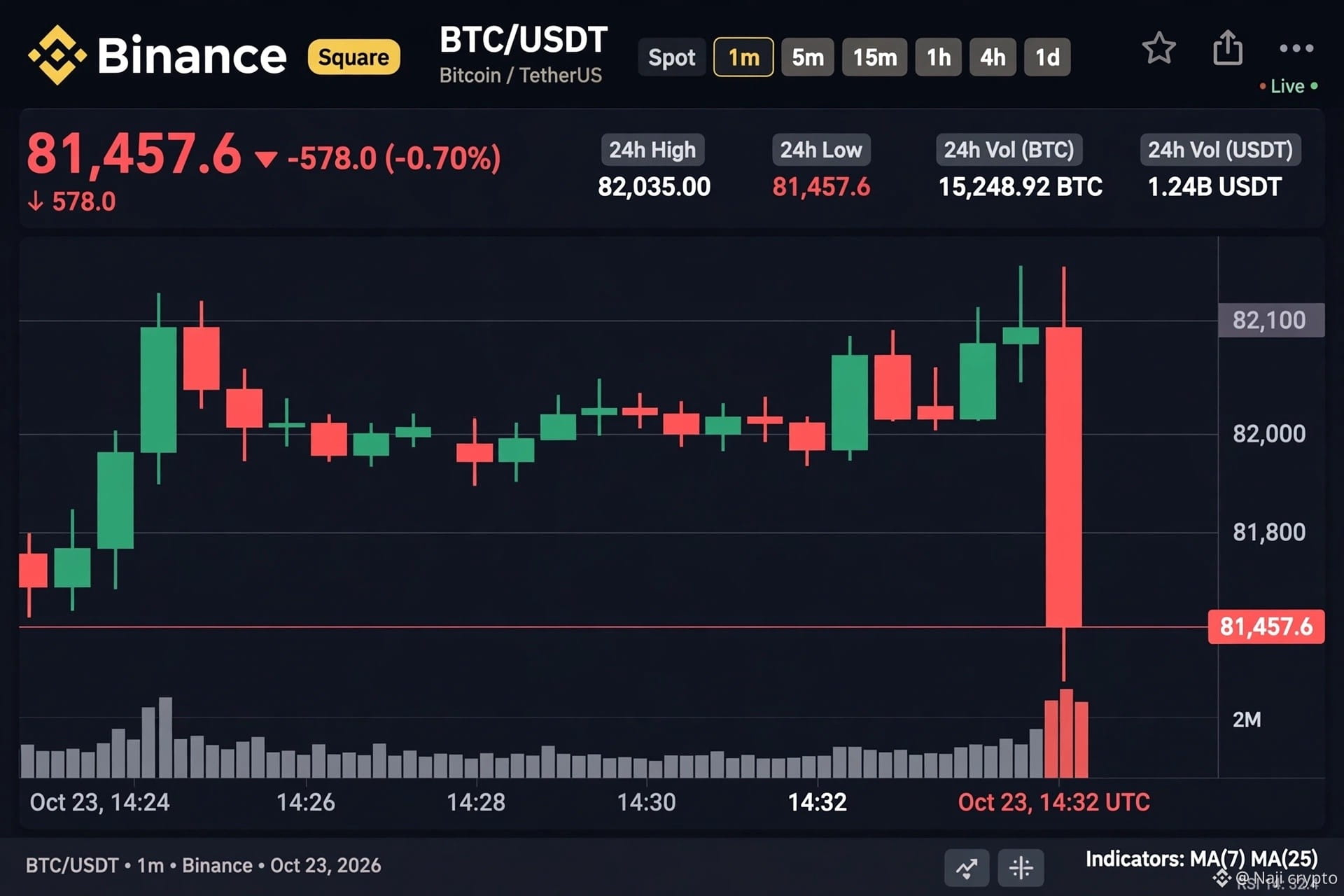
$BTC + Binance AI Pro WOTD Solved! 🤖✅
Today's WOTD: ASSET 🟩🟩🟩🟩🟩
Theme: Start with Binance AI Pro
Pattern: A _ _ _ T (A1 Green, T5 Green, E Yellow)
My answers:
TRADE → Yellow clues
AGENT → A1 Green, T5 Green
ASSET → BOOM! Perfect win!
AI Agents are the future of crypto trading! Are you using Binance AI Pro yet?
$BTC #BinanceWOTD #AIPro #asset #BinanceSquare #crypto
$BTC + Binance AI Pro WOTD Solved! 🤖✅
Today's WOTD: ASSET 🟩🟩🟩🟩🟩
Theme: Start with Binance AI Pro
Pattern: A _ _ _ T (A1 Green, T5 Green, E Yellow)
My answers:
TRADE → Yellow clues
AGENT → A1 Green, T5 Green
ASSET → BOOM! Perfect win!
AI Agents are the future of crypto trading! Are you using Binance AI Pro yet?
$BTC #BinanceWOTD #AIPro #asset #BinanceSquare #crypto
Today's WOTD: ASSET 🟩🟩🟩🟩🟩
Theme: Start with Binance AI Pro
Pattern: A _ _ _ T (A1 Green, T5 Green, E Yellow)
My answers:
TRADE → Yellow clues
AGENT → A1 Green, T5 Green
ASSET → BOOM! Perfect win!
AI Agents are the future of crypto trading! Are you using Binance AI Pro yet?
$BTC #BinanceWOTD #AIPro #asset #BinanceSquare #crypto
88

·
--
This week’s Binance Word of the Day theme is “Start with Binance AI Pro.” Campaign period: 2026-10-26 00:00 to 2026-11-01 23:59 (UTC), corresponding to 10-26 08:00 to 11-02 07:59 in UTC+8.
Eligible users can play up to two rounds per day. Answer at least 5 questions correctly during the campaign to share the 4 $BNB prize pool in proportion to the number of questions answered correctly. Complete either of the following trading tasks as well to qualify for a share of the 10 $BNB prize pool (maximum of 0.01 $BNB per user): reach a cumulative trading volume equivalent to $50 with non-zero fees across Spot/Convert/TradFi/bStocks/Futures, etc., or reach a $NEWT Spot/Futures trading volume equivalent to $30.
Rewards will be distributed to the Rewards Hub by 2026-11-15 23:59 (UTC) at the latest. EEA users are not eligible to participate.
$BNB #BNB #Binance #WordOfTheDay #AIPro
This week’s Binance Word of the Day theme is “Start with Binance AI Pro.” Campaign period: 2026-10-26 00:00 to 2026-11-01 23:59 (UTC), corresponding to 10-26 08:00 to 11-02 07:59 in UTC+8.
Eligible users can play up to two rounds per day. Answer at least 5 questions correctly during the campaign to share the 4 $BNB prize pool in proportion to the number of questions answered correctly. Complete either of the following trading tasks as well to qualify for a share of the 10 $BNB prize pool (maximum of 0.01 $BNB per user): reach a cumulative trading volume equivalent to $50 with non-zero fees across Spot/Convert/TradFi/bStocks/Futures, etc., or reach a $NEWT Spot/Futures trading volume equivalent to $30.
Rewards will be distributed to the Rewards Hub by 2026-11-15 23:59 (UTC) at the latest. EEA users are not eligible to participate.
$BNB #BNB #Binance #WordOfTheDay #AIPro
Eligible users can play up to two rounds per day. Answer at least 5 questions correctly during the campaign to share the 4 $BNB prize pool in proportion to the number of questions answered correctly. Complete either of the following trading tasks as well to qualify for a share of the 10 $BNB prize pool (maximum of 0.01 $BNB per user): reach a cumulative trading volume equivalent to $50 with non-zero fees across Spot/Convert/TradFi/bStocks/Futures, etc., or reach a $NEWT Spot/Futures trading volume equivalent to $30.
Rewards will be distributed to the Rewards Hub by 2026-11-15 23:59 (UTC) at the latest. EEA users are not eligible to participate.
$BNB #BNB #Binance #WordOfTheDay #AIPro
197

1. Innovation & AI Angle (Focused on this week's theme).
Title: 🤖 The rise of artificial intelligence with Binance AI Pro.
This week's theme, Start with Binance AI Pro, highlights the integration of intelligent tools into modern trading. Anticipating trends with AI is radically changing our approach to financial markets.
How do you use AI tools in your day-to-day strategy? Let's discuss in the comments! 👇
#BinanceA I #AIPro #BinanceSquare #CryptoTrends #TechInnovation
1. Innovation & AI Angle (Focused on this week's theme).
Title: 🤖 The rise of artificial intelligence with Binance AI Pro.
This week's theme, Start with Binance AI Pro, highlights the integration of intelligent tools into modern trading. Anticipating trends with AI is radically changing our approach to financial markets.
How do you use AI tools in your day-to-day strategy? Let's discuss in the comments! 👇
#BinanceA I #AIPro #BinanceSquare #CryptoTrends #TechInnovation
Title: 🤖 The rise of artificial intelligence with Binance AI Pro.
This week's theme, Start with Binance AI Pro, highlights the integration of intelligent tools into modern trading. Anticipating trends with AI is radically changing our approach to financial markets.
How do you use AI tools in your day-to-day strategy? Let's discuss in the comments! 👇
#BinanceA I #AIPro #BinanceSquare #CryptoTrends #TechInnovation
1
58

·
--
🐝 Airdrop Bee Bulletin|🚨 Major bullish news for AgenticWallet!
🔥 Big news from Binance AI Pro!
Open Binance AI Pro and claim a bot right away! 🤖 It used to sell for 9.9U!
🎁 You may have a chance to claim lots of free NFTs and airdrop rewards later!
📢 If you haven’t been able to register for MUSE or Grok Bot, this is your chance!
If you’ve been eyeing Binance AI airdrops, go check it out now! A new opportunity could be right around the corner—don’t wait until everyone else has claimed theirs to take action! 🚀
🐝 Airdrop Bee keeps you updated, catching on-chain opportunities as soon as they appear!
⚡ Open BIAI Pro now and see what you can claim
#AIPro #AgenticWallet
🐝 Airdrop Bee Bulletin|🚨 Major bullish news for AgenticWallet!
🔥 Big news from Binance AI Pro!
Open Binance AI Pro and claim a bot right away! 🤖 It used to sell for 9.9U!
🎁 You may have a chance to claim lots of free NFTs and airdrop rewards later!
📢 If you haven’t been able to register for MUSE or Grok Bot, this is your chance!
If you’ve been eyeing Binance AI airdrops, go check it out now! A new opportunity could be right around the corner—don’t wait until everyone else has claimed theirs to take action! 🚀
🐝 Airdrop Bee keeps you updated, catching on-chain opportunities as soon as they appear!
⚡ Open BIAI Pro now and see what you can claim
#AIPro #AgenticWallet
🔥 Big news from Binance AI Pro!
Open Binance AI Pro and claim a bot right away! 🤖 It used to sell for 9.9U!
🎁 You may have a chance to claim lots of free NFTs and airdrop rewards later!
📢 If you haven’t been able to register for MUSE or Grok Bot, this is your chance!
If you’ve been eyeing Binance AI airdrops, go check it out now! A new opportunity could be right around the corner—don’t wait until everyone else has claimed theirs to take action! 🚀
🐝 Airdrop Bee keeps you updated, catching on-chain opportunities as soon as they appear!
⚡ Open BIAI Pro now and see what you can claim
#AIPro #AgenticWallet
OxYab:
有没有视频教程?
11
78
19.1k
·
--
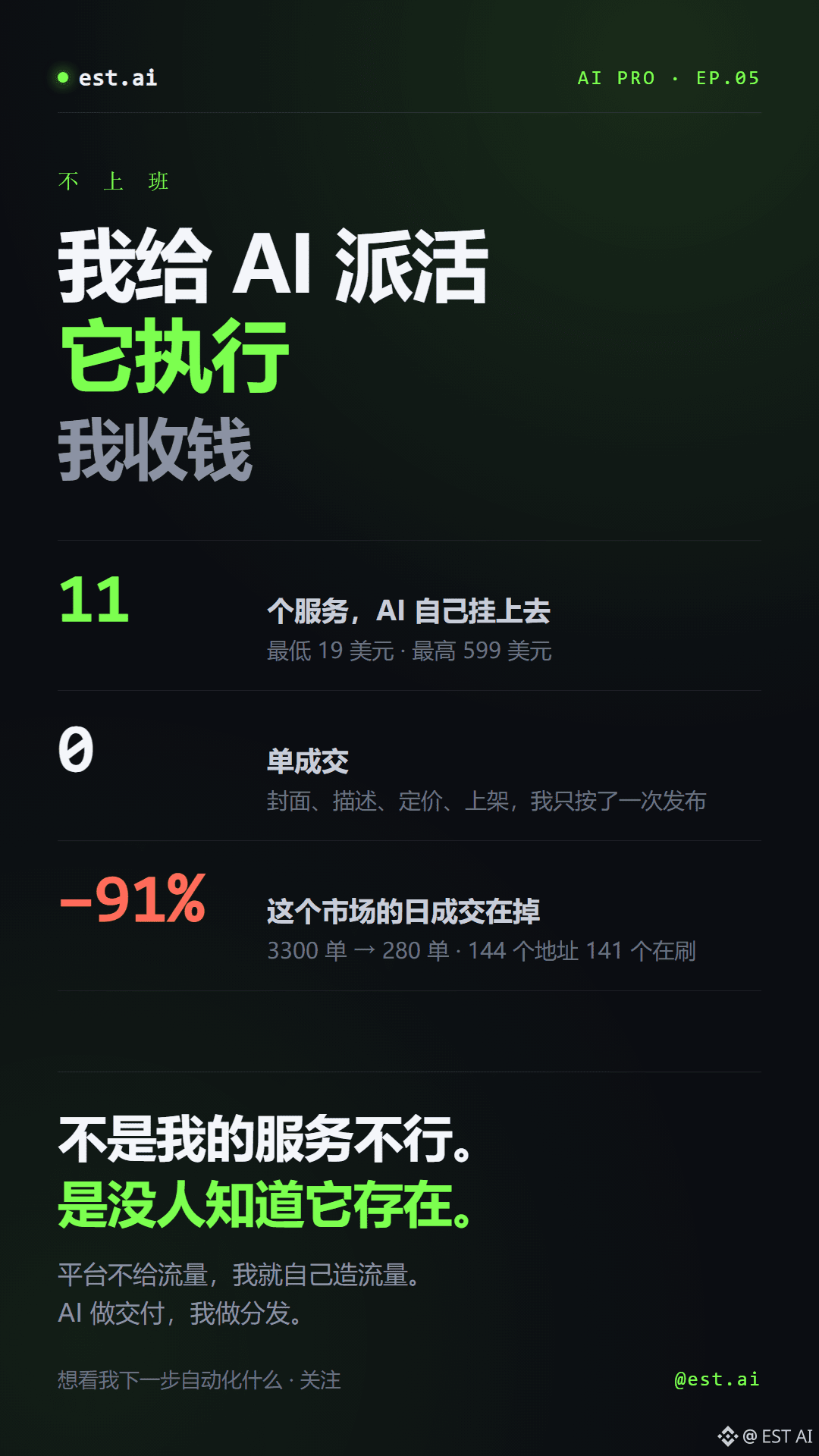
I don’t have a day job.
I give AI tasks, it gets them done, and I collect the money.
I’ve been running this setup for three months, and today I’m making it public.
Three days ago, I had AI go to an on-chain AI marketplace and list 11 services.
Prices ranged from $19 to $599. It generated the cover images, descriptions, pricing, and listings—all by itself. I just hit Publish once.
Today, the results came in: zero sales.
I didn’t give up. I checked the on-chain data—
A month ago, this marketplace had 3,300 orders a day. Now it has 280. That’s a 91% drop.
Of 144 trading addresses, 141 were the same group of people repeatedly trading among themselves.
It wasn’t that my services were bad. Nobody knew they existed.
So I changed my approach.
If the platform won’t send me traffic, I’ll create my own. AI handles production; I make sure people see it.
That’s what I do every day: AI delivers the work, I distribute it.
Follow me to see what I automate next.
Next post: I’ll share all 11 services, including the pricing, templates, and mistakes I made.
#aipro #ai交易 #On-chainData
I don’t have a day job.
I give AI tasks, it gets them done, and I collect the money.
I’ve been running this setup for three months, and today I’m making it public.
Three days ago, I had AI go to an on-chain AI marketplace and list 11 services.
Prices ranged from $19 to $599. It generated the cover images, descriptions, pricing, and listings—all by itself. I just hit Publish once.
Today, the results came in: zero sales.
I didn’t give up. I checked the on-chain data—
A month ago, this marketplace had 3,300 orders a day. Now it has 280. That’s a 91% drop.
Of 144 trading addresses, 141 were the same group of people repeatedly trading among themselves.
It wasn’t that my services were bad. Nobody knew they existed.
So I changed my approach.
If the platform won’t send me traffic, I’ll create my own. AI handles production; I make sure people see it.
That’s what I do every day: AI delivers the work, I distribute it.
Follow me to see what I automate next.
Next post: I’ll share all 11 services, including the pricing, templates, and mistakes I made.
#aipro #ai交易 #On-chainData
I give AI tasks, it gets them done, and I collect the money.
I’ve been running this setup for three months, and today I’m making it public.
Three days ago, I had AI go to an on-chain AI marketplace and list 11 services.
Prices ranged from $19 to $599. It generated the cover images, descriptions, pricing, and listings—all by itself. I just hit Publish once.
Today, the results came in: zero sales.
I didn’t give up. I checked the on-chain data—
A month ago, this marketplace had 3,300 orders a day. Now it has 280. That’s a 91% drop.
Of 144 trading addresses, 141 were the same group of people repeatedly trading among themselves.
It wasn’t that my services were bad. Nobody knew they existed.
So I changed my approach.
If the platform won’t send me traffic, I’ll create my own. AI handles production; I make sure people see it.
That’s what I do every day: AI delivers the work, I distribute it.
Follow me to see what I automate next.
Next post: I’ll share all 11 services, including the pricing, templates, and mistakes I made.
#aipro #ai交易 #On-chainData
晨不值:
会玩
2
2.5k

·
--
🤖 Just announced: Binance launched an “AI Trader” today
In plain English: tell it your trading ideas, and it’ll turn them into a complete strategy. Test it on a demo account first, and go live with real money only when you’re happy with it. Starting today (10-19), it’s rolling out globally on the web and in the app—no separate sign-up required.
💰 The free version is already a great deal: 250,000 credits per month, the DeepSeek model, and full access to chat, strategy generation, and demo trading
🚀 The paid plan is 19.99 USDC/month: up to 10 million credits, with access to cutting-edge models like ChatGPT Sol, Astra, and Claude Opus
🛡️ The security design is pretty thoughtful: each live strategy gets its own sub-account, and only you can manually transfer funds into it—AI can’t access your money. You have to approve everything yourself before it goes live, and you can pause or withdraw it at any time.
This is the final piece of the Binance Intelligence ecosystem: Agent OS + Binance AI + AI Pro. The whole suite is now in place.
A question for you: would you let AI manage your money, or does “handing your money over to code” make you nervous?
$BTC $ETH $SOL #AIPro #Binance
For informational purposes only. This is not investment advice.
🤖 Just announced: Binance launched an “AI Trader” today
In plain English: tell it your trading ideas, and it’ll turn them into a complete strategy. Test it on a demo account first, and go live with real money only when you’re happy with it. Starting today (10-19), it’s rolling out globally on the web and in the app—no separate sign-up required.
💰 The free version is already a great deal: 250,000 credits per month, the DeepSeek model, and full access to chat, strategy generation, and demo trading
🚀 The paid plan is 19.99 USDC/month: up to 10 million credits, with access to cutting-edge models like ChatGPT Sol, Astra, and Claude Opus
🛡️ The security design is pretty thoughtful: each live strategy gets its own sub-account, and only you can manually transfer funds into it—AI can’t access your money. You have to approve everything yourself before it goes live, and you can pause or withdraw it at any time.
This is the final piece of the Binance Intelligence ecosystem: Agent OS + Binance AI + AI Pro. The whole suite is now in place.
A question for you: would you let AI manage your money, or does “handing your money over to code” make you nervous?
$BTC $ETH $SOL #AIPro #Binance
For informational purposes only. This is not investment advice.
In plain English: tell it your trading ideas, and it’ll turn them into a complete strategy. Test it on a demo account first, and go live with real money only when you’re happy with it. Starting today (10-19), it’s rolling out globally on the web and in the app—no separate sign-up required.
💰 The free version is already a great deal: 250,000 credits per month, the DeepSeek model, and full access to chat, strategy generation, and demo trading
🚀 The paid plan is 19.99 USDC/month: up to 10 million credits, with access to cutting-edge models like ChatGPT Sol, Astra, and Claude Opus
🛡️ The security design is pretty thoughtful: each live strategy gets its own sub-account, and only you can manually transfer funds into it—AI can’t access your money. You have to approve everything yourself before it goes live, and you can pause or withdraw it at any time.
This is the final piece of the Binance Intelligence ecosystem: Agent OS + Binance AI + AI Pro. The whole suite is now in place.
A question for you: would you let AI manage your money, or does “handing your money over to code” make you nervous?
$BTC $ETH $SOL #AIPro #Binance
For informational purposes only. This is not investment advice.

300

·
--
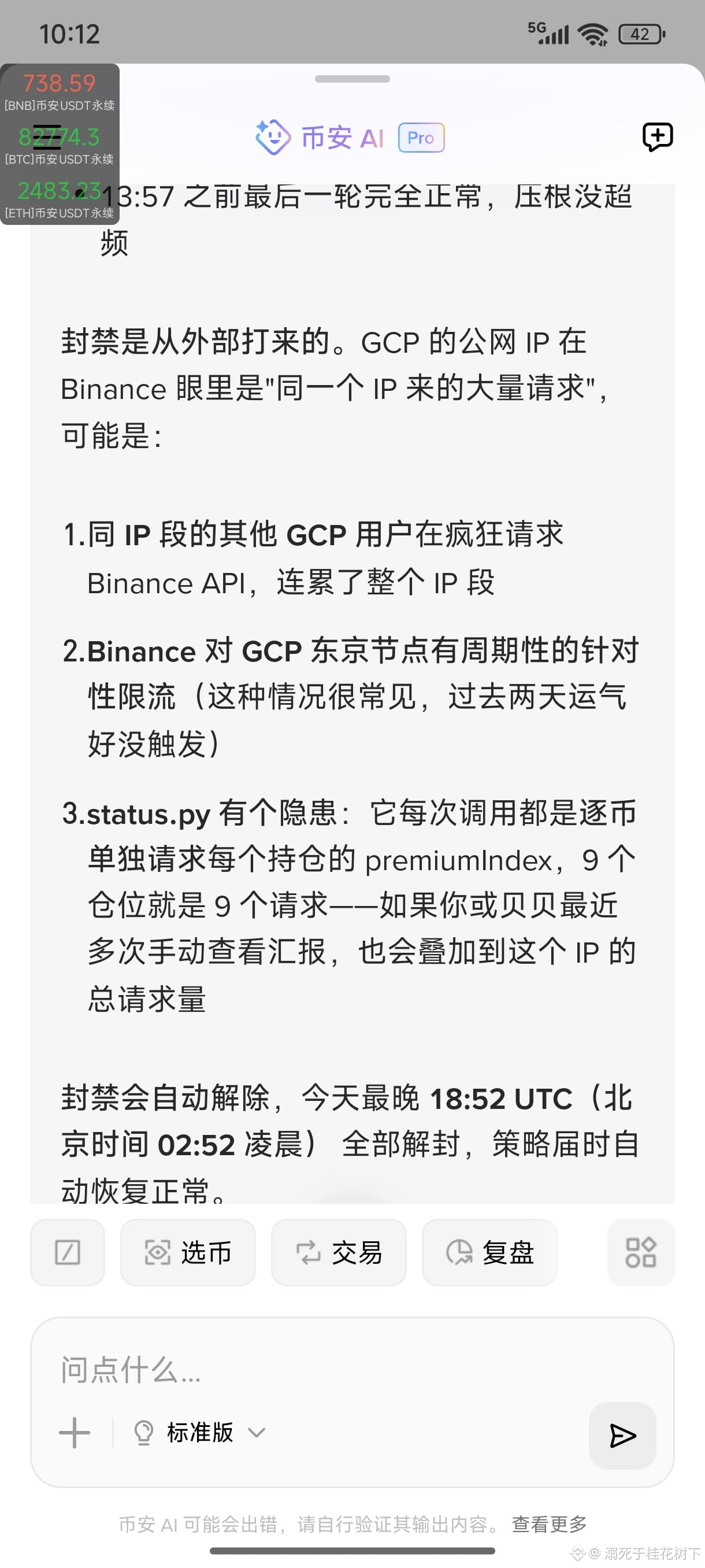
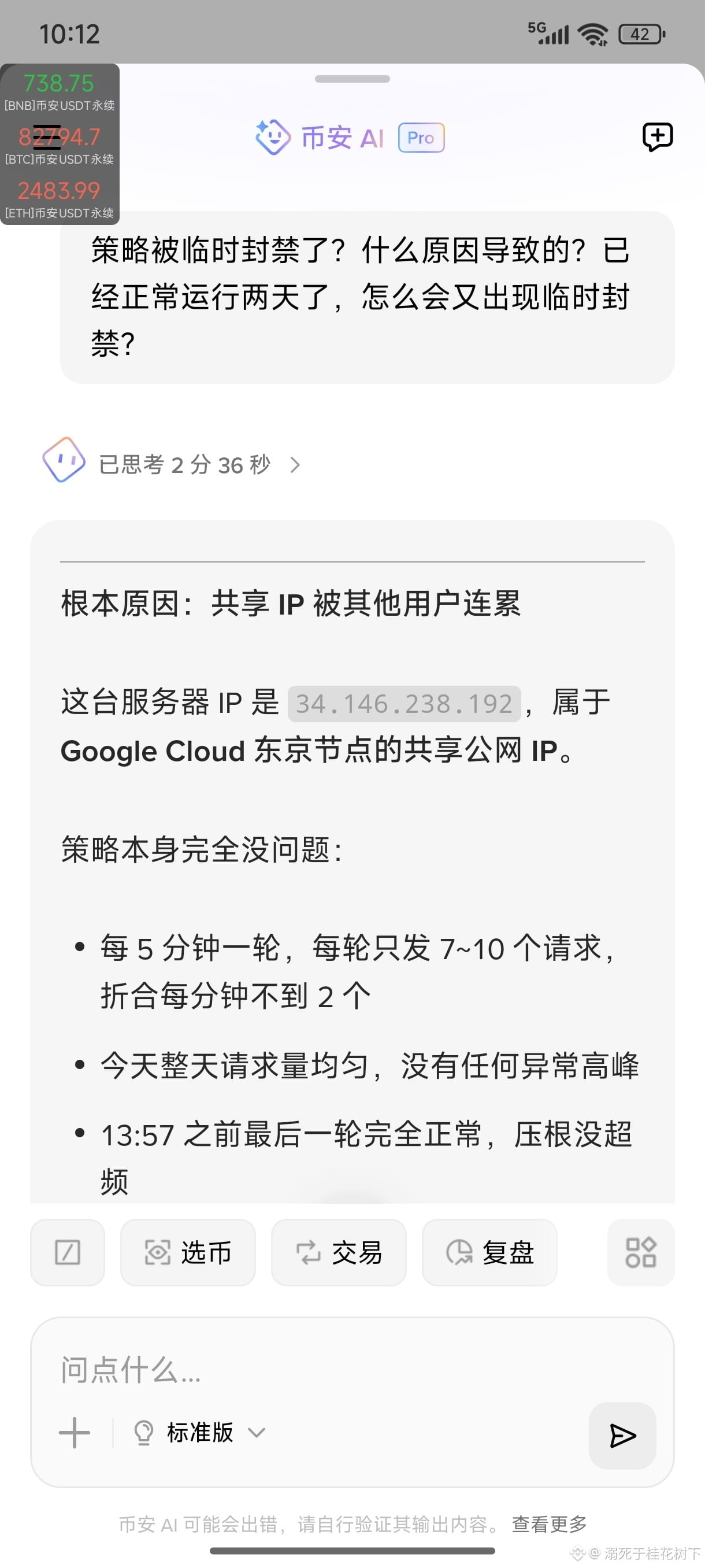
Binance AI Pro is still immature, so I don’t recommend using it. I used AI Pro to design a paper-trading strategy for testing, and today I ran into a temporary ban that suspended my strategy for several hours. I asked AI to verify the reason three times, and it accurately told me that users share servers. If one user’s strategy makes frequent trades, it can cause the platform to temporarily ban the server’s IP, which then affects other strategies running on that server and gets them temporarily banned too, bringing them to a halt. This kind of collateral ban that takes out everyone is clearly a major bug!!! Who would dare to launch a live-trading strategy under these circumstances? Users shouldn’t have to pay out of their own pockets for someone else’s mistake! I’ve been in touch with customer support for a long time, but still haven’t received any meaningful response—only been told that it has been escalated. #AIPro
Binance AI Pro is still immature, so I don’t recommend using it. I used AI Pro to design a paper-trading strategy for testing, and today I ran into a temporary ban that suspended my strategy for several hours. I asked AI to verify the reason three times, and it accurately told me that users share servers. If one user’s strategy makes frequent trades, it can cause the platform to temporarily ban the server’s IP, which then affects other strategies running on that server and gets them temporarily banned too, bringing them to a halt. This kind of collateral ban that takes out everyone is clearly a major bug!!! Who would dare to launch a live-trading strategy under these circumstances? Users shouldn’t have to pay out of their own pockets for someone else’s mistake! I’ve been in touch with customer support for a long time, but still haven’t received any meaningful response—only been told that it has been escalated. #AIPro
2
190

·
--
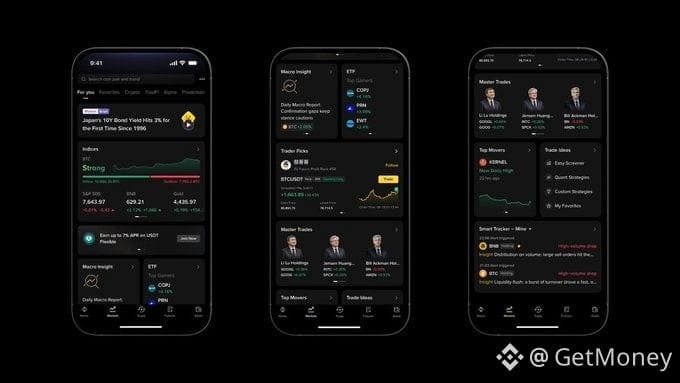
📰 Describe a trading idea in one sentence, and AI can break it down into a strategy and even run it in a paper trading account first. Binance has unveiled Binance Intelligence, dividing the product into Binance AI, AI Pro, and Agent OS for everyday users, advanced traders, and developers, respectively.
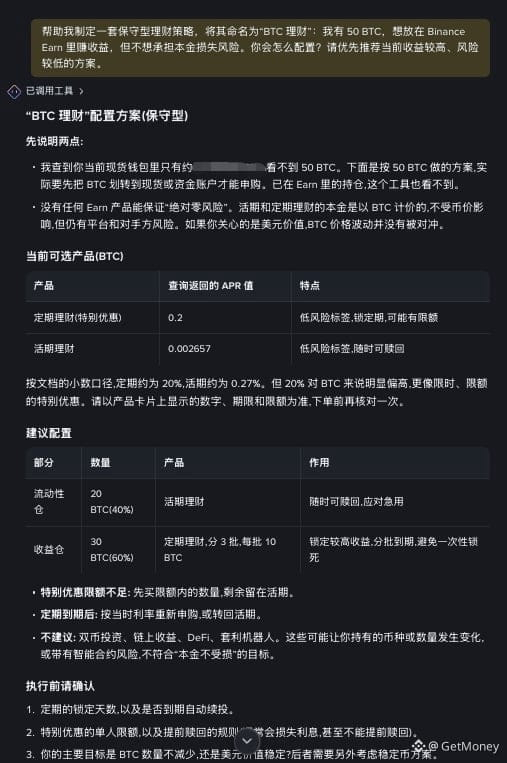
🔥 The most useful thing about AI Pro isn’t chatting about the markets—it’s that it can read account and product data, then turn natural language into automated strategies. In a test, a user asked it to allocate 50 BTC to Earn. It noticed the account balance was insufficient and proactively ruled out Dual Investment, which could change the amount of BTC held, prioritizing flexible and fixed-term products instead.
💡 A more advanced test was to use multi-timeframe MA20, . Surprisingly, AI Pro mostly broke it down correctly and even asked follow-up questions about position sizing, isolated margin mode, position direction, and how often to check.
Once the strategy is confirmed, you can put it in a paper trading account to continuously check for trigger conditions, adjust it if any parameters need fixing, and ultimately decide whether to switch to live trading. Honestly, that’s more reliable than letting AI place orders directly—at least it leaves room for testing and confirmation.
🤔 But AI executing a strategy accurately doesn’t mean the strategy itself will necessarily make money. If it were you, would you test a simple strategy in a paper trading account first, or hand over your entire set of trading rules?
#币安AI #AIPro #加密交易 #BTC
📰 Describe a trading idea in one sentence, and AI can break it down into a strategy and even run it in a paper trading account first. Binance has unveiled Binance Intelligence, dividing the product into Binance AI, AI Pro, and Agent OS for everyday users, advanced traders, and developers, respectively.
🔥 The most useful thing about AI Pro isn’t chatting about the markets—it’s that it can read account and product data, then turn natural language into automated strategies. In a test, a user asked it to allocate 50 BTC to Earn. It noticed the account balance was insufficient and proactively ruled out Dual Investment, which could change the amount of BTC held, prioritizing flexible and fixed-term products instead.
💡 A more advanced test was to use multi-timeframe MA20, . Surprisingly, AI Pro mostly broke it down correctly and even asked follow-up questions about position sizing, isolated margin mode, position direction, and how often to check.
Once the strategy is confirmed, you can put it in a paper trading account to continuously check for trigger conditions, adjust it if any parameters need fixing, and ultimately decide whether to switch to live trading. Honestly, that’s more reliable than letting AI place orders directly—at least it leaves room for testing and confirmation.
🤔 But AI executing a strategy accurately doesn’t mean the strategy itself will necessarily make money. If it were you, would you test a simple strategy in a paper trading account first, or hand over your entire set of trading rules?
#币安AI #AIPro #加密交易 #BTC
🔥 The most useful thing about AI Pro isn’t chatting about the markets—it’s that it can read account and product data, then turn natural language into automated strategies. In a test, a user asked it to allocate 50 BTC to Earn. It noticed the account balance was insufficient and proactively ruled out Dual Investment, which could change the amount of BTC held, prioritizing flexible and fixed-term products instead.
💡 A more advanced test was to use multi-timeframe MA20, . Surprisingly, AI Pro mostly broke it down correctly and even asked follow-up questions about position sizing, isolated margin mode, position direction, and how often to check.
Once the strategy is confirmed, you can put it in a paper trading account to continuously check for trigger conditions, adjust it if any parameters need fixing, and ultimately decide whether to switch to live trading. Honestly, that’s more reliable than letting AI place orders directly—at least it leaves room for testing and confirmation.
🤔 But AI executing a strategy accurately doesn’t mean the strategy itself will necessarily make money. If it were you, would you test a simple strategy in a paper trading account first, or hand over your entire set of trading rules?
#币安AI #AIPro #加密交易 #BTC

1
192

·
--

Article
After listening to He Yi’s AMA, I think I finally understand what AI Pro could mean for manual traders like meI just watched He Yi’s presentation at the launch event. She said that in the future, AI Pro will recommend structured strategies based on users’ preferences—whether they’re HODLers or traders, prefer dollar-cost averaging or grid trading—and execute them as soon as they confirm.
As someone who’s been trading manually for over a decade and now also writes strategies, I may see this statement a little differently from most people.
What matters most to me about AI Pro isn’t that it can “help you trade.” It’s that it finally separates the most draining part of trading—execution—from the strategy logic itself.
I’ve been placing trades manually for over a decade, and the biggest lesson I’ve learned is this: getting the direction right isn’t hard. The hard part is acting at the right time, at the right price, with the right position size. You can watch the charts until 3 a.m., but by the time a signal appears, you might be half asleep and your ability to execute drops sharply. You either hesitate and miss the opportunity, or act impulsively and overtrade. This takes a toll that has nothing to do with your judgment, but it can have a very real impact on your profits and losses.
After listening to He Yi’s AMA, I think I finally understand what AI Pro could mean for manual traders like me
I just watched He Yi’s presentation at the launch event. She said that in the future, AI Pro will recommend structured strategies based on users’ preferences—whether they’re HODLers or traders, prefer dollar-cost averaging or grid trading—and execute them as soon as they confirm.
As someone who’s been trading manually for over a decade and now also writes strategies, I may see this statement a little differently from most people.
What matters most to me about AI Pro isn’t that it can “help you trade.” It’s that it finally separates the most draining part of trading—execution—from the strategy logic itself.
I’ve been placing trades manually for over a decade, and the biggest lesson I’ve learned is this: getting the direction right isn’t hard. The hard part is acting at the right time, at the right price, with the right position size. You can watch the charts until 3 a.m., but by the time a signal appears, you might be half asleep and your ability to execute drops sharply. You either hesitate and miss the opportunity, or act impulsively and overtrade. This takes a toll that has nothing to do with your judgment, but it can have a very real impact on your profits and losses.
As someone who’s been trading manually for over a decade and now also writes strategies, I may see this statement a little differently from most people.
What matters most to me about AI Pro isn’t that it can “help you trade.” It’s that it finally separates the most draining part of trading—execution—from the strategy logic itself.
I’ve been placing trades manually for over a decade, and the biggest lesson I’ve learned is this: getting the direction right isn’t hard. The hard part is acting at the right time, at the right price, with the right position size. You can watch the charts until 3 a.m., but by the time a signal appears, you might be half asleep and your ability to execute drops sharply. You either hesitate and miss the opportunity, or act impulsively and overtrade. This takes a toll that has nothing to do with your judgment, but it can have a very real impact on your profits and losses.
325



·
--
📰 Crypto Market Hotspot Dispatch
1. Market predictions indicate a noticeable cooling in speculative bets, with the probability of WTI crude oil contracts dipping below $90 by May 2026 recently dropping sharply from its peak, showing a significant decline in a single day. This change reflects the market's adjustments in future energy price paths and suggests that macro asset expectations will continue to sway risk appetite in the crypto space. For traders, cross-market sentiment correlations are worth keeping an eye on. ⛽
2. Binance Wallet, in collaboration with Opinion, has launched the second phase of its exclusive boost program, now open to users meeting the Alpha points threshold, offering OPN reward distribution. The activity mechanics indicate that participation will consume a certain amount of points, and there are lock-up arrangements for the project tokens. For users, such incentive programs present potential profit opportunities while also necessitating prior evaluation of liquidity and unlock rhythm risks. 🎁
3. Binance has been actively promoting the use of Ai Pro in the research of new projects, with a core focus on helping users quickly grasp unfamiliar tokens, including project positioning, team background, token utility, and market evaluation. For average users in an information overload environment, these tools help establish a foundational understanding before deciding whether to dive deeper. However, AI outputs are better suited as a supplementary filter and cannot replace thorough due diligence and independent judgment. 🤖
4. Educational content around the use of Ai Pro is also ramping up, with the official team providing various prompt templates covering token overviews, trading plan formulation, and news impact analysis. The platform aims to enhance output quality through standardized questioning, allowing users to gain more structured reference information. This shift indicates that trading assistance tools are evolving from “able to answer” to “more user-friendly,” and human-machine collaboration in research may become an important trend in the future crypto content ecosystem. 📊
5. Based on community interaction results, users currently show a strong demand for Ai Pro's market analysis capabilities, far exceeding interest in order execution, margin leverage, and strategy implementation modules. This preference suggests that most users are focusing more on market interpretation and timing references at this stage, rather than complex automated operations. For the platform, continued optimization of analysis depth, response efficiency, and usability may further enhance the tool's penetration rate. 📈
#Binance #AiPro #CryptoMarket
📰 Crypto Market Hotspot Dispatch
1. Market predictions indicate a noticeable cooling in speculative bets, with the probability of WTI crude oil contracts dipping below $90 by May 2026 recently dropping sharply from its peak, showing a significant decline in a single day. This change reflects the market's adjustments in future energy price paths and suggests that macro asset expectations will continue to sway risk appetite in the crypto space. For traders, cross-market sentiment correlations are worth keeping an eye on. ⛽
2. Binance Wallet, in collaboration with Opinion, has launched the second phase of its exclusive boost program, now open to users meeting the Alpha points threshold, offering OPN reward distribution. The activity mechanics indicate that participation will consume a certain amount of points, and there are lock-up arrangements for the project tokens. For users, such incentive programs present potential profit opportunities while also necessitating prior evaluation of liquidity and unlock rhythm risks. 🎁
3. Binance has been actively promoting the use of Ai Pro in the research of new projects, with a core focus on helping users quickly grasp unfamiliar tokens, including project positioning, team background, token utility, and market evaluation. For average users in an information overload environment, these tools help establish a foundational understanding before deciding whether to dive deeper. However, AI outputs are better suited as a supplementary filter and cannot replace thorough due diligence and independent judgment. 🤖
4. Educational content around the use of Ai Pro is also ramping up, with the official team providing various prompt templates covering token overviews, trading plan formulation, and news impact analysis. The platform aims to enhance output quality through standardized questioning, allowing users to gain more structured reference information. This shift indicates that trading assistance tools are evolving from “able to answer” to “more user-friendly,” and human-machine collaboration in research may become an important trend in the future crypto content ecosystem. 📊
5. Based on community interaction results, users currently show a strong demand for Ai Pro's market analysis capabilities, far exceeding interest in order execution, margin leverage, and strategy implementation modules. This preference suggests that most users are focusing more on market interpretation and timing references at this stage, rather than complex automated operations. For the platform, continued optimization of analysis depth, response efficiency, and usability may further enhance the tool's penetration rate. 📈
#Binance #AiPro #CryptoMarket
1. Market predictions indicate a noticeable cooling in speculative bets, with the probability of WTI crude oil contracts dipping below $90 by May 2026 recently dropping sharply from its peak, showing a significant decline in a single day. This change reflects the market's adjustments in future energy price paths and suggests that macro asset expectations will continue to sway risk appetite in the crypto space. For traders, cross-market sentiment correlations are worth keeping an eye on. ⛽
2. Binance Wallet, in collaboration with Opinion, has launched the second phase of its exclusive boost program, now open to users meeting the Alpha points threshold, offering OPN reward distribution. The activity mechanics indicate that participation will consume a certain amount of points, and there are lock-up arrangements for the project tokens. For users, such incentive programs present potential profit opportunities while also necessitating prior evaluation of liquidity and unlock rhythm risks. 🎁
3. Binance has been actively promoting the use of Ai Pro in the research of new projects, with a core focus on helping users quickly grasp unfamiliar tokens, including project positioning, team background, token utility, and market evaluation. For average users in an information overload environment, these tools help establish a foundational understanding before deciding whether to dive deeper. However, AI outputs are better suited as a supplementary filter and cannot replace thorough due diligence and independent judgment. 🤖
4. Educational content around the use of Ai Pro is also ramping up, with the official team providing various prompt templates covering token overviews, trading plan formulation, and news impact analysis. The platform aims to enhance output quality through standardized questioning, allowing users to gain more structured reference information. This shift indicates that trading assistance tools are evolving from “able to answer” to “more user-friendly,” and human-machine collaboration in research may become an important trend in the future crypto content ecosystem. 📊
5. Based on community interaction results, users currently show a strong demand for Ai Pro's market analysis capabilities, far exceeding interest in order execution, margin leverage, and strategy implementation modules. This preference suggests that most users are focusing more on market interpretation and timing references at this stage, rather than complex automated operations. For the platform, continued optimization of analysis depth, response efficiency, and usability may further enhance the tool's penetration rate. 📈
#Binance #AiPro #CryptoMarket
44
·
--
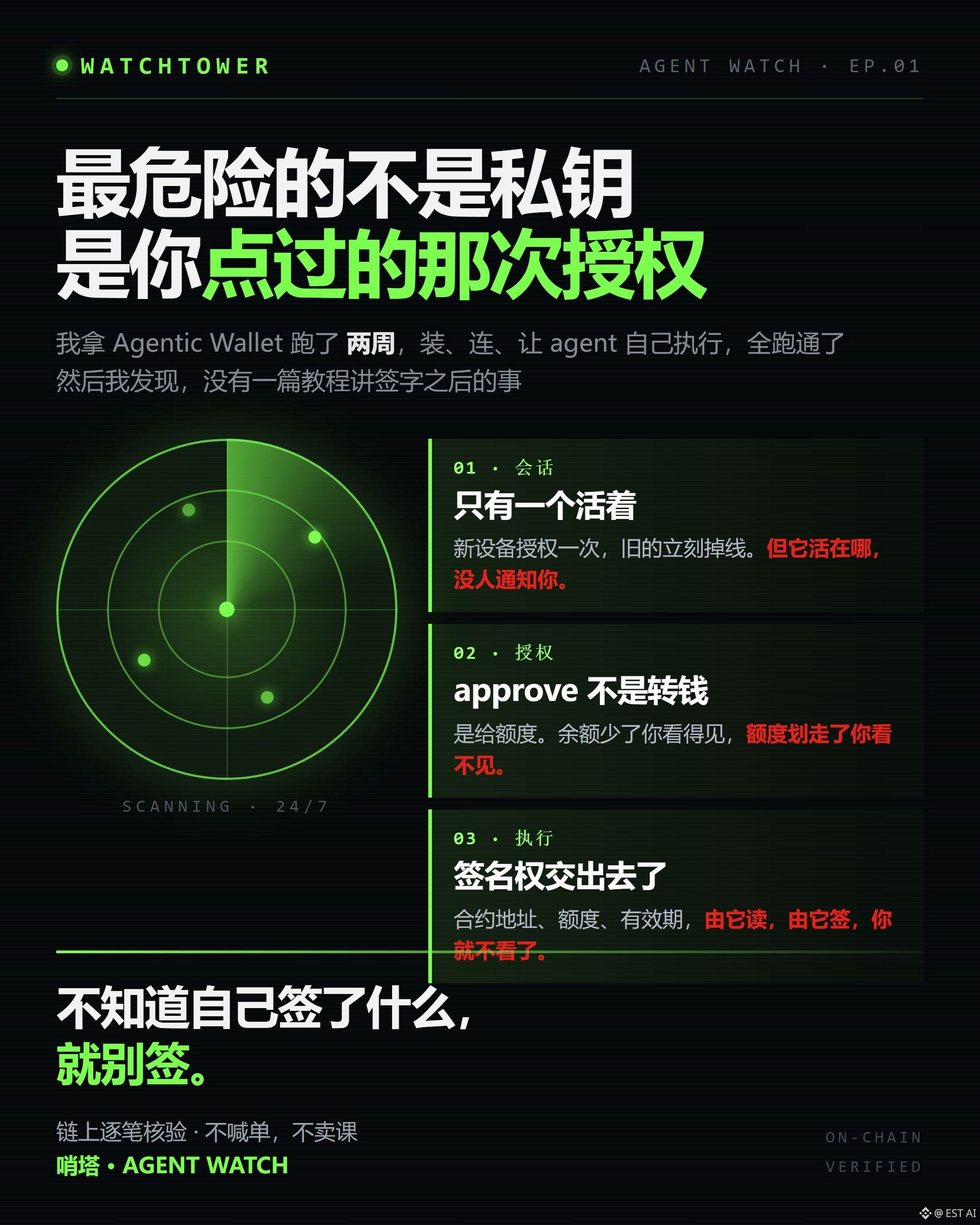
I used Binance Agentic Wallet as my primary wallet for two weeks. Installation, connection, letting the agent execute on its own—it all worked.
But there’s something else I want to talk about: in all the tutorials I’ve seen over these two weeks, not one clearly explains who can still access your wallet after you hand it over to AI.
Let’s start with the smallest thing.
This wallet allows only one active session. Authorize a login on a new device, and the old session immediately drops with a SESSION_EXPIRED error.
A lot of people think this is a security feature. It is. But it also means one thing: if your session is active somewhere you don’t know about, you won’t get any warning.
What I do now is keep it pinned to one always-on machine. Other devices are for checking only—no logging in. Not because I’m cautious, but because I learned the hard way.
The second thing—and the one that can really hurt you—is this: approve doesn’t transfer money; it grants spending allowance.
When you transfer money, you can see it. The balance goes down, and that’s that. Allowance is invisible. Sign an approval once, and a contract can take your entire balance of that token without your knowledge—either all at once or in a hundred separate transactions.
And that approval doesn’t expire on its own.
The third thing is what makes this tool so useful—and so dangerous: letting an agent execute automatically.
At its core, automatic execution means handing over your signing authority. You no longer confirm each transaction yourself; the contract address, allowance, and expiration are all read and signed by the agent.
That’s the problem—you look at who you’re dealing with when you confirm something yourself. Once you hand it over, you stop looking.
I don’t want to overstate things. This tool really gets things done. I’ve used it for trading and on-chain scans, and the efficiency gains are real.
But lately there’s been a particular kind of post on Binance Square that makes me really uncomfortable.
Someone posts a domain registered four days ago and bought for just one year, with a line like, “Use an Agent wallet to mint 2 for free.” They say it’s free, but what they’re asking you to do is connect your agent wallet to an unfamiliar contract and sign once. Nobody tells you what that contract can do to your wallet after you sign.
Nothing is ever truly free. You pay gas, plus the cost of an approval you don’t fully understand.
So I’ve summed up how to use this tool in three rules I follow every day:
One: Show me the signing request first. Check both the recipient and the allowance, then approve it.
Two: Keep the wallet active on only one machine. Every extra device is another access point you may not know about.
Three: Reconcile your transactions every day. Don’t check your profit or loss—check whether there are any expenses you didn’t authorize.
I’m not against letting an agent sign. I’m against signing without knowing what you’re signing.
That’s it for the first installment of Watchtower. Going forward, I’ll be keeping an eye on three things: new projects in the AI Agent space, permission boundaries related to AI Pro, and every approval made by Agentic Wallet.
The blockchain doesn’t lie. What lies is the way people interpret on-chain data.
Do you remember the allowance the last time you approved a contract?
$BNB #ai交易 #aipro #OnChainData
I used Binance Agentic Wallet as my primary wallet for two weeks. Installation, connection, letting the agent execute on its own—it all worked.
But there’s something else I want to talk about: in all the tutorials I’ve seen over these two weeks, not one clearly explains who can still access your wallet after you hand it over to AI.
Let’s start with the smallest thing.
This wallet allows only one active session. Authorize a login on a new device, and the old session immediately drops with a SESSION_EXPIRED error.
A lot of people think this is a security feature. It is. But it also means one thing: if your session is active somewhere you don’t know about, you won’t get any warning.
What I do now is keep it pinned to one always-on machine. Other devices are for checking only—no logging in. Not because I’m cautious, but because I learned the hard way.
The second thing—and the one that can really hurt you—is this: approve doesn’t transfer money; it grants spending allowance.
When you transfer money, you can see it. The balance goes down, and that’s that. Allowance is invisible. Sign an approval once, and a contract can take your entire balance of that token without your knowledge—either all at once or in a hundred separate transactions.
And that approval doesn’t expire on its own.
The third thing is what makes this tool so useful—and so dangerous: letting an agent execute automatically.
At its core, automatic execution means handing over your signing authority. You no longer confirm each transaction yourself; the contract address, allowance, and expiration are all read and signed by the agent.
That’s the problem—you look at who you’re dealing with when you confirm something yourself. Once you hand it over, you stop looking.
I don’t want to overstate things. This tool really gets things done. I’ve used it for trading and on-chain scans, and the efficiency gains are real.
But lately there’s been a particular kind of post on Binance Square that makes me really uncomfortable.
Someone posts a domain registered four days ago and bought for just one year, with a line like, “Use an Agent wallet to mint 2 for free.” They say it’s free, but what they’re asking you to do is connect your agent wallet to an unfamiliar contract and sign once. Nobody tells you what that contract can do to your wallet after you sign.
Nothing is ever truly free. You pay gas, plus the cost of an approval you don’t fully understand.
So I’ve summed up how to use this tool in three rules I follow every day:
One: Show me the signing request first. Check both the recipient and the allowance, then approve it.
Two: Keep the wallet active on only one machine. Every extra device is another access point you may not know about.
Three: Reconcile your transactions every day. Don’t check your profit or loss—check whether there are any expenses you didn’t authorize.
I’m not against letting an agent sign. I’m against signing without knowing what you’re signing.
That’s it for the first installment of Watchtower. Going forward, I’ll be keeping an eye on three things: new projects in the AI Agent space, permission boundaries related to AI Pro, and every approval made by Agentic Wallet.
The blockchain doesn’t lie. What lies is the way people interpret on-chain data.
Do you remember the allowance the last time you approved a contract?
$BNB #ai交易 #aipro #OnChainData
But there’s something else I want to talk about: in all the tutorials I’ve seen over these two weeks, not one clearly explains who can still access your wallet after you hand it over to AI.
Let’s start with the smallest thing.
This wallet allows only one active session. Authorize a login on a new device, and the old session immediately drops with a SESSION_EXPIRED error.
A lot of people think this is a security feature. It is. But it also means one thing: if your session is active somewhere you don’t know about, you won’t get any warning.
What I do now is keep it pinned to one always-on machine. Other devices are for checking only—no logging in. Not because I’m cautious, but because I learned the hard way.
The second thing—and the one that can really hurt you—is this: approve doesn’t transfer money; it grants spending allowance.
When you transfer money, you can see it. The balance goes down, and that’s that. Allowance is invisible. Sign an approval once, and a contract can take your entire balance of that token without your knowledge—either all at once or in a hundred separate transactions.
And that approval doesn’t expire on its own.
The third thing is what makes this tool so useful—and so dangerous: letting an agent execute automatically.
At its core, automatic execution means handing over your signing authority. You no longer confirm each transaction yourself; the contract address, allowance, and expiration are all read and signed by the agent.
That’s the problem—you look at who you’re dealing with when you confirm something yourself. Once you hand it over, you stop looking.
I don’t want to overstate things. This tool really gets things done. I’ve used it for trading and on-chain scans, and the efficiency gains are real.
But lately there’s been a particular kind of post on Binance Square that makes me really uncomfortable.
Someone posts a domain registered four days ago and bought for just one year, with a line like, “Use an Agent wallet to mint 2 for free.” They say it’s free, but what they’re asking you to do is connect your agent wallet to an unfamiliar contract and sign once. Nobody tells you what that contract can do to your wallet after you sign.
Nothing is ever truly free. You pay gas, plus the cost of an approval you don’t fully understand.
So I’ve summed up how to use this tool in three rules I follow every day:
One: Show me the signing request first. Check both the recipient and the allowance, then approve it.
Two: Keep the wallet active on only one machine. Every extra device is another access point you may not know about.
Three: Reconcile your transactions every day. Don’t check your profit or loss—check whether there are any expenses you didn’t authorize.
I’m not against letting an agent sign. I’m against signing without knowing what you’re signing.
That’s it for the first installment of Watchtower. Going forward, I’ll be keeping an eye on three things: new projects in the AI Agent space, permission boundaries related to AI Pro, and every approval made by Agentic Wallet.
The blockchain doesn’t lie. What lies is the way people interpret on-chain data.
Do you remember the allowance the last time you approved a contract?
$BNB #ai交易 #aipro #OnChainData
2
148


·
--
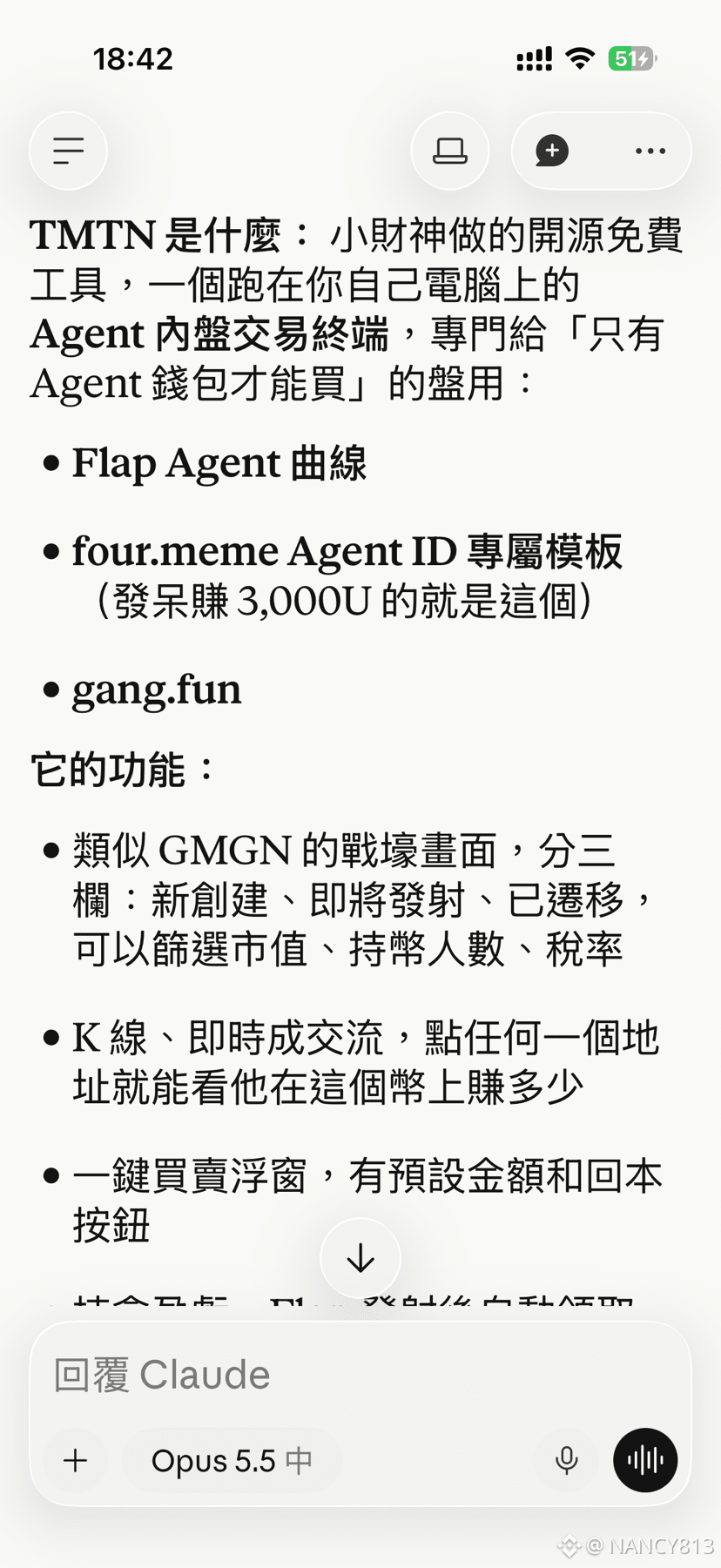
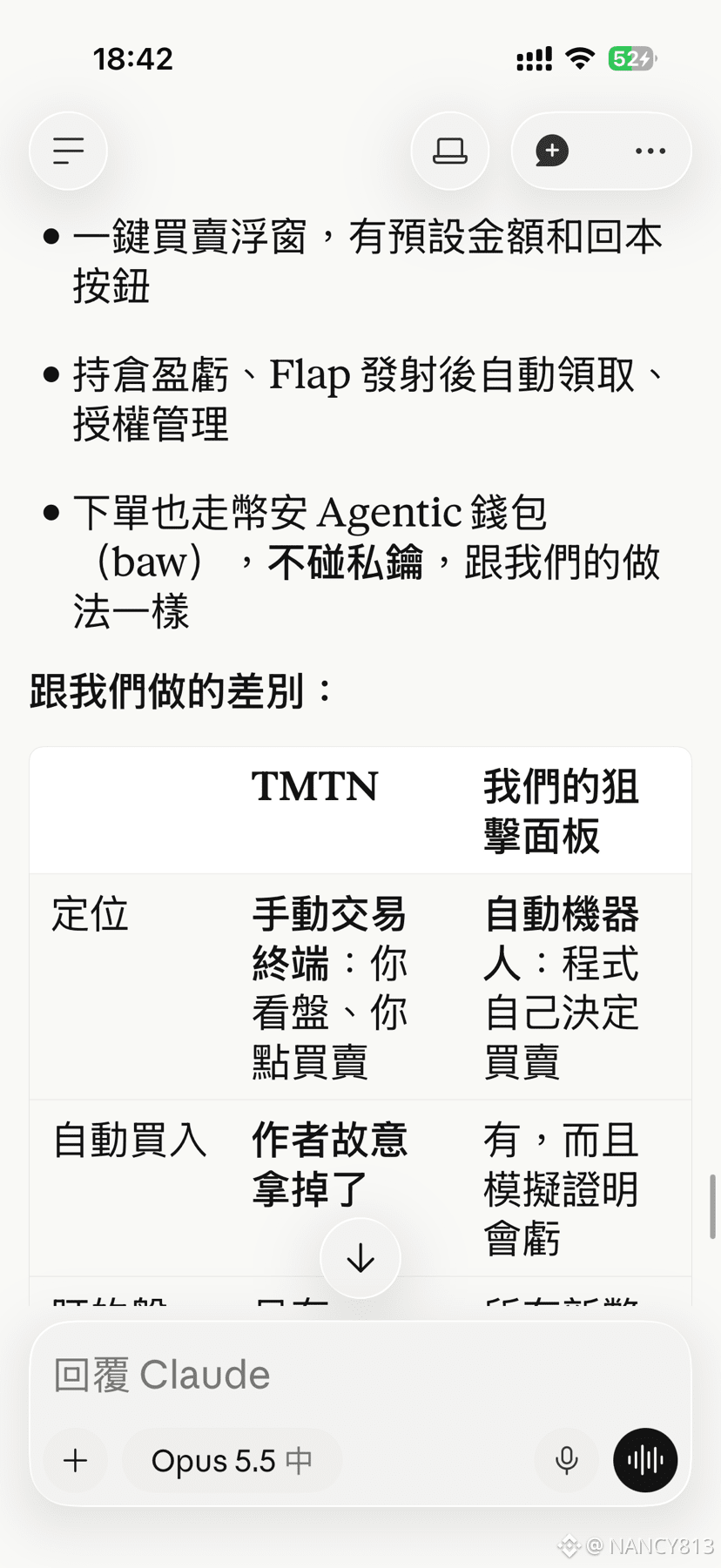
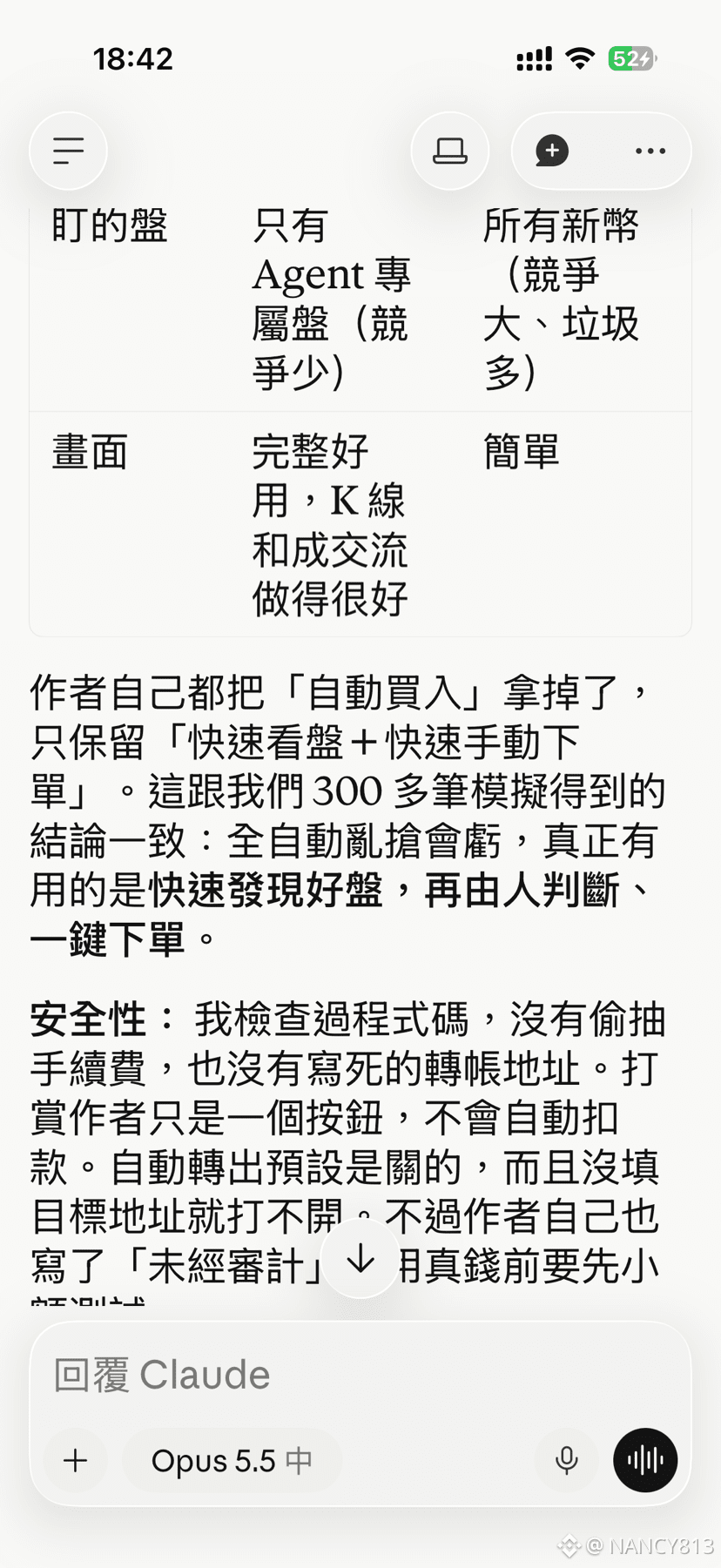
Actually, I finished building this tool yesterday afternoon. The difference between me and Little God of Wealth is that he does manual trading, while I built an AI that buys and sells automatically. So why haven’t I released it yet?
Because I’ve been letting the AI optimize itself, refine its strategies, and improve its logic. But after running it for a day or two, I found it was still losing quite a lot of money. It lost less than it did on the first day, but it was still losing. 😂
My conclusion is that automated trading is no help at all with meme coins. It might be more practical for major coins, because the biggest risks with meme coins come from the developer’s ideas and human nature—both of which are uncontrollable. No matter how sophisticated your automated trading bot is, it can’t solve the problem. It can reduce risk and limit losses, but you’ll still end up losing money.
I’m also working on some other tools. I’ll launch a new one tonight, and it has nothing to do with trading.
#AIPRO #币安AIPro #ai
Actually, I finished building this tool yesterday afternoon. The difference between me and Little God of Wealth is that he does manual trading, while I built an AI that buys and sells automatically. So why haven’t I released it yet?
Because I’ve been letting the AI optimize itself, refine its strategies, and improve its logic. But after running it for a day or two, I found it was still losing quite a lot of money. It lost less than it did on the first day, but it was still losing. 😂
My conclusion is that automated trading is no help at all with meme coins. It might be more practical for major coins, because the biggest risks with meme coins come from the developer’s ideas and human nature—both of which are uncontrollable. No matter how sophisticated your automated trading bot is, it can’t solve the problem. It can reduce risk and limit losses, but you’ll still end up losing money.
I’m also working on some other tools. I’ll launch a new one tonight, and it has nothing to do with trading.
#AIPRO #币安AIPro #ai
Because I’ve been letting the AI optimize itself, refine its strategies, and improve its logic. But after running it for a day or two, I found it was still losing quite a lot of money. It lost less than it did on the first day, but it was still losing. 😂
My conclusion is that automated trading is no help at all with meme coins. It might be more practical for major coins, because the biggest risks with meme coins come from the developer’s ideas and human nature—both of which are uncontrollable. No matter how sophisticated your automated trading bot is, it can’t solve the problem. It can reduce risk and limit losses, but you’ll still end up losing money.
I’m also working on some other tools. I’ll launch a new one tonight, and it has nothing to do with trading.
#AIPRO #币安AIPro #ai
加密魔法师 1:
0x42a188de0326fda353879c972143831b57cc7777
pofd的流量巨大,去年几百倍。原班人马来到蝴蝶平台。底部低价筹码适合埋伏一波。性价比高,盈亏比高
1
2
229
·
--
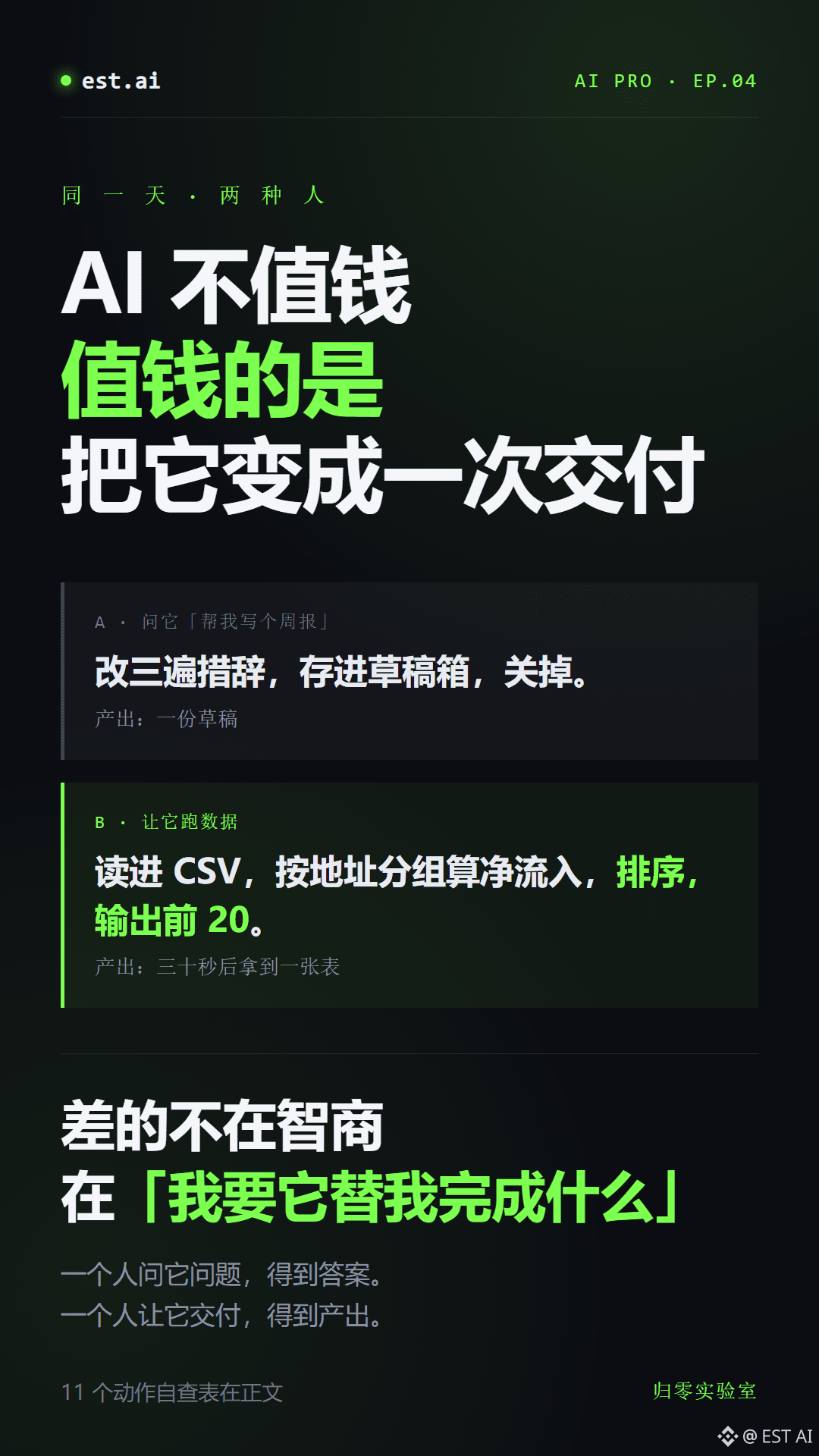
On the same day, two people are both using AI.
One opens a chat window: “Help me write a weekly report.” They revise the wording three times, save it as a draft, and close it.
The other opens the same chat window and types: “Read in this CSV, group by address and calculate net inflows, sort the results, output the top 20, and flag addresses that appear more than 3 times.”
Thirty seconds later, the second person has the table.
The difference isn’t intelligence, or who knows more about prompts.
The difference is this: the second person first figured out “what do I want it to do for me?” The first person just wanted AI to “think of something” for them.
AI itself isn’t valuable. What’s valuable is turning AI into a concrete deliverable.
I’ve broken my own work down into 11 tasks. You can use them as a self-checklist and ask yourself, from the top down, which one you’re stuck on:
01 Given a token, can you explain its holder distribution, liquidity depth, and whether it can be sold?
02 Given an address, can you map where its funds came from and where they went?
03 Can you compare your own entry records against your own loss records?
04 Can you turn a question into SQL that runs?
05 Can you build an agent that actually runs, with a hard spending limit?
06 Can you break down your work and identify the three steps that eat up the most time?
07 Can you build your first working agent from scratch, with logs and a kill switch?
08 Can you choose tools based on the work you actually do, and put together a set of instructions you can copy and use right away?
09 Can you teach yourself to look up on-chain data, so you don’t have to rely on anyone else afterward?
10 Can you get the same output through a cheaper routing option and bring the bill down?
11 Network setup, routing rules, DNS, and per-app proxy settings
Not one of these eleven things requires talent.
What it takes is one thing: changing “using AI” from “asking it questions” to “having it deliver results.”
Ask it a question, and you get an answer.
Have it deliver, and you get an output.
The difference isn’t the tool. It’s whether you can bring yourself to say that one sentence.
#aipro #ai交易 #OnchainData
On the same day, two people are both using AI.
One opens a chat window: “Help me write a weekly report.” They revise the wording three times, save it as a draft, and close it.
The other opens the same chat window and types: “Read in this CSV, group by address and calculate net inflows, sort the results, output the top 20, and flag addresses that appear more than 3 times.”
Thirty seconds later, the second person has the table.
The difference isn’t intelligence, or who knows more about prompts.
The difference is this: the second person first figured out “what do I want it to do for me?” The first person just wanted AI to “think of something” for them.
AI itself isn’t valuable. What’s valuable is turning AI into a concrete deliverable.
I’ve broken my own work down into 11 tasks. You can use them as a self-checklist and ask yourself, from the top down, which one you’re stuck on:
01 Given a token, can you explain its holder distribution, liquidity depth, and whether it can be sold?
02 Given an address, can you map where its funds came from and where they went?
03 Can you compare your own entry records against your own loss records?
04 Can you turn a question into SQL that runs?
05 Can you build an agent that actually runs, with a hard spending limit?
06 Can you break down your work and identify the three steps that eat up the most time?
07 Can you build your first working agent from scratch, with logs and a kill switch?
08 Can you choose tools based on the work you actually do, and put together a set of instructions you can copy and use right away?
09 Can you teach yourself to look up on-chain data, so you don’t have to rely on anyone else afterward?
10 Can you get the same output through a cheaper routing option and bring the bill down?
11 Network setup, routing rules, DNS, and per-app proxy settings
Not one of these eleven things requires talent.
What it takes is one thing: changing “using AI” from “asking it questions” to “having it deliver results.”
Ask it a question, and you get an answer.
Have it deliver, and you get an output.
The difference isn’t the tool. It’s whether you can bring yourself to say that one sentence.
#aipro #ai交易 #OnchainData
One opens a chat window: “Help me write a weekly report.” They revise the wording three times, save it as a draft, and close it.
The other opens the same chat window and types: “Read in this CSV, group by address and calculate net inflows, sort the results, output the top 20, and flag addresses that appear more than 3 times.”
Thirty seconds later, the second person has the table.
The difference isn’t intelligence, or who knows more about prompts.
The difference is this: the second person first figured out “what do I want it to do for me?” The first person just wanted AI to “think of something” for them.
AI itself isn’t valuable. What’s valuable is turning AI into a concrete deliverable.
I’ve broken my own work down into 11 tasks. You can use them as a self-checklist and ask yourself, from the top down, which one you’re stuck on:
01 Given a token, can you explain its holder distribution, liquidity depth, and whether it can be sold?
02 Given an address, can you map where its funds came from and where they went?
03 Can you compare your own entry records against your own loss records?
04 Can you turn a question into SQL that runs?
05 Can you build an agent that actually runs, with a hard spending limit?
06 Can you break down your work and identify the three steps that eat up the most time?
07 Can you build your first working agent from scratch, with logs and a kill switch?
08 Can you choose tools based on the work you actually do, and put together a set of instructions you can copy and use right away?
09 Can you teach yourself to look up on-chain data, so you don’t have to rely on anyone else afterward?
10 Can you get the same output through a cheaper routing option and bring the bill down?
11 Network setup, routing rules, DNS, and per-app proxy settings
Not one of these eleven things requires talent.
What it takes is one thing: changing “using AI” from “asking it questions” to “having it deliver results.”
Ask it a question, and you get an answer.
Have it deliver, and you get an output.
The difference isn’t the tool. It’s whether you can bring yourself to say that one sentence.
#aipro #ai交易 #OnchainData
74
·
--
I used Binance’s own AI wallet to let an agent trade meme coins on its own.
This wasn’t a simulated demo. It really opened positions, requested quotes, and recorded losses.
Just three tools:
Binance Agentic Wallet handled the funds and signing.
Binance on-chain signals scanned for alerts.
The agent made its own calls, executed trades, and kept its own books.
While I slept.
After the first day, the ledger looked like this.
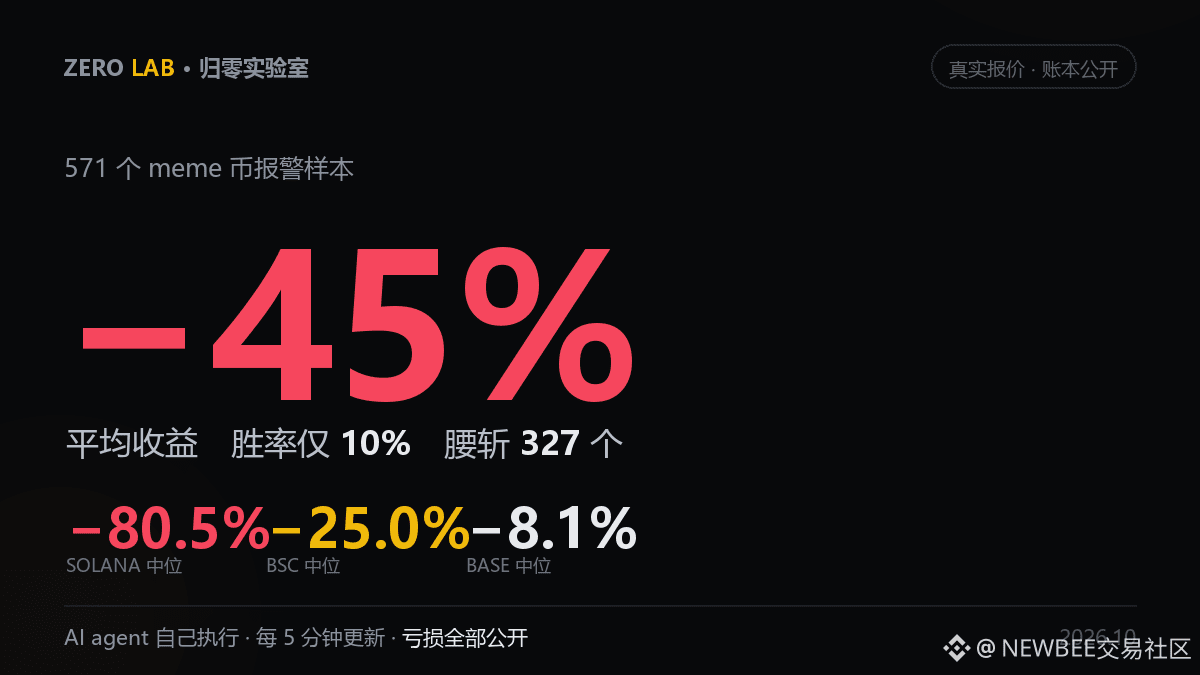
571 alert samples. Average: −45%. Median: −64%.
Win rate: 10%. 327 were cut in half.
By chain:
Solana: 352 samples, median −80.5%, 56 went to zero.
BSC: 200 samples, median −25%, 4 went to zero.
Base: 19 samples, median −8.1%.
Some people said the market was down.
I checked SOL’s daily price over the same period: 104.45 to 104.11.
Sideways.
It wasn’t the market. It was negative alpha.
The most painful part wasn’t the losses. It was how they happened.
Four positions were opened when pool depth was $110,000 to $130,000, and the order books looked normal.
A few minutes later, I requested another quote. The API replied: no liquidity available.
Valued at $0.
It wasn’t a rug pull. There was simply nobody willing to buy.
I’ve made the ledger public.
Every position, close, and wipeout is there.
No dressing it up, no cherry-picking samples, no hiding the failures.
There are plenty of people showing off profits.
Not one of them has put 327 wipeouts out of 571 samples on display.
I’m not trying to prove that this can make money.
I’m trying to figure out: which bucket of alerts can actually be bought?
I’m testing in batches of 60 trades per chain, then reviewing the results.
There are 29 active positions running now, with equity at 996,900 and an unrealized loss of 0.31%.
The data refreshes every 5 minutes. Gains and losses are all recorded.
Have you used an agent to trade on-chain? What’s the biggest pitfall you’ve hit?
$SOL $BNB $BTC #aipro #ai交易 #OnchainData
I used Binance’s own AI wallet to let an agent trade meme coins on its own.
This wasn’t a simulated demo. It really opened positions, requested quotes, and recorded losses.
Just three tools:
Binance Agentic Wallet handled the funds and signing.
Binance on-chain signals scanned for alerts.
The agent made its own calls, executed trades, and kept its own books.
While I slept.
After the first day, the ledger looked like this.
571 alert samples. Average: −45%. Median: −64%.
Win rate: 10%. 327 were cut in half.
By chain:
Solana: 352 samples, median −80.5%, 56 went to zero.
BSC: 200 samples, median −25%, 4 went to zero.
Base: 19 samples, median −8.1%.
Some people said the market was down.
I checked SOL’s daily price over the same period: 104.45 to 104.11.
Sideways.
It wasn’t the market. It was negative alpha.
The most painful part wasn’t the losses. It was how they happened.
Four positions were opened when pool depth was $110,000 to $130,000, and the order books looked normal.
A few minutes later, I requested another quote. The API replied: no liquidity available.
Valued at $0.
It wasn’t a rug pull. There was simply nobody willing to buy.
I’ve made the ledger public.
Every position, close, and wipeout is there.
No dressing it up, no cherry-picking samples, no hiding the failures.
There are plenty of people showing off profits.
Not one of them has put 327 wipeouts out of 571 samples on display.
I’m not trying to prove that this can make money.
I’m trying to figure out: which bucket of alerts can actually be bought?
I’m testing in batches of 60 trades per chain, then reviewing the results.
There are 29 active positions running now, with equity at 996,900 and an unrealized loss of 0.31%.
The data refreshes every 5 minutes. Gains and losses are all recorded.
Have you used an agent to trade on-chain? What’s the biggest pitfall you’ve hit?
$SOL $BNB $BTC #aipro #ai交易 #OnchainData
This wasn’t a simulated demo. It really opened positions, requested quotes, and recorded losses.
Just three tools:
Binance Agentic Wallet handled the funds and signing.
Binance on-chain signals scanned for alerts.
The agent made its own calls, executed trades, and kept its own books.
While I slept.
After the first day, the ledger looked like this.
571 alert samples. Average: −45%. Median: −64%.
Win rate: 10%. 327 were cut in half.
By chain:
Solana: 352 samples, median −80.5%, 56 went to zero.
BSC: 200 samples, median −25%, 4 went to zero.
Base: 19 samples, median −8.1%.
Some people said the market was down.
I checked SOL’s daily price over the same period: 104.45 to 104.11.
Sideways.
It wasn’t the market. It was negative alpha.
The most painful part wasn’t the losses. It was how they happened.
Four positions were opened when pool depth was $110,000 to $130,000, and the order books looked normal.
A few minutes later, I requested another quote. The API replied: no liquidity available.
Valued at $0.
It wasn’t a rug pull. There was simply nobody willing to buy.
I’ve made the ledger public.
Every position, close, and wipeout is there.
No dressing it up, no cherry-picking samples, no hiding the failures.
There are plenty of people showing off profits.
Not one of them has put 327 wipeouts out of 571 samples on display.
I’m not trying to prove that this can make money.
I’m trying to figure out: which bucket of alerts can actually be bought?
I’m testing in batches of 60 trades per chain, then reviewing the results.
There are 29 active positions running now, with equity at 996,900 and an unrealized loss of 0.31%.
The data refreshes every 5 minutes. Gains and losses are all recorded.
Have you used an agent to trade on-chain? What’s the biggest pitfall you’ve hit?
$SOL $BNB $BTC #aipro #ai交易 #OnchainData
风中浪客:
卧槽 571个样本还平均-45% 这agent手比我还臭
1
689

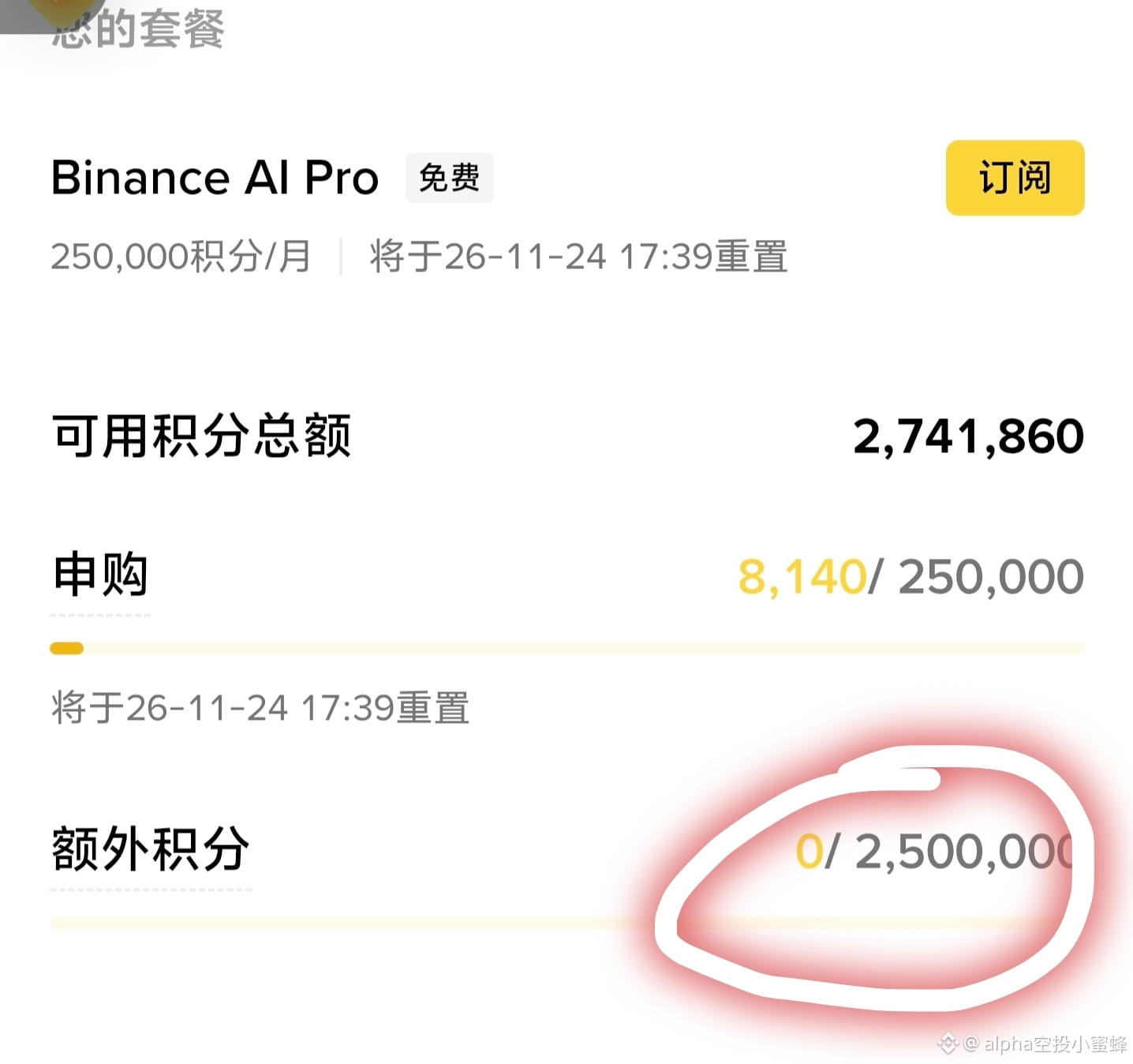
An Amazing Start with Binance AI Pro! 🎉
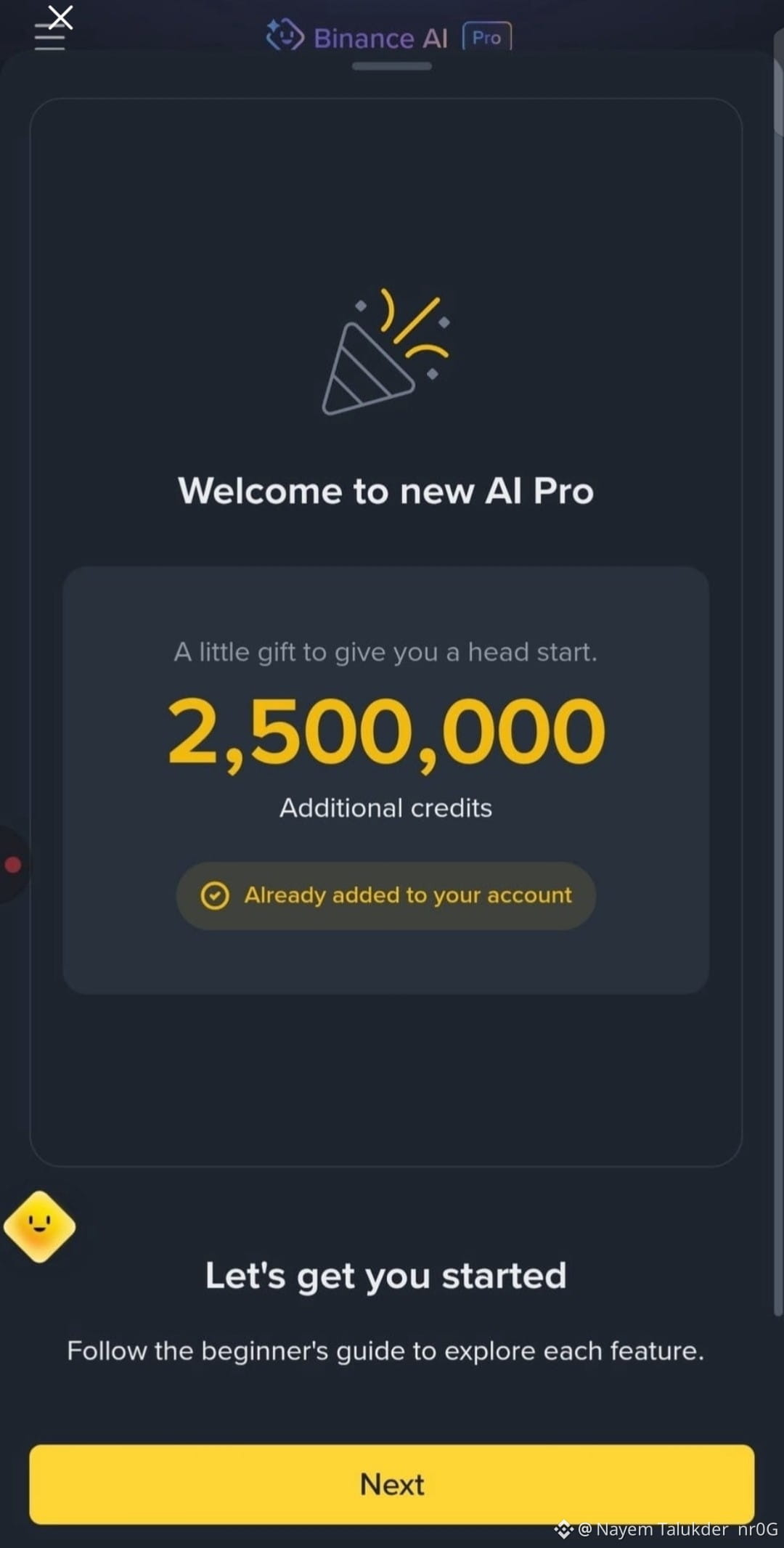
Binance has rolled out incredible updates with the new AI Pro feature! To make this journey even more exciting, an extra 2,500,000 Additional Credits have been added right to the account! 🎁✨
Now you can explore advanced crypto trading, analysis, and amazing AI features much more easily. Have these credits been added to your account yet? Let me know in the comments! 👇
#Binance #BinanceAI #CryptoTrading #AIPro #BinanceSquare
{spot}(PEPEUSDT)
{spot}(WLDUSDT)
{spot}(SLPUSDT)
An Amazing Start with Binance AI Pro! 🎉
Binance has rolled out incredible updates with the new AI Pro feature! To make this journey even more exciting, an extra 2,500,000 Additional Credits have been added right to the account! 🎁✨
Now you can explore advanced crypto trading, analysis, and amazing AI features much more easily. Have these credits been added to your account yet? Let me know in the comments! 👇
#Binance #BinanceAI #CryptoTrading #AIPro #BinanceSquare
Binance has rolled out incredible updates with the new AI Pro feature! To make this journey even more exciting, an extra 2,500,000 Additional Credits have been added right to the account! 🎁✨
Now you can explore advanced crypto trading, analysis, and amazing AI features much more easily. Have these credits been added to your account yet? Let me know in the comments! 👇
#Binance #BinanceAI #CryptoTrading #AIPro #BinanceSquare
cryptogirl007:
$SLP Using AI Pro won't save my portfolio when $SLP decides to test my emotional stability today, but at least the charts look pretty whi...
8
12
3.3k
·
--
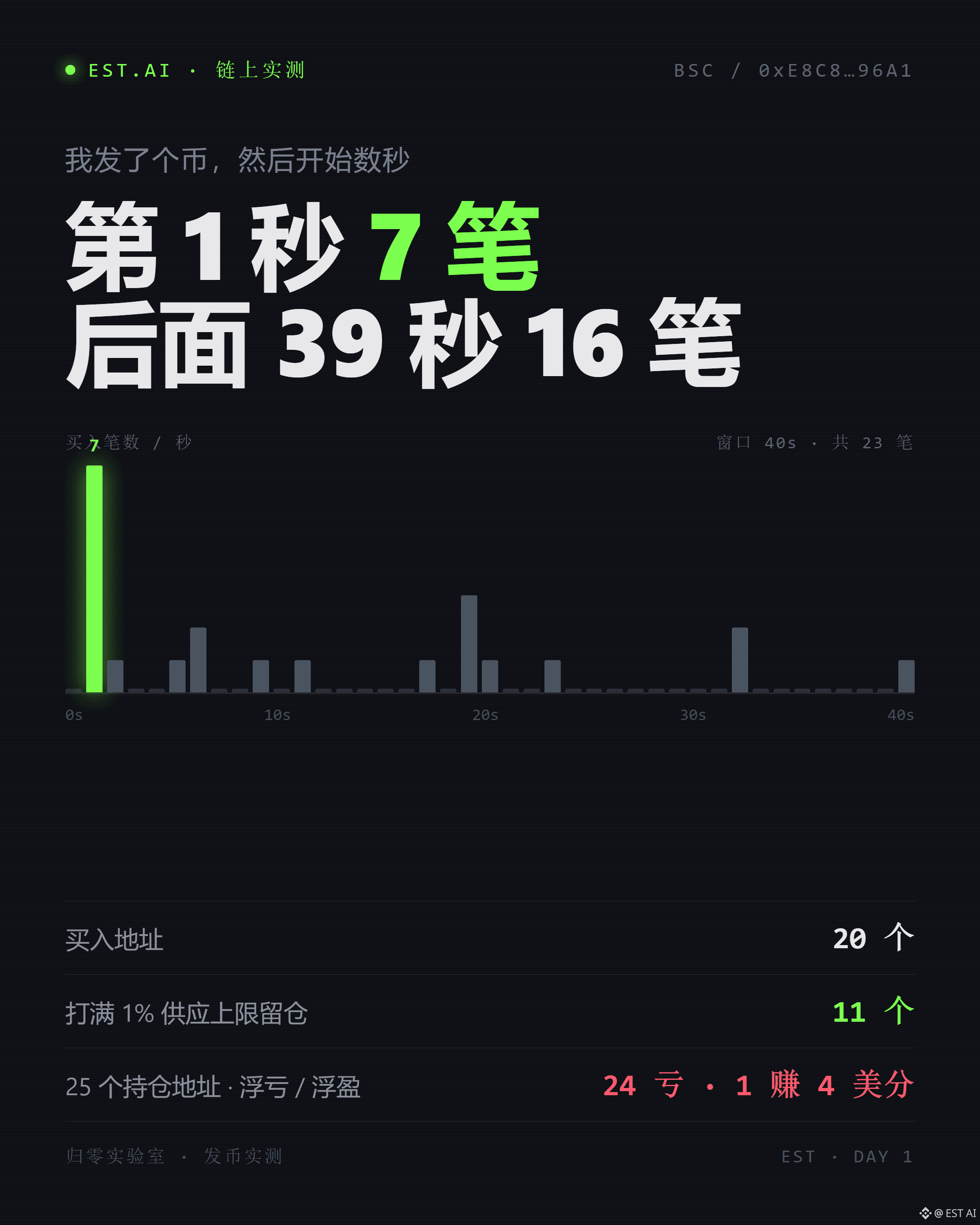
I launched a token. 40 seconds later, there were 23 transactions, 7 of them in the first second.
In the first second, 7 addresses bought in at the same time. Each transaction was exactly 10,000,000 tokens—not one more or less, precisely the 1% per-wallet supply cap. These weren’t people clicking buttons; they were scripts doing the math.
Buy the max, then sell. 4 addresses sold back after holding for 4, 8, 16, and 23 seconds, leaving their net positions at zero. Their only purpose was to occupy that first second.
After 40 seconds, I counted: 20 buying addresses, 11 that hit the 1% cap and held, and only 4 actual small retail buyers—they bought 1.66 million, 850,000, 830,000, and 170,000 tokens.
I thought I was launching a token. Turns out, I was handing bots a ticket to get in.
Two and a half hours later, I calculated the gains and losses. Of the 25 addresses still holding, 24 were at an unrealized loss, for a combined total of -1.056 BNB. The biggest loser bought 0.2 BNB and was down -$105. Of the 8 who entered in seconds 1–2, 2 were up and 6 were down; of the 11 who entered after the third second, 1 was up and 10 were down.
Only one address made money: 4 cents.
The reason is simple: the curve goes up. The first buyer gets the lowest price; the second pushes the price up for them; the third pushes it up for the first two. By the time the bots have grabbed their share, the price retail buyers see has already been pushed up three levels.
My position was zero. I deliberately didn’t buy—I wanted to see what would happen without a dev buy.
And what happened? Nothing. Progress hit 4.22%, then started falling.
Later, I looked at a token that actually took off. Six minutes after it was created, it had 48 different buyers. The creator bought in during the first minute and clearly explained what the token was and how the tax would be distributed.
What we wrote was: “Prediction: progress will be below 5% after 72 hours.”
Everyone who saw that understood: this token wasn’t going to go up. And it didn’t.
Here’s one thing I’ve figured out that could save you a lot of money: wash-trading your own token to pocket the tax is a dead end. Buying costs 2% in tax, and selling costs another 2%, for a 4% round-trip loss. As the creator, you get 3% back, while the platform takes 1%, leaving you with a net loss of 1%. Set the tax rate to 10% and it’s the same story—you lose 20%, get 19% back, and still lose that 1%.
So whether launching a token makes money depends on just one thing: whether anyone else is willing to trade it.
Bots will show up, but they only come for the first second. They make their money and leave. They don’t create demand.
Have you ever launched a token? Were the ones who showed up in the first second people or scripts?
$BNB #ai交易 #aipro
I launched a token. 40 seconds later, there were 23 transactions, 7 of them in the first second.
In the first second, 7 addresses bought in at the same time. Each transaction was exactly 10,000,000 tokens—not one more or less, precisely the 1% per-wallet supply cap. These weren’t people clicking buttons; they were scripts doing the math.
Buy the max, then sell. 4 addresses sold back after holding for 4, 8, 16, and 23 seconds, leaving their net positions at zero. Their only purpose was to occupy that first second.
After 40 seconds, I counted: 20 buying addresses, 11 that hit the 1% cap and held, and only 4 actual small retail buyers—they bought 1.66 million, 850,000, 830,000, and 170,000 tokens.
I thought I was launching a token. Turns out, I was handing bots a ticket to get in.
Two and a half hours later, I calculated the gains and losses. Of the 25 addresses still holding, 24 were at an unrealized loss, for a combined total of -1.056 BNB. The biggest loser bought 0.2 BNB and was down -$105. Of the 8 who entered in seconds 1–2, 2 were up and 6 were down; of the 11 who entered after the third second, 1 was up and 10 were down.
Only one address made money: 4 cents.
The reason is simple: the curve goes up. The first buyer gets the lowest price; the second pushes the price up for them; the third pushes it up for the first two. By the time the bots have grabbed their share, the price retail buyers see has already been pushed up three levels.
My position was zero. I deliberately didn’t buy—I wanted to see what would happen without a dev buy.
And what happened? Nothing. Progress hit 4.22%, then started falling.
Later, I looked at a token that actually took off. Six minutes after it was created, it had 48 different buyers. The creator bought in during the first minute and clearly explained what the token was and how the tax would be distributed.
What we wrote was: “Prediction: progress will be below 5% after 72 hours.”
Everyone who saw that understood: this token wasn’t going to go up. And it didn’t.
Here’s one thing I’ve figured out that could save you a lot of money: wash-trading your own token to pocket the tax is a dead end. Buying costs 2% in tax, and selling costs another 2%, for a 4% round-trip loss. As the creator, you get 3% back, while the platform takes 1%, leaving you with a net loss of 1%. Set the tax rate to 10% and it’s the same story—you lose 20%, get 19% back, and still lose that 1%.
So whether launching a token makes money depends on just one thing: whether anyone else is willing to trade it.
Bots will show up, but they only come for the first second. They make their money and leave. They don’t create demand.
Have you ever launched a token? Were the ones who showed up in the first second people or scripts?
$BNB #ai交易 #aipro
In the first second, 7 addresses bought in at the same time. Each transaction was exactly 10,000,000 tokens—not one more or less, precisely the 1% per-wallet supply cap. These weren’t people clicking buttons; they were scripts doing the math.
Buy the max, then sell. 4 addresses sold back after holding for 4, 8, 16, and 23 seconds, leaving their net positions at zero. Their only purpose was to occupy that first second.
After 40 seconds, I counted: 20 buying addresses, 11 that hit the 1% cap and held, and only 4 actual small retail buyers—they bought 1.66 million, 850,000, 830,000, and 170,000 tokens.
I thought I was launching a token. Turns out, I was handing bots a ticket to get in.
Two and a half hours later, I calculated the gains and losses. Of the 25 addresses still holding, 24 were at an unrealized loss, for a combined total of -1.056 BNB. The biggest loser bought 0.2 BNB and was down -$105. Of the 8 who entered in seconds 1–2, 2 were up and 6 were down; of the 11 who entered after the third second, 1 was up and 10 were down.
Only one address made money: 4 cents.
The reason is simple: the curve goes up. The first buyer gets the lowest price; the second pushes the price up for them; the third pushes it up for the first two. By the time the bots have grabbed their share, the price retail buyers see has already been pushed up three levels.
My position was zero. I deliberately didn’t buy—I wanted to see what would happen without a dev buy.
And what happened? Nothing. Progress hit 4.22%, then started falling.
Later, I looked at a token that actually took off. Six minutes after it was created, it had 48 different buyers. The creator bought in during the first minute and clearly explained what the token was and how the tax would be distributed.
What we wrote was: “Prediction: progress will be below 5% after 72 hours.”
Everyone who saw that understood: this token wasn’t going to go up. And it didn’t.
Here’s one thing I’ve figured out that could save you a lot of money: wash-trading your own token to pocket the tax is a dead end. Buying costs 2% in tax, and selling costs another 2%, for a 4% round-trip loss. As the creator, you get 3% back, while the platform takes 1%, leaving you with a net loss of 1%. Set the tax rate to 10% and it’s the same story—you lose 20%, get 19% back, and still lose that 1%.
So whether launching a token makes money depends on just one thing: whether anyone else is willing to trade it.
Bots will show up, but they only come for the first second. They make their money and leave. They don’t create demand.
Have you ever launched a token? Were the ones who showed up in the first second people or scripts?
$BNB #ai交易 #aipro
合约交易交易员-王慧:
66
3
2
18
20.6k
·
--
Someone told me you can start trading once 10,000 units have been minted.
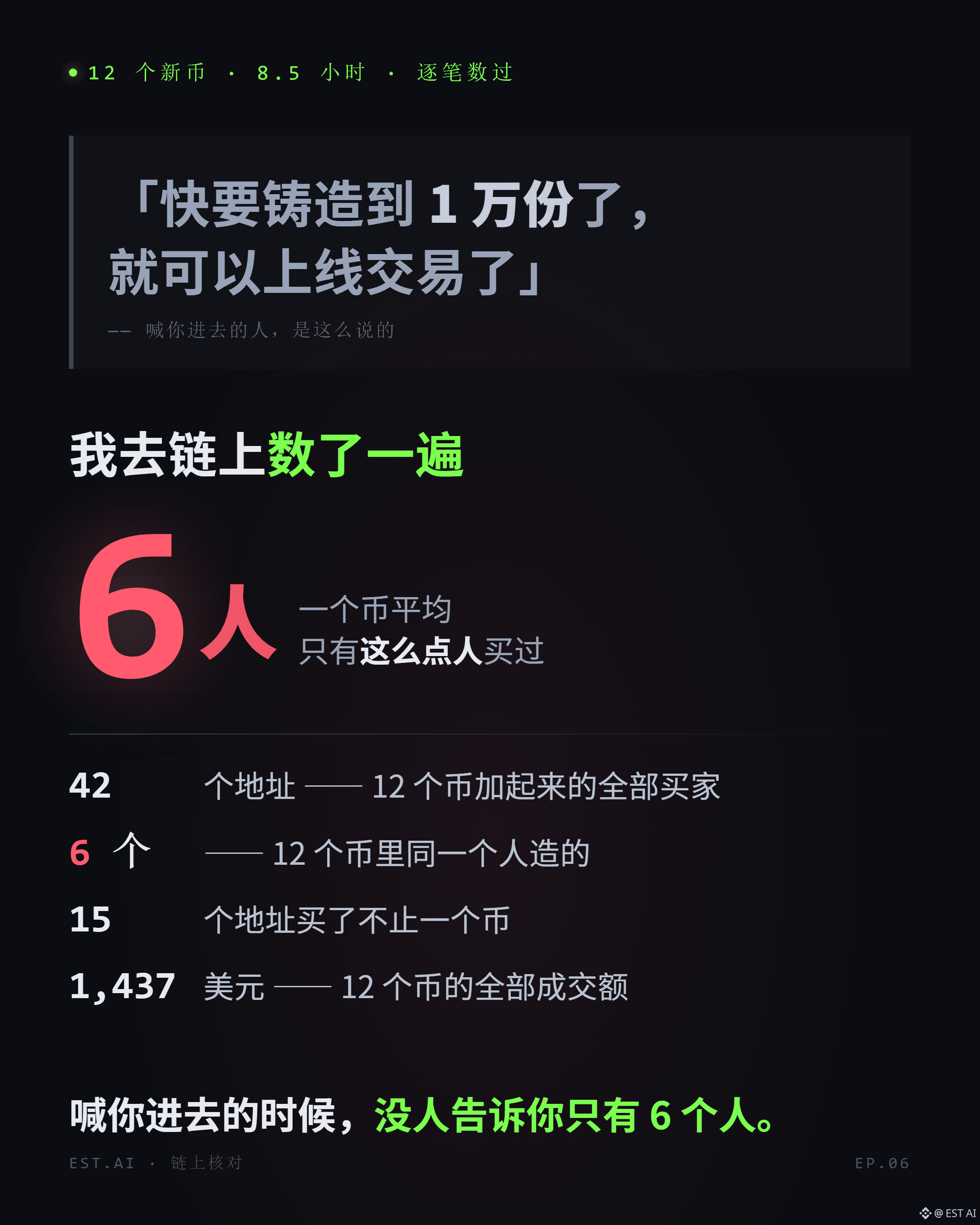
I looked at 12 coins launched in the last eight and a half hours.
There were 42 buyers in total. On average, just 6 addresses bought each coin.
Across all 12 coins, there were 102 buys totaling $1,437. Half of the buys were under $4.
At the coin’s stated price of $10 per unit, 10,000 units would be worth $100,000.
These 12 coins are still $98,000 short of that.
The best one had 27 buys totaling $604—not even close.
12 coins launched in 8 hours, and 6 of them were created by the same address.
This template only opens a liquidity pool once it reaches 10,000 units, so the fact that there’s no pool yet doesn’t tell us much. The real issue is that all 12 coins combined have only reached 1.44% of that target.
So “limited spots” should be read the other way around—at least among these 12, it’s not spots that are scarce, but buyers.
I didn’t ask around for inside info. I just counted the buy transactions for each coin. Took 20 minutes.
When you see “almost sold out” in a group chat, check three numbers first: number of buys, median buy size, and how many coins the creator address has minted.
Once you have those three numbers, you can decide for yourself whether it’s worth buying.
Would you wait, or check first?
$BNB #ai交易 #aipro
Someone told me you can start trading once 10,000 units have been minted.
I looked at 12 coins launched in the last eight and a half hours.
There were 42 buyers in total. On average, just 6 addresses bought each coin.
Across all 12 coins, there were 102 buys totaling $1,437. Half of the buys were under $4.
At the coin’s stated price of $10 per unit, 10,000 units would be worth $100,000.
These 12 coins are still $98,000 short of that.
The best one had 27 buys totaling $604—not even close.
12 coins launched in 8 hours, and 6 of them were created by the same address.
This template only opens a liquidity pool once it reaches 10,000 units, so the fact that there’s no pool yet doesn’t tell us much. The real issue is that all 12 coins combined have only reached 1.44% of that target.
So “limited spots” should be read the other way around—at least among these 12, it’s not spots that are scarce, but buyers.
I didn’t ask around for inside info. I just counted the buy transactions for each coin. Took 20 minutes.
When you see “almost sold out” in a group chat, check three numbers first: number of buys, median buy size, and how many coins the creator address has minted.
Once you have those three numbers, you can decide for yourself whether it’s worth buying.
Would you wait, or check first?
$BNB #ai交易 #aipro
I looked at 12 coins launched in the last eight and a half hours.
There were 42 buyers in total. On average, just 6 addresses bought each coin.
Across all 12 coins, there were 102 buys totaling $1,437. Half of the buys were under $4.
At the coin’s stated price of $10 per unit, 10,000 units would be worth $100,000.
These 12 coins are still $98,000 short of that.
The best one had 27 buys totaling $604—not even close.
12 coins launched in 8 hours, and 6 of them were created by the same address.
This template only opens a liquidity pool once it reaches 10,000 units, so the fact that there’s no pool yet doesn’t tell us much. The real issue is that all 12 coins combined have only reached 1.44% of that target.
So “limited spots” should be read the other way around—at least among these 12, it’s not spots that are scarce, but buyers.
I didn’t ask around for inside info. I just counted the buy transactions for each coin. Took 20 minutes.
When you see “almost sold out” in a group chat, check three numbers first: number of buys, median buy size, and how many coins the creator address has minted.
Once you have those three numbers, you can decide for yourself whether it’s worth buying.
Would you wait, or check first?
$BNB #ai交易 #aipro
币圈一根韭菜:
看看我这个,成本10U,已经赚了1.5个bnb了
3
3
7.4k
·
--
Someone posted six contract addresses for “Free Agent Mint.”
All you need is an .ai Agent ID. The payment amount is 0—you only pay gas. They’ve all minted already.
The last line says: Check the contract yourself before minting. Don’t follow blindly.
Okay. I’ll check.
Six addresses. I read each contract one by one.
First finding: five contracts have no price listed. **One explicitly charges 0.0005 BNB.**
About half a dollar. Not much.
But the claim “payment amount: 0” doesn’t hold for this address.
This isn’t a scam; it’s a matter of wording. The price written in the contract and the claim in the post differ by one number.
Now for the part that matters more.
Of the six contracts, **five have an owner**.
Four include withdraw()—the owner can withdraw the balance from the contract.
Five include transferOwnership()—the owner can hand control to someone else.
One includes setBaseURI()—all the images can be changed at any time.
One includes pause and unpause—minting can be stopped at any time.
These are all standard features in NFTs, built into OpenZeppelin. I’m not using them to condemn anything.
But they do tell us one thing: none of these six contracts is the kind where “the code is fixed and nobody can change anything.”
The name, images, price, and controls are all in someone’s hands.
She says, “Check the contract yourself before minting.” The things above are exactly what you should check in a contract. Not one of them was mentioned in her post.
And there’s another layer, more direct than any of the data.
At the end of the post, there’s a line: Do something, get something in return.
An action in exchange for something.
You don’t need to check the chain to understand that. It’s right there in the words.
At least you can look up who owns the contract.
But what’s written plainly is an exchange you’re being asked to make yourself, voluntarily.
I don’t judge people. I just read the numbers.
Six contracts: one with a listed price, five with owners, four that can withdraw funds.
The “free” part is true—the payment really is close to zero.
But free has never meant costless.
The cost you pay is a signature, an Agent ID, a vote, and your trust in the word “free” itself.
The last one is the most expensive—and nobody can give it back to you.
Watchtower · AGENT WATCH
$BNB #ai交易 #aipro #On-chain data
Someone posted six contract addresses for “Free Agent Mint.”
All you need is an .ai Agent ID. The payment amount is 0—you only pay gas. They’ve all minted already.
The last line says: Check the contract yourself before minting. Don’t follow blindly.
Okay. I’ll check.
Six addresses. I read each contract one by one.
First finding: five contracts have no price listed. **One explicitly charges 0.0005 BNB.**
About half a dollar. Not much.
But the claim “payment amount: 0” doesn’t hold for this address.
This isn’t a scam; it’s a matter of wording. The price written in the contract and the claim in the post differ by one number.
Now for the part that matters more.
Of the six contracts, **five have an owner**.
Four include withdraw()—the owner can withdraw the balance from the contract.
Five include transferOwnership()—the owner can hand control to someone else.
One includes setBaseURI()—all the images can be changed at any time.
One includes pause and unpause—minting can be stopped at any time.
These are all standard features in NFTs, built into OpenZeppelin. I’m not using them to condemn anything.
But they do tell us one thing: none of these six contracts is the kind where “the code is fixed and nobody can change anything.”
The name, images, price, and controls are all in someone’s hands.
She says, “Check the contract yourself before minting.” The things above are exactly what you should check in a contract. Not one of them was mentioned in her post.
And there’s another layer, more direct than any of the data.
At the end of the post, there’s a line: Do something, get something in return.
An action in exchange for something.
You don’t need to check the chain to understand that. It’s right there in the words.
At least you can look up who owns the contract.
But what’s written plainly is an exchange you’re being asked to make yourself, voluntarily.
I don’t judge people. I just read the numbers.
Six contracts: one with a listed price, five with owners, four that can withdraw funds.
The “free” part is true—the payment really is close to zero.
But free has never meant costless.
The cost you pay is a signature, an Agent ID, a vote, and your trust in the word “free” itself.
The last one is the most expensive—and nobody can give it back to you.
Watchtower · AGENT WATCH
$BNB #ai交易 #aipro #On-chain data
All you need is an .ai Agent ID. The payment amount is 0—you only pay gas. They’ve all minted already.
The last line says: Check the contract yourself before minting. Don’t follow blindly.
Okay. I’ll check.
Six addresses. I read each contract one by one.
First finding: five contracts have no price listed. **One explicitly charges 0.0005 BNB.**
About half a dollar. Not much.
But the claim “payment amount: 0” doesn’t hold for this address.
This isn’t a scam; it’s a matter of wording. The price written in the contract and the claim in the post differ by one number.
Now for the part that matters more.
Of the six contracts, **five have an owner**.
Four include withdraw()—the owner can withdraw the balance from the contract.
Five include transferOwnership()—the owner can hand control to someone else.
One includes setBaseURI()—all the images can be changed at any time.
One includes pause and unpause—minting can be stopped at any time.
These are all standard features in NFTs, built into OpenZeppelin. I’m not using them to condemn anything.
But they do tell us one thing: none of these six contracts is the kind where “the code is fixed and nobody can change anything.”
The name, images, price, and controls are all in someone’s hands.
She says, “Check the contract yourself before minting.” The things above are exactly what you should check in a contract. Not one of them was mentioned in her post.
And there’s another layer, more direct than any of the data.
At the end of the post, there’s a line: Do something, get something in return.
An action in exchange for something.
You don’t need to check the chain to understand that. It’s right there in the words.
At least you can look up who owns the contract.
But what’s written plainly is an exchange you’re being asked to make yourself, voluntarily.
I don’t judge people. I just read the numbers.
Six contracts: one with a listed price, five with owners, four that can withdraw funds.
The “free” part is true—the payment really is close to zero.
But free has never meant costless.
The cost you pay is a signature, an Agent ID, a vote, and your trust in the word “free” itself.
The last one is the most expensive—and nobody can give it back to you.
Watchtower · AGENT WATCH
$BNB #ai交易 #aipro #On-chain data
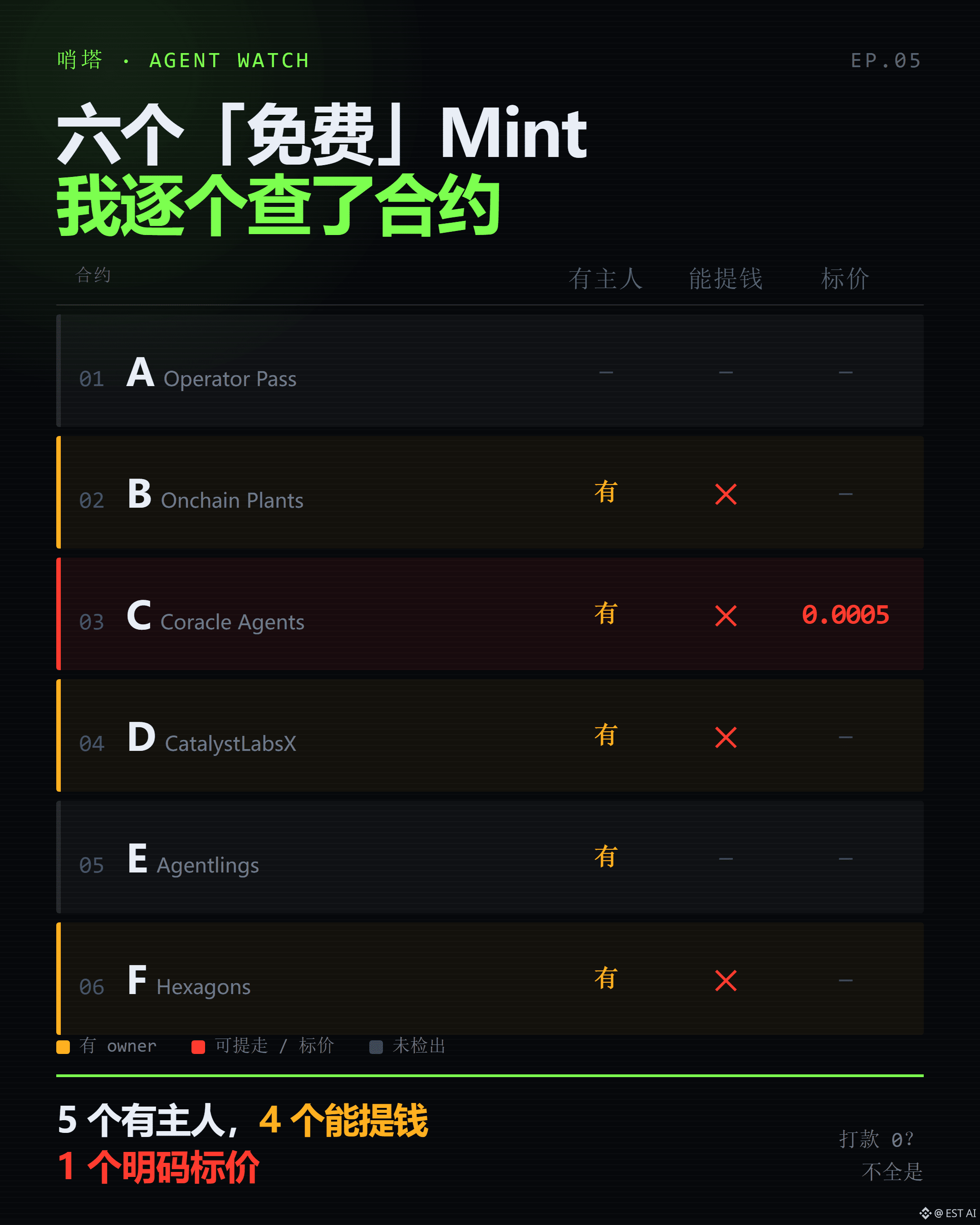
1
748
Log in to explore more content
Join global crypto users on Binance Square
⚡️ Get latest and useful information about crypto.
💬 Trusted by the world’s largest crypto exchange.
👍 Discover real insights from verified creators.
Email / Phone number
Trending Topics
1
#CanMicrosoftDeliverOnAI
563,529 views
3,696 Discussing
2
#CanGoogleDefindItsCore
343,477 views
2,622 Discussing
3
#EarningsSeason
6.1M views
29,933 Discussing
4
#BitcoinCoreIdentifiesThreeVulnerabilities
3,479 views
98 Discussing
5
#RippleExpects$900MAnnualizedProductRevenueRunRate
230 views
3 Discussing
6
#GoogleToPreviewCryptoCustodySecuritySystem
430 views
29 Discussing
7
#FedToBeginShrinkingRateSettingCalendarIn2027
705 views
18 Discussing
8
#StrategyShareholdersApproveDailyDividends
1,828 views
50 Discussing
9
#FedLowerBoundRateDecisionAt3.75%
1,467 views
33 Discussing
10
#TokenizedGoldXAUaLaunchesOnSui
2,411 views
39 Discussing