

#phishingprotection
phishingprotection
163,624 views
27 Discussing
Hot
Latest

·
--
Hong Kong SFC Bans OTP for Crypto Platforms
Hong Kongs Securities and Futures Commission (SFC) has issued a groundbreaking circular requiring all virtual asset trading platforms (VATPs) and online brokers to implement phishing-resistant authentication methods for client logins.
The new mandate comes amid a surge in sophisticated phishing attacks that have compromised countless crypto user accounts. Under the updated rules, traditional one-time passwords (OTPs) are no longer considered sufficient for authentication.
Key Requirements: Phishing-resistant authentication methods must be implemented immediately. Device binding protocols are now mandatory for all platforms. OTP-only authentication is prohibited for client logins effective immediately.
This move positions Hong Kong as a global leader in crypto user protection, directly addressing one of the most common vectors for crypto theft. The SFC cited alarming statistics showing phishing attacks have become the primary method attackers use to hijack customer accounts on trading platforms.
The regulation applies to all Virtual Asset Trading Platforms (VATPs), online brokers offering crypto services, and any platform handling client digital assets in Hong Kong jurisdiction.
Industry reaction has been overwhelmingly positive. Major exchanges have already begun upgrading their authentication systems to comply with the new standards. Security experts welcome the move, noting that phishing-resistant methods like WebAuthn and hardware security keys offer substantially better protection than SMS-based OTPs.
This development aligns with broader global trends toward stronger crypto security standards, following similar initiatives by regulators in the EU, Singapore, and Japan.
#CryptoSecurity #HongKongSFC #PhishingProtection
Hong Kong SFC Bans OTP for Crypto Platforms
Hong Kongs Securities and Futures Commission (SFC) has issued a groundbreaking circular requiring all virtual asset trading platforms (VATPs) and online brokers to implement phishing-resistant authentication methods for client logins.
The new mandate comes amid a surge in sophisticated phishing attacks that have compromised countless crypto user accounts. Under the updated rules, traditional one-time passwords (OTPs) are no longer considered sufficient for authentication.
Key Requirements: Phishing-resistant authentication methods must be implemented immediately. Device binding protocols are now mandatory for all platforms. OTP-only authentication is prohibited for client logins effective immediately.
This move positions Hong Kong as a global leader in crypto user protection, directly addressing one of the most common vectors for crypto theft. The SFC cited alarming statistics showing phishing attacks have become the primary method attackers use to hijack customer accounts on trading platforms.
The regulation applies to all Virtual Asset Trading Platforms (VATPs), online brokers offering crypto services, and any platform handling client digital assets in Hong Kong jurisdiction.
Industry reaction has been overwhelmingly positive. Major exchanges have already begun upgrading their authentication systems to comply with the new standards. Security experts welcome the move, noting that phishing-resistant methods like WebAuthn and hardware security keys offer substantially better protection than SMS-based OTPs.
This development aligns with broader global trends toward stronger crypto security standards, following similar initiatives by regulators in the EU, Singapore, and Japan.
#CryptoSecurity #HongKongSFC #PhishingProtection
Hong Kongs Securities and Futures Commission (SFC) has issued a groundbreaking circular requiring all virtual asset trading platforms (VATPs) and online brokers to implement phishing-resistant authentication methods for client logins.
The new mandate comes amid a surge in sophisticated phishing attacks that have compromised countless crypto user accounts. Under the updated rules, traditional one-time passwords (OTPs) are no longer considered sufficient for authentication.
Key Requirements: Phishing-resistant authentication methods must be implemented immediately. Device binding protocols are now mandatory for all platforms. OTP-only authentication is prohibited for client logins effective immediately.
This move positions Hong Kong as a global leader in crypto user protection, directly addressing one of the most common vectors for crypto theft. The SFC cited alarming statistics showing phishing attacks have become the primary method attackers use to hijack customer accounts on trading platforms.
The regulation applies to all Virtual Asset Trading Platforms (VATPs), online brokers offering crypto services, and any platform handling client digital assets in Hong Kong jurisdiction.
Industry reaction has been overwhelmingly positive. Major exchanges have already begun upgrading their authentication systems to comply with the new standards. Security experts welcome the move, noting that phishing-resistant methods like WebAuthn and hardware security keys offer substantially better protection than SMS-based OTPs.
This development aligns with broader global trends toward stronger crypto security standards, following similar initiatives by regulators in the EU, Singapore, and Japan.
#CryptoSecurity #HongKongSFC #PhishingProtection
26

·
--
🚨 Protect your Binance account – Enable your anti-phishing code! 🔐
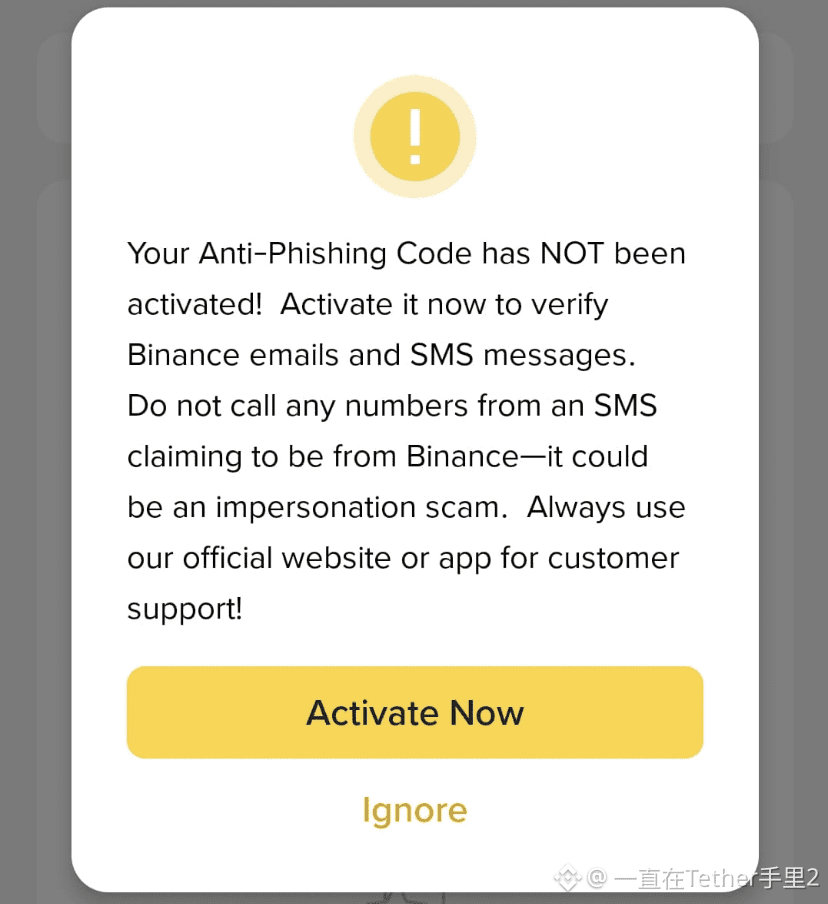
Many users are seeing this warning and wondering what to do. Here’s what it means and why YOU MUST act:
What is the anti-phishing code?
It’s a custom code that you set on your Binance account. Once enabled, each official Binance email will include this code, helping you verify that the message is genuinely from Binance and not a scam.
Why is it important?:
Phishing attacks are common; scammers may send fake SMS messages or emails posing as Binance. If your anti-phishing code isn’t configured, it’s easier to fall for these scams.
Example:
Let’s say you set your code as: MyCode123.
Now, any real Binance email will include “MyCode123” in the header.
If it’s missing — 🚫 don’t trust it.
✅ What to do now:
1. Open your Binance app.
2. Go to [Security Settings] → [Anti-Phishing Code].
3. Set a custom code that only you will recognize.
4. Done!
IMPORTANT:
Never trust SMS or phone calls that claim to be from Binance.
Always use the official Binance app or the website for support.
Stay safe and protected! 🛡️
#CryptoSecurity #BinanceTips #PhishingProtection
🚨 Protect your Binance account – Enable your anti-phishing code! 🔐
Many users are seeing this warning and wondering what to do. Here’s what it means and why YOU MUST act:
What is the anti-phishing code?
It’s a custom code that you set on your Binance account. Once enabled, each official Binance email will include this code, helping you verify that the message is genuinely from Binance and not a scam.
Why is it important?:
Phishing attacks are common; scammers may send fake SMS messages or emails posing as Binance. If your anti-phishing code isn’t configured, it’s easier to fall for these scams.
Example:
Let’s say you set your code as: MyCode123.
Now, any real Binance email will include “MyCode123” in the header.
If it’s missing — 🚫 don’t trust it.
✅ What to do now:
1. Open your Binance app.
2. Go to [Security Settings] → [Anti-Phishing Code].
3. Set a custom code that only you will recognize.
4. Done!
IMPORTANT:
Never trust SMS or phone calls that claim to be from Binance.
Always use the official Binance app or the website for support.
Stay safe and protected! 🛡️
#CryptoSecurity #BinanceTips #PhishingProtection
Many users are seeing this warning and wondering what to do. Here’s what it means and why YOU MUST act:
What is the anti-phishing code?
It’s a custom code that you set on your Binance account. Once enabled, each official Binance email will include this code, helping you verify that the message is genuinely from Binance and not a scam.
Why is it important?:
Phishing attacks are common; scammers may send fake SMS messages or emails posing as Binance. If your anti-phishing code isn’t configured, it’s easier to fall for these scams.
Example:
Let’s say you set your code as: MyCode123.
Now, any real Binance email will include “MyCode123” in the header.
If it’s missing — 🚫 don’t trust it.
✅ What to do now:
1. Open your Binance app.
2. Go to [Security Settings] → [Anti-Phishing Code].
3. Set a custom code that only you will recognize.
4. Done!
IMPORTANT:
Never trust SMS or phone calls that claim to be from Binance.
Always use the official Binance app or the website for support.
Stay safe and protected! 🛡️
#CryptoSecurity #BinanceTips #PhishingProtection
1
3
398
Log in to explore more content
Join global crypto users on Binance Square
⚡️ Get latest and useful information about crypto.
💬 Trusted by the world’s largest crypto exchange.
👍 Discover real insights from verified creators.
Email / Phone number
Trending Topics
1
#FedWatch
16.2M views
38,067 Discussing
2
#SolidusLabsReportsSuspected$170MSpoofingOnHyperliquidOilContracts
0 views
5 Discussing
3
#StanDruckenmillerBecomesInvestorInTradeXYZ
6 views
18 Discussing
4
#RussiaProposedNonCustodialWalletLimitsExcludeIntlSettlements
456 views
23 Discussing
5
#AlphabetSharesSlide10%InLateTrading
3,591 views
93 Discussing
6
#HyperliquidPermanentlyBurns49.87MillionHYPE
0 views
15 Discussing
7
#Nasdaq100FuturesFall0.9%
5,191 views
167 Discussing
8
#BitcoinCore32.1RaisesPeerConnectionLimit
26,142 views
504 Discussing
9
#VisaStablecoinSettlementTops$25BAnnualized
505 views
21 Discussing
10
#WestpacToCapCryptoPaymentsAtAUD10KPerMonth
7,103 views
169 Discussing