

When you trade crypto futures every single day, you want your platform to run as smoothly as possible. The team at Binance knows this. That is exactly why they push continuous backend updates to streamline the trading experience. Today, June 15, 2026, a major technical sync is happening behind the scenes. Binance is officially upgrading the position mode settings for all COIN-M Futures accounts.
If you trade both USD-margined and Coin-margined contracts, you might notice some sudden changes to your open orders and balances over the next 24 hours. The goal is to make your account settings completely uniform. But whenever a platform forces an automatic sync, you need to know exactly how your active trades will react. Let's break down what this upgrade means for your portfolio and the exact steps you should take to protect your open positions.
❍ What Exactly Is Changing Today?
Binance offers two different ways to hold your futures contracts. You can use One-Way Mode, where you only hold a single direction at a time. Alternatively, you can use Hedge Mode, which allows you to hold both a long and a short position on the same token simultaneously.
Historically, you could run different modes on different sides of the platform. You could have your USD-M Futures set to Hedge Mode while keeping your COIN-M Futures on One-Way Mode. This update removes that split entirely.
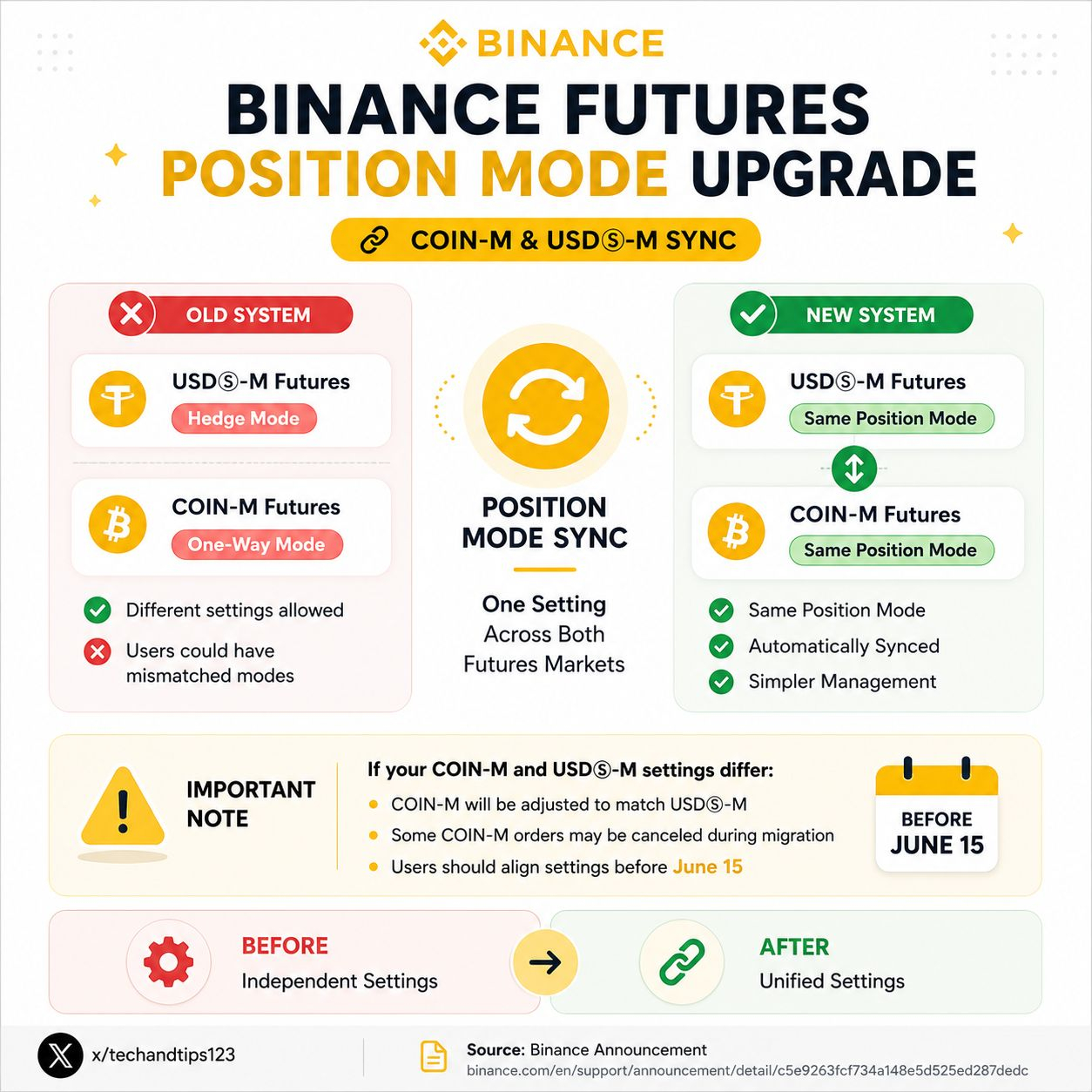
Starting today, the system is permanently syncing the two sides. Your COIN-M Futures settings will automatically update to match whatever you currently have set in your USD-M Futures account. If your USD-M account runs on Hedge Mode, the system will force your COIN-M account to switch to Hedge Mode as well.
❍ How This Sync Impacts Your Active Trades
This is where you really need to pay close attention. The upgrade process takes about 24 hours to complete. During this window, your core trading functions will remain active. However, you might experience a few brief moments of trading disruption. If an order fails to execute, simply wait a few seconds and try clicking the button again.
The real impact hits if your two accounts are currently running mismatched settings. When the system steps in to force the sync, it has to clear the board first. The Binance engine will automatically cancel all your open orders in COIN-M Futures. This includes your limit orders, your take profit targets, and your stop loss triggers.
Things get even more complex if the system forces your COIN-M account to switch from Hedge Mode down to One-Way Mode. If you currently hold both a long and a short position on the exact same coin, the system cannot keep them both open in One-Way Mode. It will trigger a netting effect. The system will close both opposing positions and calculate the difference. You will be left with a single reinstated net position based on the current mark price. This netting process can drastically change your average entry price and your visible account balance.
❍ Your Action Plan for Today
You should never let an automated system manage your risk for you. Since this upgrade is rolling out right now, you need to take control of your account immediately.
First, log into your Binance Futures dashboard and check your preference settings. Look at what mode you are using for your USD-M contracts.
Next, manually switch over to your COIN-M dashboard and change the position mode so it matches perfectly. By manually aligning the settings yourself before the system forces the sync, you completely avoid the chaotic netting effect.
Finally, keep a very close eye on your active trades over the next day. If the system did cancel your open orders during the transition, you need to manually place those take profit and stop loss orders back on the books.
❍ Our Take on the Uniform Upgrade
Dealing with sudden platform updates can be frustrating when you have money on the line. I completely understand the panic of logging in and seeing your stop losses missing. But looking at the bigger picture, this forced synchronization is a massive quality of life improvement for serious traders.
Running two completely different risk management modes on the same exchange often leads to expensive human errors. You might execute a trade thinking you are in Hedge Mode, only to accidentally close a profitable position because that specific side of the app was set to One-Way Mode. By unifying the entire futures ecosystem, Binance is removing a layer of unnecessary mental friction. It forces traders to pick a single strategy and stick to it across all markets. Just make sure you double check your active orders today. Protect your downside, and let the updated system do the heavy lifting from tomorrow onward.
And Always, Peace ✌️