
TL;DR: Australians can buy Bitcoin legally through Binance by registering with an email, completing identity verification (KYC), depositing AUD via bank transfer or card, and placing a spot order. The entire process takes roughly 20 to 40 minutes for a new account. This guide walks through every step, common pitfalls, and how to keep your investment secure after purchase.
If you are in Australia and want to own Bitcoin, the fastest path is: create a Binance account, verify your identity, deposit AUD, and buy. Australia has clear crypto regulations, and Binance is accessible to Australian residents. Below is a detailed walkthrough.
◆ Why Australians Choose Binance for Bitcoin
$BTC is the world's largest cryptocurrency by market cap, and Australian crypto ownership has grown steadily over the past few years. Binance remains one of the most popular exchanges globally due to its deep liquidity, low spot fees, and wide range of supported deposit methods.
Key reasons Australian users pick Binance:
· Competitive spot trading fees starting at 0.1%
· AUD deposit support via bank transfer (PayID / OSKO)
· Large BTC liquidity pool, meaning tighter spreads and better prices
· Mobile app for both Android and iOS
· Built-in self-custody wallet (Binance Web3 Wallet) for users who want to hold their own keys
#Bitcoin #Australia #Crypto
◆ Step 1: Register Your Binance Account
Go to the official registration page:
https://www.binance.com/register?ref=BNAPP
Use your email address or phone number to create an account. Set a strong password. You will receive a verification email or SMS to confirm.
Important: Use the referral code BNAPP during registration to qualify for potential fee discounts and new-user benefits.
After confirming your email, enable two-factor authentication (2FA) immediately. Use an authenticator app (Google Authenticator, Authy, or similar) rather than SMS alone, because SIM-swap attacks can compromise SMS-based 2FA.
◆ Step 2: Complete Identity Verification (KYC)
Australian users must complete identity verification to deposit and trade. This is a regulatory requirement under Australia's AML/CTF framework, not an optional step.
What you need:
· A government-issued photo ID (passport, driver licence, or proof of age card)
· A clear selfie taken during the verification process
· 3 to 5 minutes in a well-lit environment
Tips for a smooth KYC:
· Make sure all four corners of your ID document are visible in the frame
· Avoid glare or reflections on the ID surface
· Use a plain background for the selfie
· If verification fails, retry with better lighting or a different document
Once verified, your account can deposit AUD and access spot trading. Withdrawal limits also increase significantly after KYC.
◆ Step 3: Deposit AUD Into Your Account
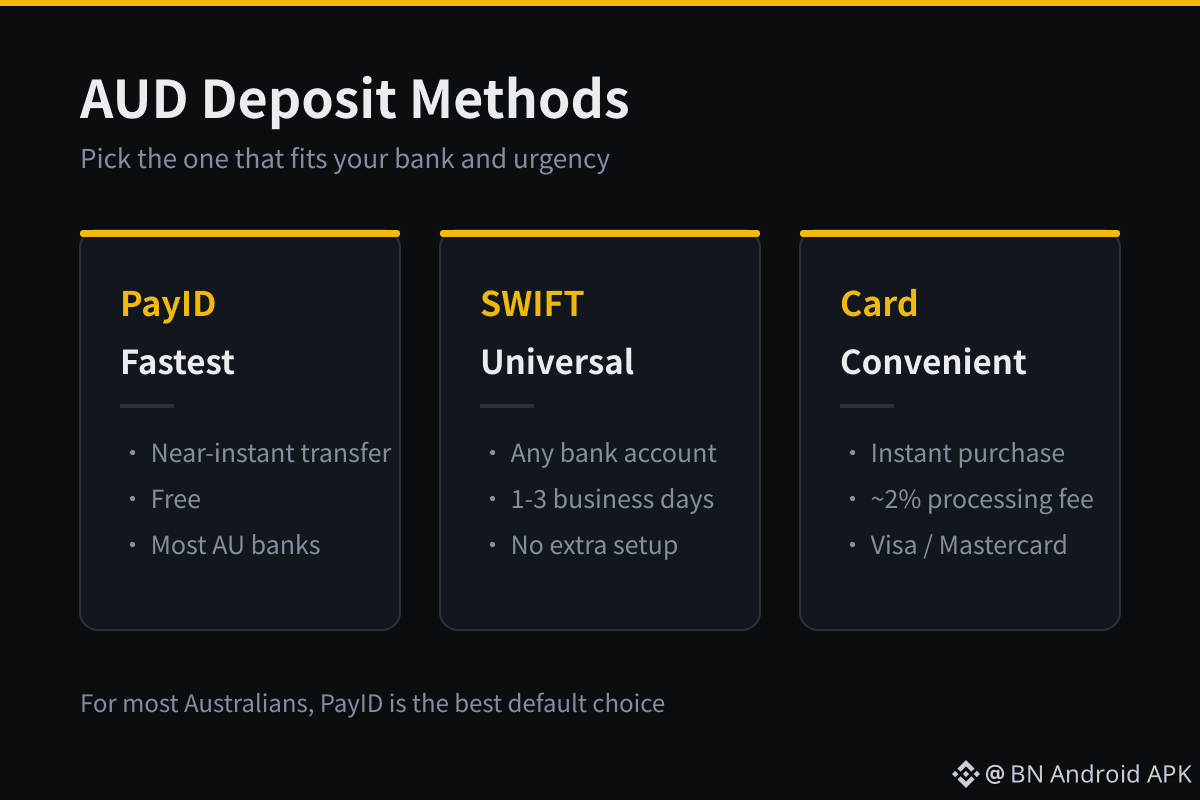
Binance supports multiple AUD deposit methods for Australian users:
· PayID / OSKO: Near-instant bank transfers, usually arriving within minutes. Most Australian banks support PayID.
· Bank transfer (SWIFT): Slower but available from any bank account.
· Credit or debit card: Faster but carries higher processing fees (typically around 2%).
For most users, PayID is the best option because it is free, fast, and widely supported by Australian banks.
Steps to deposit:
1. Go to the Wallet section in your Binance app or browser dashboard
2. Select Deposit, then choose AUD as the currency
3. Pick your preferred deposit method (PayID recommended)
4. Follow the on-screen instructions to transfer funds from your bank
Once the deposit clears, your AUD balance will appear in your Funding Wallet. Transfer it to your Spot Wallet to start trading.
◆ Step 4: Buy Bitcoin on the Spot Market
With AUD in your Spot Wallet, you are ready to buy $BTC.
There are two main ways to purchase on Binance:
· Convert: A simple one-click interface where you enter the AUD amount and the system quotes a BTC amount. Best for beginners. No trading chart knowledge needed.
· Spot Trading (BTC/AUD or BTC/USDT pair): Gives you full control over price and order type. You can place a market order (buy immediately at the best available price) or a limit order (buy only when BTC reaches your specified price).
For first-time buyers, the Convert feature is the simplest path. As you become more comfortable, you can explore the spot trading interface for better price control.
After buying, your Bitcoin will appear in your Spot Wallet. You can hold it on Binance, transfer it to a personal wallet for self-custody, or use it for trading.
◆ Step 5: Secure Your Bitcoin After Purchase
Buying Bitcoin is only half the process. Securing it properly matters just as much, especially as your holdings grow.
Three layers of security every Australian Bitcoin buyer should set up:
· KYC: Already done in Step 2. This protects your account from being taken over by someone impersonating you.
· 2FA: Use an authenticator app, not SMS. Write down the backup key on paper and store it offline.
· Withdrawal whitelist: Enable this so that Bitcoin can only be withdrawn to addresses you have pre-approved. Even if someone gains access to your account, they cannot drain your funds to an unknown wallet.
For larger holdings, consider transferring your Bitcoin to a hardware wallet (such as Ledger or Trezor). Hardware wallets keep your private keys offline, making them immune to online hacks. The trade-off is that you must keep your seed phrase safe — if you lose it, no one can recover your funds.
◆ Installing the Binance App in Australia
Most Australians can install Binance directly from the Google Play Store on Android. For iOS users in Australia, the App Store may show Binance depending on your Apple ID region settings.
If you encounter App Store restrictions, switching your Apple ID to a region where Binance is listed (such as Taiwan or Hong Kong) typically resolves it. The United States App Store only lists Binance.US, which is a separately operated platform — it and the global version of Binance do not share accounts, and logging in with a global account will not work. The China mainland App Store has also delisted Binance entirely, so users there cannot find it.
For Android users who cannot access the Play Store version, the official APK is available at:
https://download.binance.com/pack/BNApp_F0000680.apk
◆ Common Issues Australian Users Face
· Deposit delays: PayID transfers are usually instant, but first-time deposits from a new bank account may take longer due to bank-side security checks. Wait 1 to 2 hours before contacting support.
· KYC rejection: Usually caused by blurry photos or glare on the ID. Retake photos in natural daylight with no flash.
· High card fees: Credit and debit card deposits cost more. Switch to PayID for free deposits.
· App not available: Use the APK link above for Android, or switch your Apple ID region for iOS.
◆ FAQ
Q: Is buying Bitcoin legal in Australia?
A: Yes. Bitcoin and other cryptocurrencies are legal to buy, sell, and hold in Australia. Crypto exchanges operating in Australia must register with AUSTRAC and comply with AML/CTF regulations.
Q: Do I need to pay tax on Bitcoin in Australia?
A: Yes. The ATO treats Bitcoin as a capital gains tax (CGT) asset. If you sell Bitcoin for more than you paid, you may owe CGT on the profit. Keep records of your purchase price, date, and sale details. Personal use exemption may apply for small amounts, but the threshold is narrow. Consult a registered tax agent for your situation.
Q: How much Bitcoin should I buy as a beginner?
A: Start with an amount you are comfortable holding through price volatility. Many Australian investors begin with small recurring purchases (dollar-cost averaging) rather than a single large buy. There is no legal minimum — you can buy a fraction of Bitcoin on Binance.
Q: Can I store Bitcoin on Binance long-term?
A: You can, but self-custody is safer for significant amounts. Binance holds your Bitcoin in custody, which means you rely on the exchange's security. For holdings above what you need for active trading, transfer to a hardware wallet.
Q: What happens if Binance gets hacked?
A: Binance maintains a Secure Asset Fund for Users (SAFU) that covers losses from certain types of incidents. However, no exchange is entirely without risk. Self-custody removes that exchange risk for the assets you withdraw.